Azure-pipelines-tasks: Azure Powershell Vsts-Task should not import AzureRM and Azure Powershell Module
Right now the Azure-Powershell vsts-task imports the complete AzureRM and Azure powershell module. This wastes a lot of resources (just importing these takes about 30 seconds with 100% of cpu usage). According to the Azure-Powershell team the vsts-task should actually not import the full module:
 elangelo
All 20 comments
Is the suggestion to push it to the user to import a selected set? or, do we just import a small set and rely on the user to import what they use? wouldn't that break existing scripts?
 bryanmacfarlane
on 1 Aug 2018
bryanmacfarlane
on 1 Aug 2018
As far as i know, as long as your modules are installed in the correct location, powershell will load the corresponding module if you use a CmdLet from that module. The only thing that would be breaking would be the loading of the different versions of Azure Powershell
elangelo
on 1 Aug 2018
Should not VSTS determine whether there are Azure Powershell tasks within the phase? And if so, download/import them upfront (only once!) At this stage for each individual task all modules are being imported, as @elangelo mentioned. This is a waste of time.
 bstoop-github
on 24 Aug 2018
bstoop-github
on 24 Aug 2018
I am noticing this issue, too. In some of my environments it takes several minutes to import the module. So a release that was taking seconds is now taking minutes after I add the Azure PowerShell task. I would be ok with having a new option that would allow me to opt out of importing the module and relying on the script to import only the specific modules that it needs.
 cmielke
on 18 Jan 2019
cmielke
on 18 Jan 2019
VSTS task itself needs only a few modules (if not only one =AzureRM.Profile). There is really no need to import more than 50 other modules, that will never be used. Like this, task spends about 45 seconds on our machines for nothing.
If needed, modules and their commands will be imported automatically when referenced and it will happen only for modules that are needed. If backward compatibility is a big concern, then at least users should have an option to opt-out from import in advance.
 iricigor
on 12 Feb 2019
iricigor
on 12 Feb 2019
We are evaluating on how to support this without breaking backwards compatibility. Please stay tuned for updates (~2-3 weeks)
 RoopeshNair
on 14 Feb 2019
RoopeshNair
on 14 Feb 2019
Hi, any updates?
iricigor
on 7 Mar 2019
For AzureRM, they are importing the whole module. But in Az , we are only importing Az.Accounts module.
The task has been shipped. It is started deploying to Azure DevOps accounts and already available in some accounts. We have double checked and the roll out process is still in progress. It might take 2-3 days more to reach all accounts.
This is not available in onprem Azure DevOps Server yet.
 20shivangi
on 8 Mar 2019
20shivangi
on 8 Mar 2019
Thank you for the update @20shivangi! Is there anything I will need to do to my existing pipelines to get this change or will it just come across automatically when the task is updated for my account?
cmielke
on 8 Mar 2019
Good question @cmielke. @20shivangi, is it a new task next to the existing azure powershell task or just a new major version of the azure powershell task?
 LockTar
on 8 Mar 2019
LockTar
on 8 Mar 2019
I have version 4.* (preview) available with description _"Added support for Az Module and cross platform agents."_, so I guess that is the one. It is importing only Az.Accounts as described, but it throws the warning about existing AzureRm modules 😞 on public Hosted VS2017 build agents.
##[section]Starting: Azure PowerShell script: InlineScript
==============================================================================
Task         : Azure PowerShell
Description  : Run a PowerShell script within an Azure environment
Version      : 4.0.0
Author       : Microsoft Corporation
Help         : [More Information](https://go.microsoft.com/fwlink/?LinkID=613749)
==============================================================================
##[command]Import-Module -Name C:\Modules\az_1.0.0\Az.Accounts\1.0.0\Az.Accounts.psd1 -Global
##[warning]Both Az and AzureRM modules were detected on this machine. Az and AzureRM modules cannot be imported in the same session or used in the same script or runbook. If you are running PowerShell in an environment you control you can use the 'Uninstall-AzureRm' cmdlet to remove all AzureRm modules from your machine. If you are running in Azure Automation, take care that none of your runbooks import both Az and AzureRM modules. More information can be found here: https://aka.ms/azps-migration-guide
##[command]Clear-AzContext -Scope Process
##[command]Clear-AzContext -Scope CurrentUser -Force -ErrorAction SilentlyContinue
##[command]Connect-AzAccount -ServicePrincipal -Tenant *** -Credential System.Management.Automation.PSCredential -Environment AzureCloud
@cmielke Pipelines will not get updated automatically. Once the new task is available for your account, you have to update the Azure PowerShell task version to 4.* (preview) in your pipeline.
20shivangi
on 11 Mar 2019
@iricigor It is expected behavior because Azure PowerShell task (version 3) supports AzureRm modules while Azure PowerShell task (version 4) supports Az modules . So, both modules must be present for hosted agent.
You can ignore the warning.
20shivangi
on 11 Mar 2019
@20shivangi This warning is thrown by the VSTS task itself, so I guess warning action should be configured within the task.
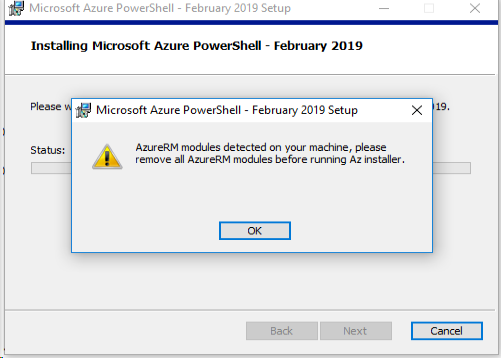
But, more importantly. Besides PowerShell throwing a warning, Azure PowerShell front page says: _"You should not install Az side-by-side with AzureRM."_ And even more, MSI installer simply rejects to install it side by side.
iricigor
on 15 Mar 2019
@iricigor Thanks for your feedback. It is conscious choice to have both Az and AzureRM modules in hosted agent.
When all the users will move to V4 task, then we will remove AzureRM module from hosted agent.
20shivangi
on 18 Mar 2019
@20shivangi, by having both AzureRM and AZ is causing issues with other preview tasks, such as Azure File Copy 3.x. In my self-hosted agent, when installing both modules, it attempts to execute Clean-AzurermContext which fails since authentication happens through AZ. Besides switching to AZ, how can we get this time lower?
 lwajswaj
on 16 Apr 2019
lwajswaj
on 16 Apr 2019
Transition was going tough, with multiple issues. First, as documented on many sites, I hit Get-SerializationSettings issue. Then some other and so on...
However, we hit one hard migration requirements. If we have both Az and AzureRM modules, old scripts inside pipelines are not working fine. Even though Enable-AzureRmAlias was set, it did not work inside the script.
# pipeline inline script
Enable-AzureRmAlias
Get-AzureRmVm
./MyScript.ps1
# MyScript.ps1 content
Get-AzureRmVm
First listed command Get-AzureRmVm was working fine. Byt, MyScript.ps1 was throwing an error Get-AzureRmVM command not found. The solution was to modify MyScript.ps1 to include Enable-AzureRmAlias and after that it started working.
if (Get-Module Az.Compute) {Enable-AzureRmAlias}
Get-AzureRmVm
Executive summary:
- Automatic loading of modules (original issue) works fine 👍
- Transition to Az modules (newly introduced requirement) is not working smooth 👎
iricigor
on 18 Apr 2019
When all the users will move to V4 task, then we will remove AzureRM module from hosted agent.
Ummm... will this _ever_ happen? 100% conversion? There have to be legacy pipelines that no one is ever going to change. Can you force users to upgrade? Have a way of notifying them?
It is expected behavior because Azure PowerShell task (version 3) supports AzureRm modules while Azure PowerShell task (version 4) supports Az modules . So, both modules must be present for hosted agent.
I've only written a few small tasks, but don't the tasks exist in separate files and can't they declare their own dependencies? Why can't v3 load PowerShell and v4 load PowerShell Core?
 MisinformedDNA
on 14 Aug 2019
MisinformedDNA
on 14 Aug 2019
We have fixed the issue , now the warning that Az and AzureRM modules are installing side by side will not come. This change may take 3-4 weeks to get deployed.
20shivangi
on 6 Sep 2019
It is same as https://github.com/microsoft/azure-pipelines-tasks/issues/10262
Closing this one.
20shivangi
on 19 Sep 2019
Related issues
 montebhoover
·
3Comments
montebhoover
·
3Comments
 MikahB
·
3Comments
MikahB
·
3Comments
 NatMarchand
·
3Comments
NatMarchand
·
3Comments
 HenrikStanley
·
3Comments
HenrikStanley
·
3Comments
 fedemkr
·
3Comments
fedemkr
·
3Comments
Most helpful comment
We are evaluating on how to support this without breaking backwards compatibility. Please stay tuned for updates (~2-3 weeks)