Azure-pipelines-tasks: Azure App Service Deploy task: Set ACR credentials on Web App during deploy
In version 4.1.10 of the Azure App Service Deploy task it's possible a Web App for Containers.
This basically settings the app setting DOCKER_CUSTOM_IMAGE_NAME.
For private registries the following settings are also required:
- DOCKER_REGISTRY_SERVER_URL
- DOCKER_REGISTRY_SERVER_USERNAME
- DOCKER_REGISTRY_SERVER_PASSWORD
These settings can currently not be set through the task.
It would be great if the task would offer an options to select an ACR and set these settings for me.
 nphmuller
All 24 comments
@nphmuller We had support for this before but had to remove it as sensitive information like DOCKER_REGISTRY_SERVER_PASSWORD was exposed in Azure portal as application settings.
Hence we have removed it for now till Azure fixes the issue. This is in our backlog and we will update on this thread once the feature is available.
Thanks for reporting the issue.
 SumiranAgg
on 10 Jul 2018
SumiranAgg
on 10 Jul 2018
@SumiranAgg Great! Do you perhaps know how Azure's planning to fix this? Because it's also one of the issues I'm running into with setting api keys, etc, through application settings. It would be great if app settings could be marked as secret.
nphmuller
on 10 Jul 2018
Is there any update on this?
Scratching my head as to why I can't deploy a container from my ACR onto an app service using VSTS.
 stweedie
on 7 Dec 2018
stweedie
on 7 Dec 2018
@stweedie This feature addition is planned work and should be available in couple of sprints. We will update the thread once feature is ready for use.
SumiranAgg
on 10 Dec 2018
Awesome! Thanks for the update. We can modify the container versions manually for the time being
stweedie
on 10 Dec 2018
@SumiranAgg any update on this? I see code determining Registry vs ACI in operations/ContainerBasedDeploymentUtility.ts but nothing wiring it to the task.json (it is marked as a TODO).
Would be great to push this one through :-)
 yvovandoorn
on 16 Jan 2019
yvovandoorn
on 16 Jan 2019
Hi all,
There are two scenarios:
“Private Docker Hub” and “Private registry” scenarios:
You can use the App settings feature of the task:

The only problem with this approach is that the app settings has a secret (registry password) which will be visible in the Azure Portal (when you click to edit).

We are working with App Service team to improve this.
“Azure Container Registry” (ACR) scenario:
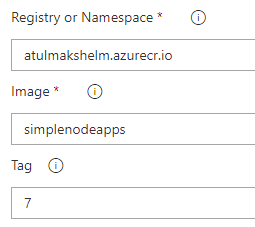
You don't have to provide user name, password, url details to Web App for Container if you are using an ACR in the same subscription. Azure Web App is able to obtain it. Just providing image details is enough.
 azooinmyluggage
on 17 Jan 2019
azooinmyluggage
on 17 Jan 2019
how this can work on Azure Pipeline
 JerryWang20
on 16 May 2019
JerryWang20
on 16 May 2019
@JerryWang20 can you elaborate the question?
Do you mean how can we implement this i task? If yes, you can add a Azure web app on container task. For Private dockerhub you can add app settings as mentioned by @azooinmyluggage
For Azure container registry in same subscription as the attached service connection in task, you just need to provide full image name, i.e. registry/imageName:tag
SumiranAgg
on 16 May 2019
I use the pipeline task to publish the to web app from ACR, but it fail with connection with ACR
steps:
task: AzureRmWebAppDeployment@4
displayName: 'Deploy App'
inputs:
azureSubscription: '$(appName)-$(subscriptionId)'
appType: webAppContainer
WebAppName: '$(appName)'
DockerNamespace: $(azureContainerRegisterName).azurecr.io
DockerRepository: $(appName)/api
DockerImageTag: '$(Build.BuildId)'
Error: 2019-05-16 05:04:40.051 ERROR - Image pull failed: Verify docker image configuration and credentials (if using private repository)
2019-05-16 05:04:50.120 INFO - Pulling image from Docker hub: dowcontainerreg.azurecr.io/dowtemplatenetcoreapi/api:38946
2019-05-16 05:04:50.139 ERROR - DockerApiException: Docker API responded with status code=InternalServerError, response={"message":"Get https://dowcontainerreg.azurecr.io/v2/dowtemplatenetcoreapi/api/manifests/38946: unauthorized: authentication required"}
JerryWang20
on 16 May 2019
So does AzureRmWebAppDeployment@4 work for web App container from ACR?
JerryWang20
on 16 May 2019
I'm having the same problem as @JerryWang20.
For some reason, after the AzureAppServiceDeploy@4 task completes, the web app is trying to pull the image from Docker hub, not from Azure Container Registry.
In my AzureAppServiceDeploy@4 task the "Registry or Namespace" filed is set to "my-registry.azurecr.io".
What's the status on this?
 wrong42
on 26 Nov 2019
wrong42
on 26 Nov 2019
Ok, I found why.. Is this part commented out because of the security issue mensioned by @azooinmyluggage?

wrong42
on 26 Nov 2019
Have the same issue, provide an update if any. Thanks
 videepthMSFT
on 14 Dec 2019
videepthMSFT
on 14 Dec 2019
Hi,
I am having the same issue. My ACR in a separate subscription and App service is in another. I tried to set the appnsettings but still getting auth error.
Thanks
Munna
 MunnaTelik
on 8 Jan 2020
MunnaTelik
on 8 Jan 2020
do we have updating on this issue?
JerryWang20
on 11 Apr 2020
Same issue here. Cannot deploy from Azure DevOps a new image that is hosted in Azure Container Registry.
 JoseFMP
on 4 May 2020
JoseFMP
on 4 May 2020
@JerryWang20 @wrong42 In my experience I can deploy ACR hosted images without a hitch from my pipeline, provided that we have at some point manually through the UI switched the "Image Source" setting from Docker Hub to Azure Container Registry.
After this has been done once, future deploys from the pipeline work.
I consider this a barely usable workaround for now, because it would stop working if somebody accidentally switches it back to Docker Hub. (which has happened at least once).
Apart from the fundamental "wrongness" of this work-around, I also find it particularly challenging as there are some access right restrictions that make this rather annoying in our setup. I can't "just" switch the Image source, as it will not let me actually press save without choosing an existing image, and even though I have the credentials to deploy anything to this environment from the pipeline, I can't choose an image in the UI because i seemingly don't have Microsoft.ContainerRegistry/registries/listCredentials/action rights. This means that while I can do everything else, I have to get an admin to make the Image source switch, and choose any random image and save, before I can get the pipeline to deploy the stuff we actually want.
From what I can see, it would be very helpful if AzureAppServiceDeploy@4 just had a ImageSource property that could be set to e.g. AzureCR instead of DockerHub, but I might be missing something. It should be able to figure out which registry to connect to based on the "DockerNameSpace" property?
 JKrag
on 20 Aug 2020
JKrag
on 20 Aug 2020
Having same issue. I was able to manually switch the image source in lower environment. But soon we will be going to PROD and I don't think I can do the same. Any update on this?
 sudheeranguluri
on 10 Sep 2020
sudheeranguluri
on 10 Sep 2020
yup same here. I can set connection strings with passwords in, etc. from the pipeline but not the container registry password. this should not be hard!
 mb345345
on 18 Sep 2020
mb345345
on 18 Sep 2020

Why? Just why?
 care4pet
on 22 Sep 2020
care4pet
on 22 Sep 2020
This issue has been open for more than 2 years.
Is there a way to do this now?
When we switch to ACR in the UI like @JKrag mentioned it works once, but changes back to Docker Hub on the next deploy, so unfortunately that's not a viable solution.
 damianon
on 5 Nov 2020
damianon
on 5 Nov 2020
@damianon Welcome on the 'lack of support' boat.
As previously described the following App Service configuration settings should be set before deploying anything to the App Service:
- DOCKER_REGISTRY_SERVER_URL
- DOCKER_REGISTRY_SERVER_USERNAME
- DOCKER_REGISTRY_SERVER_PASSWORD
I use Terraform to do that, but probably there is a CLI way. And manual via UI of course.
The AzureRmWebAppDeployment task updates only docker image name.
 igor-bakhtoiarov-8451
on 5 Nov 2020
igor-bakhtoiarov-8451
on 5 Nov 2020
how this can work on Azure Pipeline
I might be too late to answer but I encountered the same issue just today when setting up my Azure Pipeline; and I was able to fix it. I set up the task as "Azure App Service Deploy" and it is important to choose the correct subscription where the Container Registry and the App Service both under with (just like one of the comments pointed out in this post). My task looks like this in my yml file:
- task: AzureRmWebAppDeployment@4
  inputs:
    ConnectionType: 'AzureRM'
    azureSubscription: 'Pay-As-You-Go _(SubscriptionId)'_ #Automatically populated if the task is selected via Tasks side panel
    appType: 'webAppContainer'
    WebAppName: 'myWebAppName'
    DockerNamespace: '$(containerRegistry)' #variable translates to <_my_container_registry_.azurecr.io>
    DockerRepository: '$(imageRepository)' #variable for the **Image** I set in the App Service
    DockerImageTag: '$(Build.BuildId)'
I also added a task to restart the App Server (Task name: Azure App Service manage) right after the Deploy task above has been executed.
- task: AzureAppServiceManage@0
      inputs:
        azureSubscription: 'Pay-As-You-Go _(SubscriptionId)'_ #Automatically populated if the task is selected via Tasks side panel
        Action: 'Restart Azure App Service'
        WebAppName: 'myWebAppName'
After completing the run of my updated pipeline job, I don't have to do anything further in Azure App Service UI. I just checked the logs to see if the activity is done. Afterwards, I was able to call my updated service successfully. I hope this helps.
 dadakleinedler
on 27 Dec 2020
dadakleinedler
on 27 Dec 2020
Related issues
 TheRealEdwardCullen
·
3Comments
TheRealEdwardCullen
·
3Comments
 MichaelWhiteCodingForFun
·
3Comments
MichaelWhiteCodingForFun
·
3Comments
 pharring
·
3Comments
pharring
·
3Comments
 gregpakes
·
3Comments
gregpakes
·
3Comments
 divyesh-parikh
·
3Comments
divyesh-parikh
·
3Comments
Most helpful comment
@JerryWang20 @wrong42 In my experience I can deploy ACR hosted images without a hitch from my pipeline, provided that we have at some point manually through the UI switched the "Image Source" setting from
Docker HubtoAzure Container Registry.After this has been done once, future deploys from the pipeline work.
I consider this a barely usable workaround for now, because it would stop working if somebody accidentally switches it back to Docker Hub. (which has happened at least once).
Apart from the fundamental "wrongness" of this work-around, I also find it particularly challenging as there are some access right restrictions that make this rather annoying in our setup. I can't "just" switch the Image source, as it will not let me actually press save without choosing an existing image, and even though I have the credentials to deploy anything to this environment from the pipeline, I can't choose an image in the UI because i seemingly don't have
Microsoft.ContainerRegistry/registries/listCredentials/actionrights. This means that while I can do everything else, I have to get an admin to make the Image source switch, and choose any random image and save, before I can get the pipeline to deploy the stuff we actually want.From what I can see, it would be very helpful if
AzureAppServiceDeploy@4just had aImageSourceproperty that could be set to e.g. AzureCR instead of DockerHub, but I might be missing something. It should be able to figure out which registry to connect to based on the "DockerNameSpace" property?