Azure-pipelines-tasks: Add support for custom conditions on task groups
Currently, individual tasks can be assigned a custom condition. Task groups don't have that capability though.
 kzu
kzu
All 28 comments
Yeah, it's in the works. It's not a task issue but a service side issue. task group support is coming soon (the main issue is the task group UI is still using the old editor)
 bryanmacfarlane
on 24 Aug 2017
bryanmacfarlane
on 24 Aug 2017
👍 on this.. any news @bryanmacfarlane ?
 rmarinho
on 13 Sep 2017
rmarinho
on 13 Sep 2017
@rmarinho I just came to the conclusion that I need this and I need it now. After observing @bryanmacfarlane's comment I realized that if we set the condition to a task and then create a task group from that task, the condition will still be set, just not visible until they deploy the new UI. I just tried it and it works. 🥇
 ivan-prodanov
on 23 Sep 2017
ivan-prodanov
on 23 Sep 2017
Yep, indeed. I found this out by coincidence.
kzu
on 2 Oct 2017
Any ETA for this release?
 frankfuu
on 24 Nov 2017
frankfuu
on 24 Nov 2017
If someone else is looking for a workaround: using the dev tools of the browser of your choice, search for .prototype.beginUpdateTaskGroup in MS's code. In there, the variable t contains the JSON object sent to the REST endpoint. You can set a breakpoint before saving a task group and modify it as required, including the condition field.
Edit: seems like this issue is more for custom conditions on task groups, and not for setting custom conditions of tasks inside task groups. Sorry for that. I hope that both will be available in the future.
 sibbl
on 4 Dec 2017
sibbl
on 4 Dec 2017
Why is this closed? I still don't see the custom conditions on tasks within a Task Group
 jstawski
on 4 Dec 2017
jstawski
on 4 Dec 2017
@jstawski - see the comment that went along with closing it.
bryanmacfarlane
on 4 Dec 2017
@bryanmacfarlane Is there a publicly tracked issue for migrating Task Groups to the new UI?
 stijnherreman
on 11 Dec 2017
stijnherreman
on 11 Dec 2017
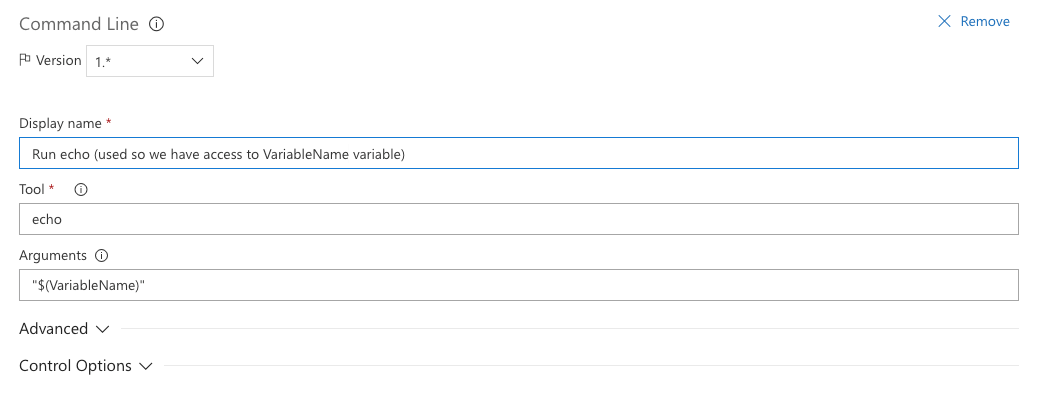
I'm not sure if this merits a new bug or not, but here some feedback. As of today, it seems the only way to add a variable into a task group is to reference one in one of the tasks. That is problematic if the variable is only used on the custom condition as it is not being checked. I had to resolve by using a dummy task and reference the variable there, but it truly shouldn't be like that. Either add support to check for new variables on the custom condition or the ability to manually add a variable.
For others that might run into this problem:
My dummy condition is a Command Line task:
Tool: echo
Arguments: "$(VariableName)"
jstawski
on 7 Feb 2018
Yes, not usable if the variable is only used on the custom condition.
 deka
on 4 Jun 2018
deka
on 4 Jun 2018
@bryanmacfarlane This still does not seem to be implemented
 bergmeister
on 25 Jul 2018
bergmeister
on 25 Jul 2018
@bansalaseem for task group question.
bryanmacfarlane
on 25 Jul 2018
Since this is a service side issue, developer community would be a better channel. That's the only publicly tracking mechanism for the service.
bryanmacfarlane
on 25 Jul 2018
Thanks @jstawski for the feedback. Right now the workaround which you have done looks reasonable and we have a story in our backlog to manually specify a task group variable. I dont have a specific timeline when we will get to it though.
 bansalaseem
on 26 Jul 2018
bansalaseem
on 26 Jul 2018
@bryanmacfarlane
Yeah, it's in the works. It's not a task issue but a service side issue. task group support is coming soon (the main issue is the task group UI is still using the old editor)
We are using TFS 2018 Update 2. There is still no option to add a condition to the Task Group!
I want to NOT RUN the entire task group, based on a single condition. Seems overkill to introduce a variable in one of the underlying tasks and then add a custom run condition on each of the tasks within the group. That's just really silly!
So why is this issue closed? There is a valid use case for having a custom run condition on the task group itself.
 AroglDarthu
on 28 Sep 2018
AroglDarthu
on 28 Sep 2018
Is there an update on this? I have the same requirement as AroglDarthu. I am using Azure DevOps and see no option to control execution of task group apart from hacky solution!
 harsh-vm
on 12 Apr 2019
harsh-vm
on 12 Apr 2019
Are you planning to enable Custom Conditions on task groups any time soon?
The initial request was from Aug 2017.
 guillermomartinez-accenture
on 14 May 2019
guillermomartinez-accenture
on 14 May 2019
Came here looking for this, almost 2 years later. Any updates?
 joshbrw
on 7 Jun 2019
joshbrw
on 7 Jun 2019
Following on from my message above; the way that I ended up solving this was using separate Agent Phases and putting the task group into an Agent Phase that I've set up with execution conditions. If you do use this path, make sure you set the Dependencies on each phase so that it only runs if previous phases have been completed.
joshbrw
on 7 Jun 2019
Due to few other priority items like pipelines YAML, we couldn't find bandwidth to work on this feature. As of now the backlog for the next 2 months is full. We will try to pick up task group conditions feature after that. Will keep you posted.
 ashokirla
on 10 Jun 2019
ashokirla
on 10 Jun 2019
Please add this. I need this to be able to run a Task Group in parallel using "multi-configuration".
For the impatient ones: I've found a sick workaround:
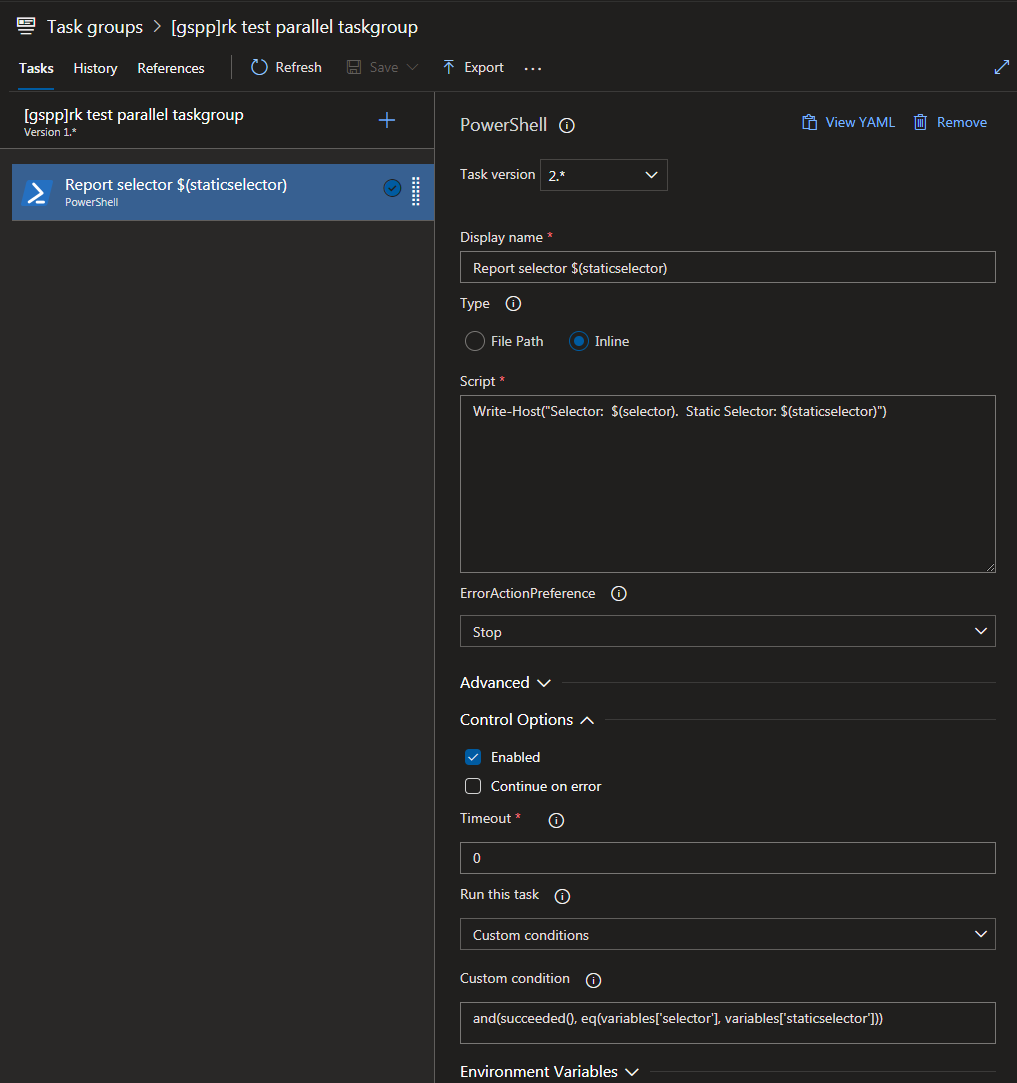
1) take your Task Group and add a dummy task to print two vars (this is just to make the vars appear on Task Group variable list). Eg:
Inline Powershell: Write-Host("$(selector) $(staticselector)")
2) specify Custom Condition on ALL tasks in the Task Group to:
and(succeeded(), eq(variables['selector'], variables['staticselector']))
3) Add $selector variable to your release, set to a multi-configuration CSV string, eg: "thread_one,thread_two,thread_three"
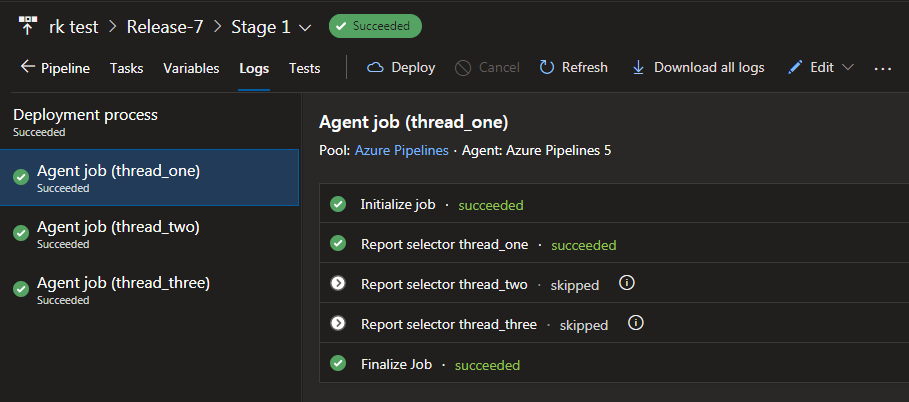
3) add your Task Group three times to a Multi-Configuration Agent Job. For each one, set:
$selector to $(selector)
$staticselector to one of the CSV values, eg "thread_one" for the first instance, "thread_two" for the second and "thread_three" for the third

4) Profit! Each multi-configuration job runs a separate thread of your Task Group with thread-specific parameters
 robal
on 2 Oct 2019
robal
on 2 Oct 2019
This issue is stale because it has been open for a year with no activity. Remove the stale label or comment on the issue otherwise this will be closed in 5 days
![github-actions[bot] picture](https://avatars.githubusercontent.com/in/15368?v=4&s=40) github-actions[bot]
on 1 Oct 2020
github-actions[bot]
on 1 Oct 2020
Oh, come on... has it been a year already? I thought the solution was in the works...
AroglDarthu
on 1 Oct 2020
Another vote for this.
 paul-roberts-dt
on 4 Nov 2020
paul-roberts-dt
on 4 Nov 2020
+1 !
 shayki5
on 15 Nov 2020
shayki5
on 15 Nov 2020
+1
 maxkoshevoi
on 26 Nov 2020
maxkoshevoi
on 26 Nov 2020
Attached link to related Developer community issue - since it would be better place to get last updates about it's status.
Closing this issue here since it's not related to pipeline tasks itself.
 anatolybolshakov
on 26 Nov 2020
anatolybolshakov
on 26 Nov 2020
Related issues
 gregpakes
·
3Comments
gregpakes
·
3Comments
 montebhoover
·
3Comments
montebhoover
·
3Comments
 MarkIannucci
·
3Comments
MarkIannucci
·
3Comments
 divyesh-parikh
·
3Comments
divyesh-parikh
·
3Comments
 ThomasBarnekow
·
3Comments
ThomasBarnekow
·
3Comments
Most helpful comment
Oh, come on... has it been a year already? I thought the solution was
in the works...