Azure-pipelines-tasks: IIS Web App Manage(Preview): SSL Certificate thumbprint contains non-hexadecimal characters in binding
For the IIS Web App Manage(Preview) task, I've configured a valid, hex thumbprint, with no spaces or punctuation, just a-f, A-F, and 0-9.
But I get this warning:
"SSL Certificate thumbprint contains non-hexadecimal characters in binding : ( https/All Unassigned:443 ) . Trimming all non-hexadecimal characters."
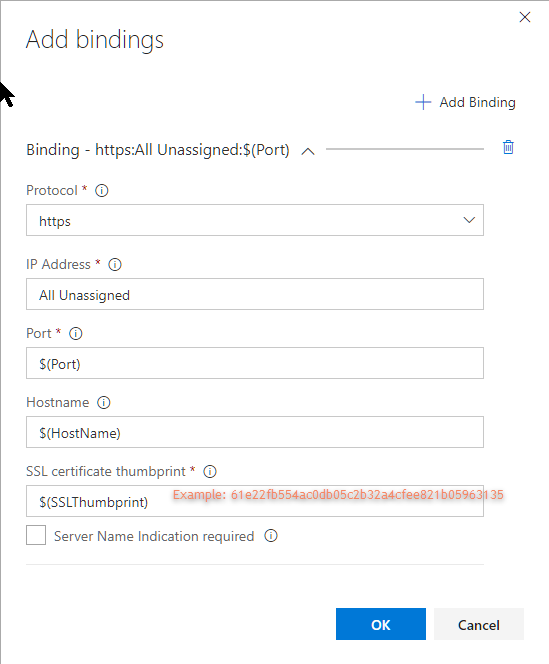
Binding configuration looks like this:
 bdbvb
bdbvb
All 7 comments
@bdbvb Can you enter the thumbprint directly (instead of the varibale $(SSLThumbprint) in the SSL certificate thumbprint input to see if there is any non-hexadecimal character in the input. In case of error, the UI shows :

 asranja
on 18 Aug 2017
asranja
on 18 Aug 2017
Weird. I did a select/copy of the value from the release definition, and pasted into the Add Bindings dialog, and though it looks perfect, I do get the error you mention:

I originally copy/pasted the value from the thumbprint of the built-in Windows certificate viewer and deleted the spaces.
I guess the next thing I should try is typing the value in by hand.
Since I'm thinking this might be a common use-case (copying the value from the certificate viewer and pasting it), I wonder if the "SSL certificate thumbprint" field could be enhanced to automatically trim out any non-hex characters, spaces, etc.
I'll try by hand and see how it goes....
bdbvb
on 18 Aug 2017
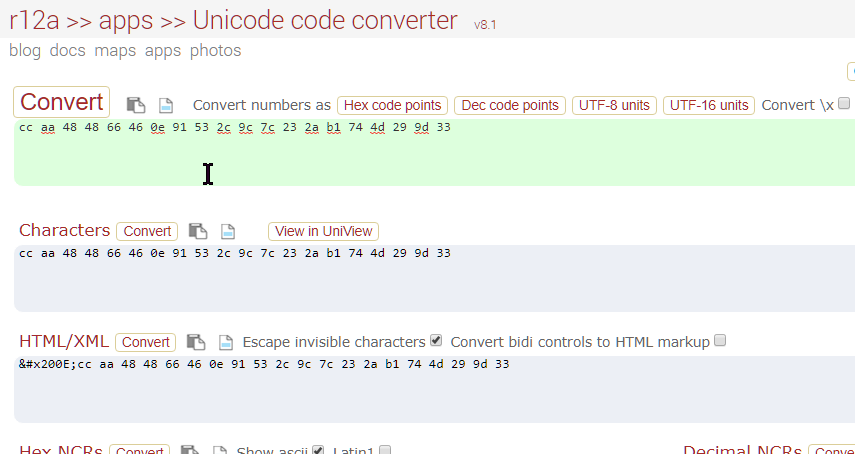
Using a Unicode converter, I see my thumbprint is actually something like:
‎61e22fb554ac0db05c2b32a4cfee821b05963135
200E is the Left to Right Mark (https://en.wikipedia.org/wiki/Left-to-right_mark)
I'm guessing (maybe) when copying that value from the Windows certificate viewer, it includes this hidden character.
Anyway, eliminating that character eliminates the warning.
So I suppose it's technically not a bug :-)
However, would be nice for it to automatically trim that sort of thing out, since I'm guessing it might be a common use case.
Thanks!
bdbvb
on 18 Aug 2017
(Update: I did try selecting and copying the thumbprint value from the certificate viewer and pasting it into a unicode converter, and it indeed is the culprit.)

bdbvb
on 18 Aug 2017
@bdbvb Yes, you are right. The thumbprint from the certificate manager does append an invisible Unicode at the beginning of the thumbprint. Currently we are not trimming it out in the UI. We let the task trim out any non-hexadecimal character and spaces.
asranja
on 18 Aug 2017
It's copy paste problem. Just Retype Thumbprint
 UmairRafique01
on 21 Dec 2018
UmairRafique01
on 21 Dec 2018
This solved it for me. Run "certutil -store my"
My thumbprint was coming back as 41 characters.
https://support.microsoft.com/en-us/help/2023835/certificate-thumbprint-displayed-in-mmc-certificate-snap-in-has-extra
 kkilton
on 18 Jan 2019
kkilton
on 18 Jan 2019
Related issues
 jared-hexagon
·
3Comments
jared-hexagon
·
3Comments
 Mardoxx
·
3Comments
Mardoxx
·
3Comments
 HenrikStanley
·
3Comments
HenrikStanley
·
3Comments
 gregpakes
·
3Comments
gregpakes
·
3Comments
 MikahB
·
3Comments
MikahB
·
3Comments
Most helpful comment
(Update: I did try selecting and copying the thumbprint value from the certificate viewer and pasting it into a unicode converter, and it indeed is the culprit.)