Azure-pipelines-tasks: Remove artificial restriction on length of inline PowerShell scripts.
Currently, inline PowerShell scripts are limited to 500 characters ("maxLength": "500"). Please remove this restriction so longer inline scripts can be used.
 JacobHenner
All 12 comments
This is a dupe. We have it on our backlog to do "right". That means use the web based editor, putting it in external file container storage (with a ref in the definition) etc... Until then, the limit will stay. It's not artificial - not deterministic / specific yes but a job with multiple with very large file contents can cause issues in job message orchestration server side. Inline support at 500 chars was a bridge to the real feature to support the case where I just want to execute a few lines and I don't want multiple cmd line task invocations or check into source control just for that. We also have yaml on the horizon.
 bryanmacfarlane
on 9 May 2017
bryanmacfarlane
on 9 May 2017
Did not see the duplicate when I searched. Thank you for the quick response.
On May 9, 2017 7:12 AM, "Bryan MacFarlane" notifications@github.com wrote:
This is a dupe. We have it on our backlog to do "right". That means use the
web based editor, putting it in external file container storage (with a ref
in the definition) etc... Until then, the limit will stay. It's not
artificial - not deterministic / specific yes but a job with multiple with
very large file contents can cause issues in job message orchestration
server side. Inline support at 500 chars was a bridge to the real feature
to support the case where I just want to execute a few lines and I don't
want multiple cmd line task invocations or check into source control just
for that. We also have yaml on the horizon.
—
You are receiving this because you authored the thread.
Reply to this email directly, view it on GitHub
https://github.com/Microsoft/vsts-tasks/issues/4272#issuecomment-300132847,
or mute the thread
https://github.com/notifications/unsubscribe-auth/AAIy99QDntnsqS8Zc3huEpdwUgrLk37Cks5r4EougaJpZM4NUt-j
.
JacobHenner
on 9 May 2017
It might be closed - we're tracking to do it "right" on our backlog. Hopefully we get to it soon.
bryanmacfarlane
on 9 May 2017
Yeah, it looks like the previous issue was #3447, which is closed. Is there any ETA for this? In the meantime, would it be possible to indicate the maximum length below the field?
JacobHenner
on 9 May 2017
For reference: see https://github.com/Microsoft/vsts-tasks/pull/1676 and https://github.com/XpiritBV/Vsts-Build-Task-InlinePowershell/pull/1
 icnocop
on 16 May 2017
icnocop
on 16 May 2017
As a workaround:
You can change the inline task length for tfs online with F12 Developer Tools:
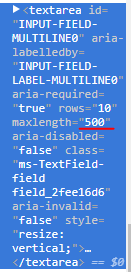
To something like:
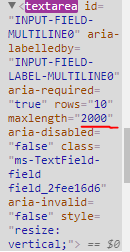
I tried myself and it's working
 PatrizioR
on 10 Aug 2017
PatrizioR
on 10 Aug 2017
@bryanmacfarlane Is there a subscribe-able issue for keeping track of? I have traversed 3+ issues that have the exact same inquiry and would seem indicates enough of a interest to get the backlog item to include acceptance criteria to update subsequent issue. Ditto for yaml (arguably supersedes this in superior fashion).
 iyerusad
on 31 Aug 2017
iyerusad
on 31 Aug 2017
We added this support in the V2 versions of those tasks as part of the yaml work (about to go into preview). You should be able to use those tasks today.
https://github.com/Microsoft/vsts-tasks/blob/master/Tasks/powerShell/task.json#L73
bryanmacfarlane
on 31 Aug 2017
Fixed in V2 versions of tasks
bryanmacfarlane
on 31 Aug 2017
Usage in YAML coming soon: https://github.com/Microsoft/vsts-agent/blob/master/docs/preview/yamlgettingstarted-powershell.md
bryanmacfarlane
on 31 Aug 2017
Thanks Bryan.
I gotta ask - Is YAML availability only for specific tasks?
I noticed the documentation is targeting powershell and https://github.com/Microsoft/vsts-agent/tree/master/docs/preview contains others... but I don't see one for AZ CLI and was wondering if the YAML implementation here was preview for only certain tasks.
iyerusad
on 31 Aug 2017
YAML will be available for all tasks.
bryanmacfarlane
on 1 Sep 2017
Related issues
 pharring
·
3Comments
pharring
·
3Comments
 NatMarchand
·
3Comments
NatMarchand
·
3Comments
 MikahB
·
3Comments
MikahB
·
3Comments
 HenrikStanley
·
3Comments
HenrikStanley
·
3Comments
 MichaelWhiteCodingForFun
·
3Comments
MichaelWhiteCodingForFun
·
3Comments