Azure-pipelines-tasks: AzureFileCopy cannot copy to $root container.
Upload to container: '$root' in storage account: 'accountName' with blobprefix: '' failed with error: 'Azure Storage container names can only contain lowercase alpha-numeric characters or hyphens
Parameter name: containerName' For more info please refer to https://aka.ms/azurefilecopyreadme
 tabeth
All 13 comments
@tabeth by any chance have you provided $root as input for container. For container name special characters like $ are not supported
 chshrikh
on 29 Dec 2016
chshrikh
on 29 Dec 2016
@chshrikh I'm running into same issue. Please see Azure Storage documentation regarding the $root container: https://msdn.microsoft.com/en-us/library/azure/hh488356.aspx
 rjygraham
on 9 Jan 2017
rjygraham
on 9 Jan 2017
@tabeth , @rjygraham , thanks for reporting this issue. Its a genuine issue and will be fixed.
 vincent1173
on 10 Jan 2017
vincent1173
on 10 Jan 2017
We should support this. Can you please ensure that it works
 RoopeshNair
on 30 Jan 2017
RoopeshNair
on 30 Jan 2017
@vincentdass @RoopeshNair Hi Did you manage to fix this issue? i am running into the same issue..
Upload to container: '' in storage account: '' with blobprefix: '' failed with error: '' For more info please refer to https://aka.ms/azurefilecopyreadme
PS: I am using team services.. azure file copy task to upload file in to the blob container
 BhaskarDasari
on 6 Mar 2017
BhaskarDasari
on 6 Mar 2017
@BhaskarDasari , the fix is in progress.
For a workaround, please use other containers, until the issue is resolved.
Can you also please share the debug logs for reference ?
vincent1173
on 7 Mar 2017
The issue is resolved and the fix will be available in upcoming deployment.
vincent1173
on 13 Mar 2017
Is this been fixed? I still see this issue while trying to upload files to an already created blob container.

 modikumar
on 2 Jul 2018
modikumar
on 2 Jul 2018
@modikumar It was fixed long ago. From these logs, I assume you have specified "armartifacts/nestedtemplates/automation/scripts" in the Container Name input. That is not the right way for this.
You must specify only "armartifacts" as your Container Name. There is another input called Blob Prefix. Please specify "nestedtemplates/automation/scripts" in the Blob Prefix input.
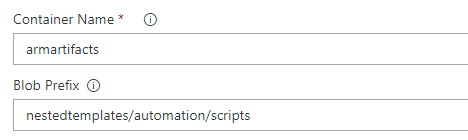
 rajatagrawal-dev
on 3 Jul 2018
rajatagrawal-dev
on 3 Jul 2018
are you sure this was fixed? i'm trying to upload to $web (static hosting preview) using azureblob file copy and i get the following error:
2018-07-20T08:42:40.6765518Z ##[error]Upload to container: '$web' in storage account: 'xxx' with blob prefix: '' failed with error: 'Azure Storage container names can only contain lowercase alpha-numeric characters or hyphens
$web is the automatically generated webroot container for static hosting.
duplicate of https://github.com/Microsoft/vsts-tasks/issues/7611
 markusdresch
on 20 Jul 2018
markusdresch
on 20 Jul 2018
@markusdresch You should be able to upload to $root container. The fix for $web container will be deployed to all accounts in around a week.
rajatagrawal-dev
on 20 Jul 2018
Hi, has the fix for deploying the $web folder been deployed yet..?
 johnhydemtm365
on 15 Aug 2018
johnhydemtm365
on 15 Aug 2018
@johnhydemtm365 Yes. It deployed a couple of hours ago. Please check if you are able to successfully deploy to $web containers.
If you have issues with this, please post here #7611.
rajatagrawal-dev
on 15 Aug 2018
Related issues
 jared-hexagon
·
3Comments
jared-hexagon
·
3Comments
 montebhoover
·
3Comments
montebhoover
·
3Comments
 gregpakes
·
3Comments
gregpakes
·
3Comments
 MikahB
·
3Comments
MikahB
·
3Comments
 MarkIannucci
·
3Comments
MarkIannucci
·
3Comments