Azure-pipelines-agent: Self-hosted agents intermittently do not pick up new jobs
Having issue with YAML?
No
Having issue with Tasks?
No
Having issue with software on Hosted Agent?
No
Having generic issue with Azure-Pipelines/VSTS/TFS?
No
Have you tried troubleshooting?
Yes
Agent Version and Platform
Version of your agent? 2.175.2
OS of the machine running the agent? CentOS 7
Azure DevOps Type and Version
dev.azure.com
If dev.azure.com, what is your organization name?
https://dev.azure.com/ (will provide this privately if necessary)
What's not working?
We have a series of pipelines that all behave the same way:
First Stage
- Run on an Ubuntu 18.x Azure hosted agent
- Create a VM in GCP that runs an Azure Self-Hosted Agent in a Docker container as described on this web page: https://docs.microsoft.com/en-us/azure/devops/pipelines/agents/docker?view=azure-devops
- Make sure the VM and the agent have a unique name per job
Second Stage
- Wait for the self-hosted agent to pick up the work, based on a custom "demand" that looks for the unique agent name
- Run some custom code on the self-hosted agent
- Finish running custom code
- Delete GCP VM
Agent and Worker's Diagnostic Logs
See the following log files for an example of a successful run, and an unsuccessful run.
self-hosted-agent-log-failure.log
self-hosted-agent-log-successful.log
Key differences that I've noticed:
The Linux version printed at the top is different, though I'm not exactly sure how/why, and I'm not sure why that would matter for this particular issue:
successful
[2020-10-28 05:30:47Z INFO AgentProcess] RuntimeInformation: Linux 4.19.150+ #1 SMP Sat Oct 24 07:57:26 PDT 2020.

failure
[2020-10-21 23:01:22Z INFO AgentProcess] RuntimeInformation: Linux 5.4.49+ #1 SMP Sun Oct 18 19:43:35 PDT 2020.
Note that the failure log shows that the agent is listening for jobs but then times out after 30 minutes, but the success log receives the job within 30 seconds
successful
[2020-10-28 05:30:49Z INFO MessageListener] Session created.
[2020-10-28 05:30:49Z INFO Terminal] WRITE LINE: 2020-10-28 05:30:49Z: Listening for Jobs
[2020-10-28 05:30:49Z INFO JobDispatcher] Set agent/worker IPC timeout to 30 seconds.
[2020-10-28 05:31:28Z INFO RSAFileKeyManager] Loading RSA key parameters from file /azp/agent/.credentials_rsaparams
[2020-10-28 05:31:28Z INFO MessageListener] Message '1' received from session 'b2dbac0f-1ab5-45ec-ae40-c811b5d35d0d'.
[2020-10-28 05:31:28Z INFO JobDispatcher] Job request 2037 for plan e2905f74-12be-4282-8fb2-215cd5c5d3f3 job fc308004-fcdd-5de5-2151-99c66bc3b9d8 received.
[2020-10-28 05:31:28Z INFO Terminal] WRITE LINE: 2020-10-28 05:31:28Z: Running job: Build container


failure
[2020-10-21 23:01:23Z INFO RSAFileKeyManager] Loading RSA key parameters from file /azp/agent/.credentials_rsaparams
[2020-10-21 23:01:23Z INFO VisualStudioServices] AAD Correlation ID for this token request: Unknown
[2020-10-21 23:01:23Z INFO MessageListener] Session created.
[2020-10-21 23:01:23Z INFO Terminal] WRITE LINE: 2020-10-21 23:01:23Z: Listening for Jobs
[2020-10-21 23:01:23Z INFO JobDispatcher] Set agent/worker IPC timeout to 30 seconds.
[2020-10-21 23:31:24Z INFO MessageListener] No message retrieved from session 'dc2f77ad-6fdb-4a0f-b539-f0eefaef1c8d' within last 30 minutes.
[2020-10-21 23:56:26Z WARN VisualStudioServices] Authentication failed with status code 401.
 dvmorris
All 15 comments
Bumping this thread as I am experiencing a similar issue. I recently moved my agent pool from running 3 instances of Azure Pipelines Agent installed directly on to a Windows Server 2019 VM to running the agents as Docker containers in an effort to try solve an issue with global tools influencing other jobs running on the same VM (more details are logged here - https://community.sonarsource.com/t/make-azure-devops-build-tasks-atomic-to-the-agent/37250).
I am experiencing this very same issue however my containers are running using the mcr.microsoft.com/dotnet/framework/runtime:4.8 as the base image. I have installed Visual Studio Build Tools, Test Agent & various other installs necessary for our workflow.
Host details:
Windows Server 2019 Standard
3 CPU cores, 6 threads
12GB RAM
Docker EE for Windows Server
Agent details:
https://dev.azure.com/
Agent version 1.181.0
mcr.microsoft.com/dotnet/framework/runtime:4.8 base image
Installed tools:
- Visual Studio 2019 Build Tools (all recommended and optional components for included workflows)
- Agents for Visual Studio 2019
- MinGit v2.30.0.windows.2
- NodeJS node-v10.23.1-win-x64 (need an older version for some older UI projects that are being deprecated as of time of writing)
- OpenJDK 11.0.9.11-2.windows
- OpenJRE 11.0.9.11-2.windows
- NuGet.exe 5.8.1
- Chocolatey
- Chrome headless
 KrylixZA
on 25 Jan 2021
KrylixZA
on 25 Jan 2021
Hi @dvmorris @KrylixZA could you please share your pipeline logs also which are relevant to the agent logs?
 anatolybolshakov
on 28 Jan 2021
anatolybolshakov
on 28 Jan 2021
Hey @anatolybolshakov. If it happens again, I will capture the agent logs. I fiddled with my Dockerfile a little and it appeared that I was missing some optional features in the Visual Studio Build Tools which meant the build just sat trying to initialize. After rebuilding and adding the features, the builds have been reliable. So it may be linked to agent capabilities but I can't be sure.
KrylixZA
on 29 Jan 2021
What specifically did you add to the dockerfile?
On Thu, Jan 28, 2021, 11:41 PM Simon Headley notifications@github.com
wrote:
Hey @anatolybolshakov https://github.com/anatolybolshakov. If it
happens again, I will capture the agent logs. I fiddled with my Dockerfile
a little and it appeared that I was missing some optional features in the
Visual Studio Build Tools which meant the build just sat trying to
initialize. After rebuilding and adding the features, the builds have been
reliable. So it may be linked to agent capabilities but I can't be sure.—
You are receiving this because you were mentioned.
Reply to this email directly, view it on GitHub
https://github.com/microsoft/azure-pipelines-agent/issues/3155#issuecomment-769589025,
or unsubscribe
https://github.com/notifications/unsubscribe-auth/AABNPDOBJWA7UPHYJ7JPRI3S4JDBXANCNFSM4TPSGMRA
.
dvmorris
on 29 Jan 2021
Scratch that - happened again.
Here are the logs:
[2021-01-29 12:55:04Z INFO RSAEncryptedFileKeyManager] Loading RSA key parameters from file C:agent.credentials_rsaparams
[2021-01-29 12:55:05Z INFO VisualStudioServices] AAD Correlation ID for this token request: Unknown
[2021-01-29 12:55:55Z INFO MessageListener] No message retrieved from session '15b76cb4-533c-4174-b46d-70b684e05739' within last 30 minutes.
[2021-01-29 13:11:22Z INFO RSAEncryptedFileKeyManager] Loading RSA key parameters from file C:agent.credentials_rsaparams
[2021-01-29 13:11:22Z INFO MessageListener] Message '9' received from session '15b76cb4-533c-4174-b46d-70b684e05739'.
[2021-01-29 13:11:22Z INFO JobDispatcher] Job request 1162379 for plan 6beb40ca-4940-4d18-a938-cc9f8895ecb8 job 3bf2df57-857a-5250-2f8f-945c718af65b received.
[2021-01-29 13:11:22Z INFO JobDispatcher] Job request 1f8795ce-d358-50fa-77d0-a341e7793f5d processed succeed.
[2021-01-29 13:11:22Z INFO Terminal] WRITE LINE: 2021-01-29 13:11:22Z: Running job: StaticAnalysis
[2021-01-29 13:11:22Z INFO AgentServer] Refresh JobRequest VssConnection to get on a different AFD node.
[2021-01-29 13:11:22Z INFO AgentServer] Establish connection with 30 seconds timeout.
[2021-01-29 13:11:22Z INFO VisualStudioServices] Starting operation Location.GetConnectionData
[2021-01-29 13:11:22Z INFO VisualStudioServices] Finished operation Location.GetConnectionData
[2021-01-29 13:11:22Z INFO JobDispatcher] Start renew job request 1162379 for job 3bf2df57-857a-5250-2f8f-945c718af65b.
[2021-01-29 13:11:23Z INFO JobDispatcher] Successfully renew job request 1162379, job is valid till 1/29/2021 1:21:22 PM
[2021-01-29 13:11:23Z INFO HostContext] Well known directory 'Bin': 'C:agentbin'
[2021-01-29 13:11:23Z INFO ProcessInvokerWrapper] Starting process:
[2021-01-29 13:11:23Z INFO ProcessInvokerWrapper] File name: 'C:agentbinAgent.Worker.exe'
[2021-01-29 13:11:23Z INFO ProcessInvokerWrapper] Arguments: 'spawnclient 2232 2044'
[2021-01-29 13:11:23Z INFO ProcessInvokerWrapper] Working directory: 'C:agentbin'
[2021-01-29 13:11:23Z INFO ProcessInvokerWrapper] Require exit code zero: 'False'
[2021-01-29 13:11:23Z INFO ProcessInvokerWrapper] Encoding web name: ; code page: ''
[2021-01-29 13:11:23Z INFO ProcessInvokerWrapper] Force kill process on cancellation: 'True'
[2021-01-29 13:11:23Z INFO ProcessInvokerWrapper] Redirected STDIN: 'False'
[2021-01-29 13:11:23Z INFO ProcessInvokerWrapper] Persist current code page: 'False'
[2021-01-29 13:11:23Z INFO ProcessInvokerWrapper] Keep redirected STDIN open: 'False'
[2021-01-29 13:11:23Z INFO ProcessInvokerWrapper] High priority process: 'True'
[2021-01-29 13:11:23Z INFO ProcessInvokerWrapper] Process started with process id 13388, waiting for process exit.
[2021-01-29 13:11:23Z INFO JobDispatcher] Send job request message to worker for job 3bf2df57-857a-5250-2f8f-945c718af65b (30 KB).
[2021-01-29 13:11:53Z INFO JobDispatcher] Job request message sending for job 3bf2df57-857a-5250-2f8f-945c718af65b been cancelled after waiting for 30 seconds, kill running worker.
[2021-01-29 13:11:53Z INFO ProcessInvokerWrapper] Kill entire process tree since both cancel and terminate signal has been ignored by the target process.
[2021-01-29 13:11:53Z INFO ProcessInvokerWrapper] Scan all processes to find relationship between all processes.
[2021-01-29 13:11:54Z INFO ProcessInvokerWrapper] Find all child processes of process '13388'.
[2021-01-29 13:11:54Z INFO ProcessInvokerWrapper] Need kill all child processes trees before kill process '13388'.
[2021-01-29 13:11:54Z INFO ProcessInvokerWrapper] Child process '11880' needs be killed first.
[2021-01-29 13:11:54Z INFO ProcessInvokerWrapper] Find all child processes of process '11880'.
[2021-01-29 13:11:54Z INFO ProcessInvokerWrapper] Kill process '11880'.
[2021-01-29 13:11:54Z INFO ProcessInvokerWrapper] Kill process '13388'.
[2021-01-29 13:11:54Z INFO ProcessInvokerWrapper] STDOUT/STDERR stream read finished.
[2021-01-29 13:11:54Z INFO ProcessInvokerWrapper] STDOUT/STDERR stream read finished.
[2021-01-29 13:11:54Z INFO ProcessInvokerWrapper] Exited process 13388 with exit code -1
[2021-01-29 13:11:54Z INFO ProcessInvokerWrapper] Finished process 13388 with exit code -1, and elapsed time 00:00:31.0531535.
[2021-01-29 13:11:54Z INFO JobDispatcher] worker process has been killed.
[2021-01-29 13:11:54Z INFO JobDispatcher] Stop renew job request for job 3bf2df57-857a-5250-2f8f-945c718af65b.
[2021-01-29 13:11:54Z INFO JobDispatcher] job renew has been canceled, stop renew job request 1162379.
KrylixZA
on 29 Jan 2021
@KrylixZA could you please share pipeline logs also? It could be helpful to determine timestamp when the job should have been started.
anatolybolshakov
on 31 Jan 2021
@anatolybolshakov there were no pipeline log files created for the failed run. That's all I have, sorry.
KrylixZA
on 31 Jan 2021
@KrylixZA Do you know the timestamp of hung job? When it should have started, but haven't?
anatolybolshakov
on 1 Feb 2021
@KrylixZA Do you know the timestamp of hung job? When it should have started, but haven't?
Relative to the logs I added above, it is between these two logged outputs:
[2021-01-29 13:11:23Z INFO JobDispatcher] Send job request message to worker for job 3bf2df57-857a-5250-2f8f-945c718af65b (30 KB).
[2021-01-29 13:11:53Z INFO JobDispatcher] Job request message sending for job 3bf2df57-857a-5250-2f8f-945c718af65b been cancelled after waiting for 30 seconds, kill running worker.
More specifically, it is exactly at 13:11:23Z when the send job request message is made.
KrylixZA
on 1 Feb 2021
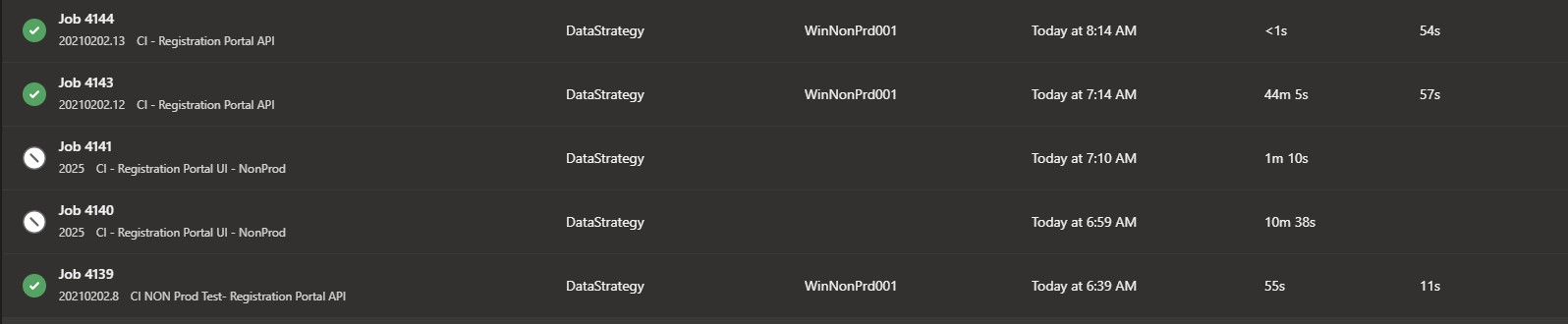
I ran into this issue this morning. We are running agent 2.181.0 on a windows 2016 server. I have pasted the agent logs below. The job was hung for about 45 minutes before the agent picked it up and ran it successfully. I think this might have happened once before with agent version 2.179, but not recently enough that I would be able to locate the logs.
 mk-AVA
on 2 Feb 2021
mk-AVA
on 2 Feb 2021
@KrylixZA @dvmorris @mk-AVA could you please double-check that there is no agent child processes terminated by OOM killer?
You can try to specify oom_score_adj for agent root process and it's child processes like below - to exclude this cause:
1) Set up ‘PIPELINE_JOB_OOMSCOREADJ’ environment variable as ‘-1000’ – to set up default oom_score_adj value for agent child processes as -1000.
2) Call ‘sudo echo -1000 > /proc/$$/oom_score_adj’ – to set oom_score_adj for current shell as -1000.
3) Run agent interactively (by running run.sh script) from current shell.
If these steps above will help to resolve the issue - this means that there are some issues with memory resources allocation on agent machine.
anatolybolshakov
on 9 Mar 2021
Hi @anatolybolshakov
I see the original issue was logged against CentOS. I am experiencing similar behaviour when running on Windows Server as a host and in the container as well. That being said, I did re-run the containers with memory and CPU limits as well as no memory or CPU limits and experienced the same behaviour as before.
My agents are running against a base image of mcr.microsoft.com/dotnet/framework/runtime:4.8. They are also running on a host OS of Windows Server build 1809 which is actually a VM hosted in VMWare ESX. According to the Microsoft Docs, it should still be fine to run the containers as they are based on Windows Server but I wondered if maybe something about the configuration is the cause of the problem.
My Dockerfile is now available here - https://github.com/KrylixZA/Azure-Pipelines-Docker-Agents/blob/main/build-agent/windows/Dockerfile.
Unfortunately I have had to turn these build agents off as they're having an impact on delivery of software for other teams so I can only test in low-stress scenarios once every couple of weeks.
KrylixZA
on 18 Mar 2021
@KrylixZA could you please re-run it and notify when it will happen again - so we could check the logs on our side also?
anatolybolshakov
on 23 Mar 2021
Hi @KrylixZA ping - any updates?
anatolybolshakov
on 2 Apr 2021
@dvmorris @KrylixZA @mk-AVA I'm closing this at the moment due to inactivity - please let us know if it's still actual for you and provide more details - for us to investigate it further.
anatolybolshakov
on 7 Apr 2021
Related issues
 alexrainman
·
5Comments
alexrainman
·
5Comments
 simonvane
·
4Comments
simonvane
·
4Comments
 rusergeev
·
4Comments
rusergeev
·
4Comments
 tjinjin95
·
3Comments
tjinjin95
·
3Comments
 CodeCasterNL
·
4Comments
CodeCasterNL
·
4Comments