Azure-pipelines-agent: how to use self-host agent for azure pipeline
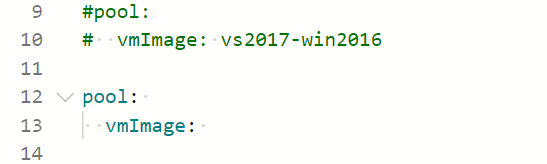
Hi, I want create a self-host agent and use it in pipeline. however, I had some problems importing the image.
the procedures are list in follow.
create a self-host agent according to the link : [https://docs.microsoft.com/en-us/azure/devops/pipelines/agents/v2-windows?view=azure-devops]

import the agent image, I do not know the right format
In other words, how could I replace lines 9 and 10 of the demo code with the self-host agent?
Thanks
 tjinjin95
All 3 comments
Hi @tjinjin95
You should specify an agent pool name:
pool:
  name: 'AgentPoolName'
If you'd like to specify an exact agent in the pool you should do the following:
pool:
  name: 'AgentPoolName'
  demands:
  - agent.name -equals 'azurePipelineWindows'
Is this information helpful for you?
 egor-bryzgalov
on 1 Mar 2021
egor-bryzgalov
on 1 Mar 2021
@egor-bryzgalov I still cannot specify the agent. The error log is as follows.
code:
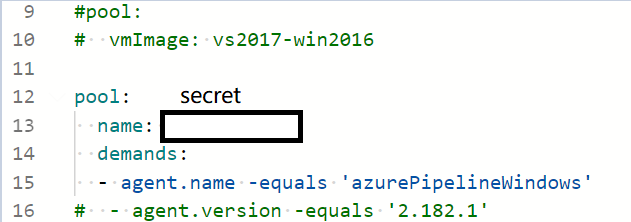
first test:

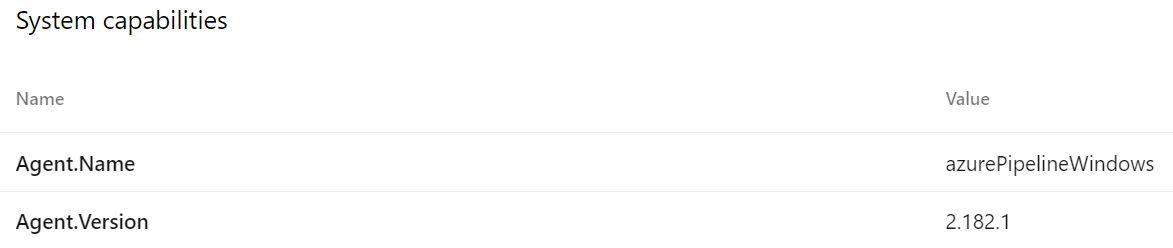
second test:

capabilities:
tjinjin95
on 2 Mar 2021
Problem solved, could refer to the link: https://github.com/microsoft/azure-pipelines-agent/issues/2996
tjinjin95
on 2 Mar 2021
Related issues
 jessehouwing
·
57Comments
jessehouwing
·
57Comments
 robinhultman
·
35Comments
robinhultman
·
35Comments
 bergmeister
·
52Comments
bergmeister
·
52Comments
 A141133
·
80Comments
A141133
·
80Comments
 vtbassmatt
·
39Comments
vtbassmatt
·
39Comments