Azure-pipelines-agent: Windows Agent Hides or Capitalizes Variables
Having generic issue with Azure-Pipelines/VSTS/TFS?
See the original Developer Community Issue here.
Agent Version and Platform
Hosted VS2017
VSTS Type and Version
dev.azure.com
What's not working?
Add the following variables to a pipeline... note this could be done either with unprotected variables or explicitly on a build step via YAML...
- Secret_Foo
- Manifest_Bar
- FooBar
Now run a Pipeline on a Hosted VS2017 agent with a powershell script to dump environment variables:
gci env:* | sort-object name
Your output will not include any variation of Secret_Foo, and any other variables you have added to the environment will have been capitalized meaning you now have MANIFEST_BAR and FOOBAR instead of what you actually entered. This behavior is completely different on the Hosted Mac agent, where each variable is available and appears in the environment as entered into the pipeline.
| Variable | Hosted VS2017 | Hosted macOS |
|:--------:|:------------:|:--------:|
| Secret_Foo | n/a | Secret_Foo |
| Manifest_Bar | MANIFEST_BAR | Manifest_Bar |
| FooBar | FOOBAR | FooBar |
The above would be true whether working with an unprotected variable or added in YAML like the following:
- task SomeTask
  env:
    Secret_Foo: $(ProtectedVariable)
    Secret_Bar: $(UnprotectedVariable)
Also worth noting that this behavior is consistent across direct Azure DevOps Hosted pipelines and App Center Builds.
 dansiegel
All 11 comments
@dansiegel we choose to replace . and toUpper so you can reference the variable in the same format across both Windows, Linux and macOS. https://docs.microsoft.com/en-us/azure/devops/pipelines/process/variables?view=vsts&tabs=yaml%2Cbatch#working-with-variables
Secret_ is a reserved variable prefix, since task-lib will consider that is a secret variable, there are also Input_, Endpoint_ etc.
the Windows behavior is what i expected, i would say that is by design.
I am not sure about the macOS behavior, can you provide more log about that, like how you set the variable and how did you print them out?
 TingluoHuang
on 21 Nov 2018
TingluoHuang
on 21 Nov 2018
Hi @TingluoHuang, I appreciate your answer on this, but "by design" doesn't make this OK.
Case sensitivity is important and "trying to make things easier" is not a good argument. If someone's environment settings are wrong - then they are wrong - they shouldn't be relying on dodgy case conversion to fix things.
As an example, in fact from the Microsoft ecosystem (Function Apps), case-sensitive environment variables are set for connection strings. Testing code in Pipelines will break because we check for the correctly cased environment variable, and Pipelines unnecessarily breaks the casing of that variable.
 willmorgan
on 21 Nov 2018
willmorgan
on 21 Nov 2018
It's not about easier, it's about consistency across all platforms so folks can write tasks once and release to the market place for all platforms. There's a single agent code base and a single task system for all platforms on equal footing.
I just ran a build on mac os with a bash script running env and it's consistent.
2018-11-21T12:30:55.6268810Z MANIFEST_BAR=some value
...
2018-11-21T12:30:55.6269810Z FOOBAR=somevalue
So I thought maybe it was a bug in running powershell core on a mac, so I tried an inline powershell step running gci env:* | sort-object name
2018-11-21T12:42:40.1328170Z FOOBAR                         somevalue
...
2018-11-21T12:42:40.1376670Z MANIFEST_BAR                   some value
So I can't repro and it looks to be consistent as designed. I'm interested in the specific bug where you saw that this wasn't the case on mac os.
Note that we preserve the variables but when we expose as environment variables we convert per the posix spec ensuring consistency across platforms and therefore to the common denominator:
http://pubs.opengroup.org/onlinepubs/9699919799/basedefs/V1_chap08.html
Environment variable names used by the utilities in the Shell and Utilities volume of POSIX.1-2017 consist solely of uppercase letters, digits, and the underscore ( _ ) from the characters defined in Portable Character Set and do not begin with a digit.
 bryanmacfarlane
on 21 Nov 2018
bryanmacfarlane
on 21 Nov 2018
close for now since the question is answered, please reopen if needed.
TingluoHuang
on 26 Jan 2019
@TingluoHuang @bryanmacfarlane sorry guys, missed the response.
I'm gonna have to reiterate @willmorgan here...
I appreciate your answer on this, but "by design" doesn't make this OK.
Also:
so you can reference the variable in the same format across both Windows, Linux and macOS
That is a COMPLETELY FALSE statement. I wouldn't have opened the issue in the first place if the behavior were the same across environments... in fact the ONLY one that handles Variables wrong is Windows. If you designed it this way, your design is bad and needs to be fixed.
dansiegel
on 29 Jan 2019
See also #1645 - this may be by design but in this case I agree that the design is hindering rather than helping. A lot of tools are cross platform now so preserving case sensitivity is important on all platforms.
 hbuckle
on 29 Jan 2019
hbuckle
on 29 Jan 2019
This auto-uppercase is causing a big headache for us, as described below.
To help keep our applications config manageable, rather than just referring to process.env.<variable-name> we have a base config object which may or may not have some typing info based on a TS definition. This config object is built up using a combination of files checked in to the repo, arguments passed in to the running process and environment variables, especially for secrets.
An example of a config file that we use is as follows:
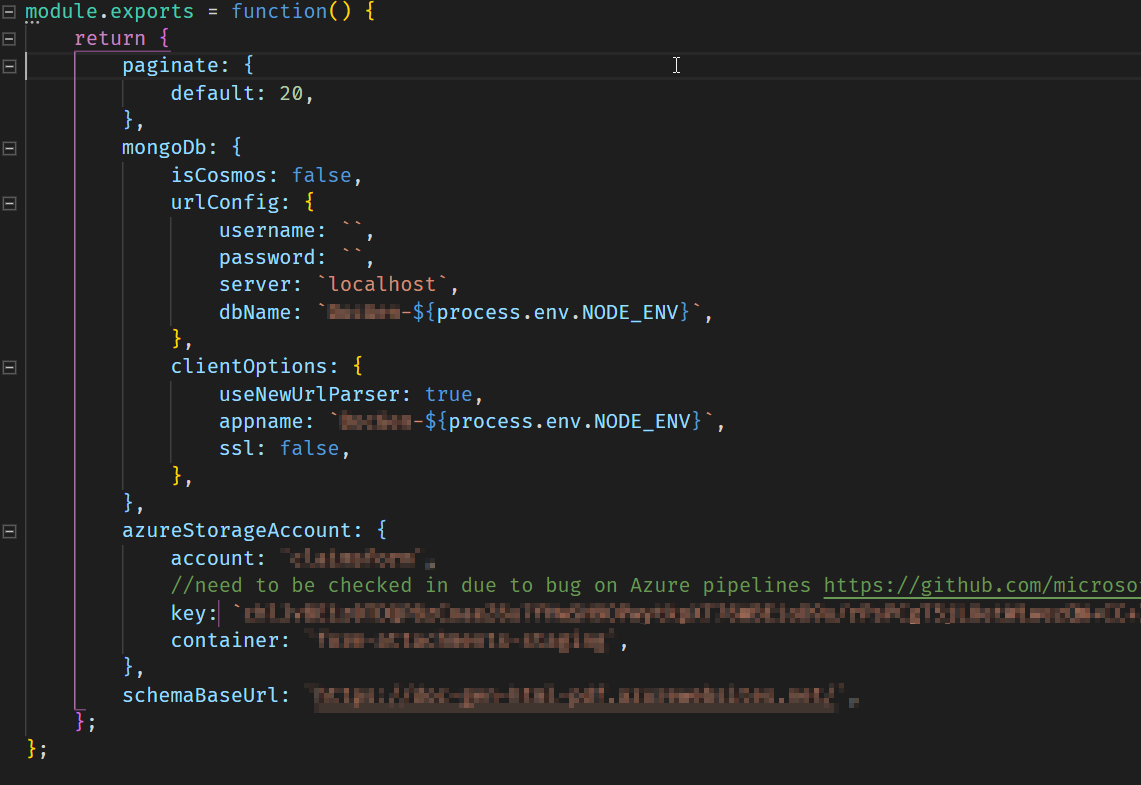
nconf then uses the convention of the double underscore __ to take env and argv variables and set properties on the object for different environments. So some example environment variables related to the above file would be:
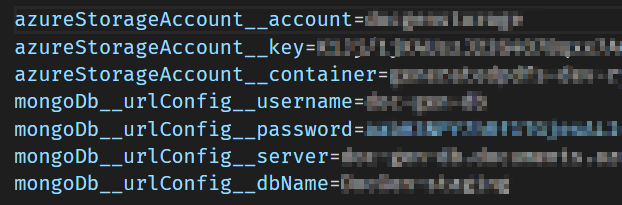
As you can probably figure out, now that all the env variables are automatically uppercased the intended properties no longer get set/replaced.
It would be really great to have the option to turn off this functionality for a pipeline or on a per-variable basis
 eXigentCoder
on 24 Jun 2019
eXigentCoder
on 24 Jun 2019
It would be great if we can have a system variable to opt out of this upper case function in pipelines.
 arbreezy
on 15 Oct 2019
arbreezy
on 15 Oct 2019
@arbreezy you're right it would be great if they would at least give us that compromise... but unfortunately @TingluoHuang @bryanmacfarlane both seem to think that the fact this issue was created specifically due to the inconsistency with other agents and the fact that they're breaking people doesn't matter... this issue really should be reopened and addressed.
To be pretty blunt here, this team needs to start considering the needs of developers rather than making decisions on their own that have a track record of breaking other teams at Microsoft, and large community OSS projects in addition to lots of customers.
dansiegel
on 15 Oct 2019
It would be great if we can have a system variable to opt out of this upper case function in pipelines.
Yes! But only if it's called OpT_out_Plz.
willmorgan
on 21 Oct 2019
@dansiegel I reach out this discussion because I have installed your Mobile.BuildTools package and is not working the secrets feature on my azure devops pipeline, now I know way. But I think the choose of Secret_ prefix was a bad decision as exposed by @TingluoHuang:
Secret_ is a reserved variable prefix, since task-lib will consider that is a secret variable, there are also Input_, Endpoint_ etc.
@TingluoHuang I also think that the reserved variable prefixes should be informed in the documentation. Now I wondering why is reserved in windows agents but not in linux and macos agents?
 frarteaga
on 10 Apr 2020
frarteaga
on 10 Apr 2020
Related issues
 ChristophLindemann
·
41Comments
ChristophLindemann
·
41Comments
 peder
·
32Comments
peder
·
32Comments
 Silthus
·
41Comments
Silthus
·
41Comments
 KelvinJin
·
54Comments
KelvinJin
·
54Comments
 rusergeev
·
48Comments
rusergeev
·
48Comments
Most helpful comment
@arbreezy you're right it would be great if they would at least give us that compromise... but unfortunately @TingluoHuang @bryanmacfarlane both seem to think that the fact this issue was created specifically due to the inconsistency with other agents and the fact that they're breaking people doesn't matter... this issue really should be reopened and addressed.
To be pretty blunt here, this team needs to start considering the needs of developers rather than making decisions on their own that have a track record of breaking other teams at Microsoft, and large community OSS projects in addition to lots of customers.