Azure-pipelines-agent: Multiple YAML pipeline files for one project?
Is it possible to define multiple different YAML pipelines for a given project? This seems like something we would need for our team's needs to deal with the scale and vast difference in number of things we want to control in our pipelines.
 cdietschrun
All 6 comments
bump? Am I misunderstanding anything about this? I imagine some of our projects will need many build pipelines, or some real potentially complicated variable settings. Another question of this, is it easy/possible to define a pipeline with many tasks that are conditionally run or opted into/out of before the pipeline runs? For example one task might be a lint check, and then another a large regression test, we may want the same pipeline defined but then only run lint on PR validation builds. This is a question if multiple YAML pipeline files aren't possible.
cdietschrun
on 22 Oct 2018
azure-pipelines-yaml would be a better repo. we're moving there and keeping this pure agent.
Yes, you can create a definition and browse to a yaml file (and therefore many) . The azure-pipelines.yml is just a convenient one that generates a definition.
We also have a story on the backlog to support a directory structure which will mirror and create defs in that same structure.
Closing since this is a question. If it's not clear then we can reopen.
 bryanmacfarlane
on 22 Oct 2018
bryanmacfarlane
on 22 Oct 2018
@cdietschrun for your second question, you can use condition to control the step at run time.
Ex:
https://github.com/Microsoft/azure-pipelines-agent/blob/master/.vsts.ci.yml#L34
 TingluoHuang
on 22 Oct 2018
TingluoHuang
on 22 Oct 2018
Cool, all parts of this make sense to me now. Thanks again all.
cdietschrun
on 23 Oct 2018
Is this feature still being worked on? Is there some existing issue I could "watch"?
I want to use YAML for Azure pipelines, and have tests run on each PR, and have other things run nightly. I gather that's not possible at the moment, but in the works?
 cdeil
on 18 Jan 2019
cdeil
on 18 Jan 2019
Create your YAML file anywhere in your project and name them whatever you need (build.yml, deploy-dev.yml, deploy-qa.yml, etc) and then go to Pipelines, create a new one, select the Azure Repos Git and then you'll see an option down the list of suggestions of use exiting YAML file:
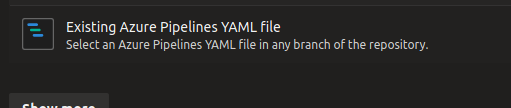
That will open a blade asking you to pick the file and you should be ready to go.
Repeat the process above for as many YAML pipeline definitions you have.
 ngcdev
on 14 Apr 2020
ngcdev
on 14 Apr 2020
Related issues
 michaelschufi
·
32Comments
michaelschufi
·
32Comments
 Silthus
·
41Comments
Silthus
·
41Comments
 A141133
·
80Comments
A141133
·
80Comments
 KelvinJin
·
54Comments
KelvinJin
·
54Comments
 jessehouwing
·
57Comments
jessehouwing
·
57Comments
Most helpful comment
Is this feature still being worked on? Is there some existing issue I could "watch"?
I want to use YAML for Azure pipelines, and have tests run on each PR, and have other things run nightly. I gather that's not possible at the moment, but in the works?