Azure-kinect-sensor-sdk: Driver issues with Kinect Azure
- My Azure kinect is connected to USB 3.0 port.
- The light at the back is stable white.
- Windows camera app works fine.
I am having these driver issues:
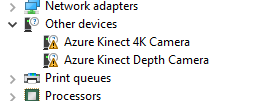
what I have tried so far:
- clicking on update driver from device manager.
- installing the latest windows updates.
- disconnected and reconnected the device.
- system reboot.
but the problem still remains.
I have installed the Azure kinect viewer v1.3.0 but it does not find the device:

 DivyanshK86
All 5 comments
In device manager, what USB host controller are you connected to?
 wes-b
on 21 Dec 2019
wes-b
on 21 Dec 2019
Strange, at my installation the Azure Kinect is installed succesfully and it shows up in the Azure Kinect Viewer.
But when I try to start the videofeed, the program quits without warning.
The same behaviour with another program that uses the new Kinect. Exit without any error.
 jelmerS2
on 2 Jan 2020
jelmerS2
on 2 Jan 2020
Are there any issues reported in Event Viewer https://github.com/microsoft/Azure-Kinect-Sensor-SDK/issues/853#issuecomment-567119412?
If not can you repro the issue with k4aviewer and share the log?
wes-b
on 7 Jan 2020
I've seen this happen when the camera is connected to the wrong USB port, or one that isn't a compatible host controller. The cameras are very picky about the port type they are connected to - and some computers have a USB 3.1 or USB 3.2 port which actually isn't compatible. ASRock's ITX Ryzen motherboards, for example, include a special extra USB 3.1 port (separate from all the USB 3.0 and 2.0 ports), and that port has its own dedicated host controller - but it is not compatible with the camera. All the other USB 3.0 ports on the motherboard are compatible with the camera, so it's just a matter of attaching to the correct port.
So, just in case you haven't already, I'd suggest testing with other ports. You'll also need to ensure that other cameras are not connected to any ports, because those can monopolize the USB Host Controller.
 Chris45215
on 7 Jan 2020
Chris45215
on 7 Jan 2020
@jelmerS2 Let us know if you are still working through this.
wes-b
on 14 Jan 2020
Related issues
 virtusense-trisha
·
4Comments
virtusense-trisha
·
4Comments
 G-mel
·
4Comments
G-mel
·
4Comments
 yeongwoonIm
·
3Comments
yeongwoonIm
·
3Comments
 Maxim-Zhukov
·
4Comments
Maxim-Zhukov
·
4Comments
 rfilkov
·
3Comments
rfilkov
·
3Comments
Most helpful comment
I've seen this happen when the camera is connected to the wrong USB port, or one that isn't a compatible host controller. The cameras are very picky about the port type they are connected to - and some computers have a USB 3.1 or USB 3.2 port which actually isn't compatible. ASRock's ITX Ryzen motherboards, for example, include a special extra USB 3.1 port (separate from all the USB 3.0 and 2.0 ports), and that port has its own dedicated host controller - but it is not compatible with the camera. All the other USB 3.0 ports on the motherboard are compatible with the camera, so it's just a matter of attaching to the correct port.
So, just in case you haven't already, I'd suggest testing with other ports. You'll also need to ensure that other cameras are not connected to any ports, because those can monopolize the USB Host Controller.