Azure-kinect-sensor-sdk: (On Ubuntu 16.04) How to install k4a library after building it from source
The problem still exists in the last SDK.
Not already resolved
Describe the bug
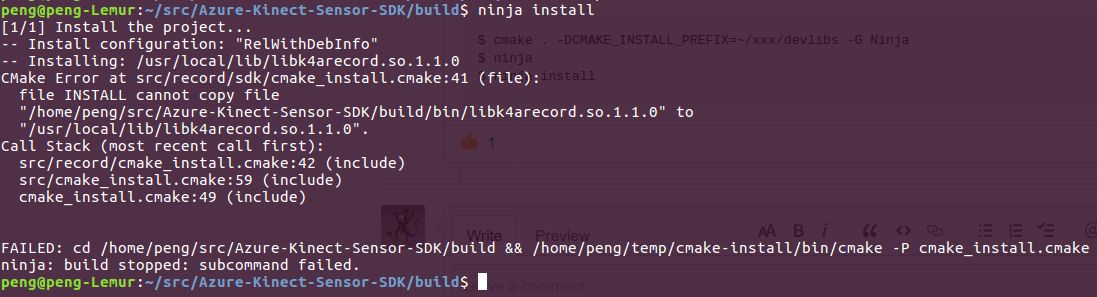
I tried to install the k4a library (on Ubuntu 16.04, to make it as a shared library for my other ROS project) after following the instruction here (https://github.com/microsoft/Azure-Kinect-Sensor-SDK/blob/develop/docs/building.md) to build the Azure Kinect SDK. I can succesfully run k4aviewer and get the RGB-D stream after building Azure Kinect SDK. But then the installation failed after I run ninja install in build folder.
To Reproduce
git clone https://github.com/microsoft/Azure-Kinect-Sensor-SDK.git
cd Azure-Kinect-Sensor-SDK
mkdir build && cd build
cmake .. -GNinja
ninja
ninja install
Expected behavior
It should install the k4a library in usr/local directory.
Screenshots
Desktop (please complete the following information):
- OS with Version: Ubuntu 16.04
- SDK Version: 1.2.0
Additional context
I think it's necessary to enable Azure Kinect to work in Ubuntu 16.04 & ROS environment. Since Azure Kinect targeted customers include robot developers and researchers. But the fact is that many of robots are tied to Ubuntu 16.04. Upgrading the robot hardware to 18.04 is difficult and would break existing projects. Although upgrading to 18.04 will eventually be necessary, it is helpful to have the Azure Kinect DK working on 16.04 in the meantime.
 msr-peng
All 5 comments
you can try this project https://github.com/microsoft/Azure_Kinect_ROS_Driver , maybe it can work at Ubuntu 16.04.
 liaoyinyu
on 23 Aug 2019
liaoyinyu
on 23 Aug 2019
@liaoyinyu
The ROS package in the linked repository needs an installed azure kinect sensor sdk.
So its only tested with Ubuntu 18.04. with ROS Melodic or ROS on Windows (also melodic).
 RoseFlunder
on 23 Aug 2019
RoseFlunder
on 23 Aug 2019
you can try this project https://github.com/microsoft/Azure_Kinect_ROS_Driver , maybe it can work at Ubuntu 16.04.
Thank you. I know this link. The problem is that the ROS package now can only work on Ubuntu 18.04 (which install azure kinect sensor sdk by apt pacakge manager). But for Ubuntu 16.04, the only way I found to make azure kinect sensor sdk work is building it from source. And now I can't install kinect sdk (required by the ROS package) after building it.
msr-peng
on 23 Aug 2019
Oh, I forgot to add 'sudo' to do installation. Now I successfully installed the Azure Kinect SDK on Ubuntu 16.04.
Provide my workaround to make Azure Kinect work in Ubuntu 16.04 & Ros Kinetic environment:
On Ubuntu 18.04:
- Instill k4a-tools and libk4a1.1-dev from apt package manager, then get
libdepthengine.so.1.0andlibstdc++.so.6from your installation path (for me it is /usr/lib/x86_64-linux-gnu/).
On Ubuntu 16.04:
- Build Azure Kinect SDK from source (be careful that it won't work for the lastest SDK, so you need git checkout Azure Kinect SDK repository to commit ID 9afcd78). Then install SDK.
- Copy the two SDK .so files (
libdepthengine.so.1.0andlibstdc++.so.6) from Ubuntu 18.04 to your lib subdirectory of SDK installation path (for me it is /usr/local/lib/). - Enable to use Azure Kinect SDK with the camera without being 'root' by setting up udev rules: cp Azure-Kinect-Sensor-SDK/scripts/99-k4a.rules /etc/udev/rules.d/
- Git clone Azure Kinect ROS package (https://github.com/microsoft/Azure_Kinect_ROS_Driver.git) to your ROS Kinetic workspace (
catkin_ws)
msr-peng
on 24 Aug 2019
For SDK Version 1.4.0 and libdepthengine.so.2.0 I had to additionally copy libm.so.6 (from /lib/x86_64-linux-gnu/) from Ubuntu 18.04 to the lib subdirectory of SDK installation path.
 caselitz
on 6 Dec 2019
caselitz
on 6 Dec 2019
Related issues
 rfilkov
·
3Comments
rfilkov
·
3Comments
 UnaNancyOwen
·
3Comments
UnaNancyOwen
·
3Comments
 RenderHeadsMrT
·
3Comments
RenderHeadsMrT
·
3Comments
 AdrienPfeufferCarmenta
·
4Comments
AdrienPfeufferCarmenta
·
4Comments
 virtusense-trisha
·
4Comments
virtusense-trisha
·
4Comments
Most helpful comment
For SDK Version 1.4.0 and
libdepthengine.so.2.0I had to additionally copylibm.so.6(from /lib/x86_64-linux-gnu/) from Ubuntu 18.04 to the lib subdirectory of SDK installation path.