Azure-kinect-sensor-sdk: Body tracking is almost unusable for WFOV (binned and unbinned) modes
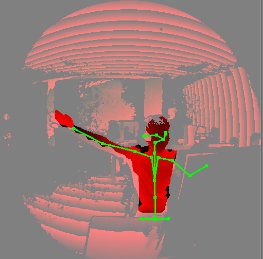
In WFOV depth modes (WFOV_2x2BINNED and WFOV_UNBINNED) body tracking is almost unusable. It cannot correctly recognize even static T-pose (see image attached). And the quality of body index map for these modes is so poor that I have no words to describe it (body pixels are highlighted on attached screenshot).

 bibigone
All 23 comments
Thanks for your feedback. Could you provide more details about the issue. The supported distance for WFOV mode is much shorter than the LTN mode. May I ask how far away you stand in front of the camera? Also, the body tracking algorithm might work worse when there is a wall closely behind you. May I ask whether it is the case for your situation?
 yijiew
on 22 Jul 2019
yijiew
on 22 Jul 2019
Also, could you try to do a screenshot with the "Azure Kinect Body Tracking Viewer"?
yijiew
on 22 Jul 2019
May I ask how far away you stand in front of the camera?
Distance between sensor and face: 1.7 m
Also, the body tracking algorithm might work worse when there is a wall closely behind you. May I ask whether it is the case for your situation?
Distance to wall: 2.5 m
Also, I would say that in NFOV modes body tracking works much better exactly in the same conditions: the same room, the same sensor position, the same person on the same distance, similar movements.
bibigone
on 22 Jul 2019
Thanks for the quick response! The NFOV mode works better because the field of view is narrower. So both the pixel density and the signal strength for each pixel are stronger.
But given your condition, the WFOV should have worked correctly. I tried on our side but I couldn't repro the problem you reported. Do you mind using the k4arecorder tool to record an mkv clip and share with us? We would like to use it to further improve the algorithm before the final release. The k4arecorder is shipped with the Sensor SDK. You can find the instruction about recording here.
yijiew
on 22 Jul 2019
Is not a BUG. The space is error. U can call k4a_calibration_3d_to_2d to calibrate and pan an offset(cx,cy) to make it correct.
 venscn
on 23 Jul 2019
venscn
on 23 Jul 2019
Do you mind using the k4arecorder tool to record an mkv clip and share with us?
Sure. Please, email me directly (bibigone (at) gmail.com) and I'll send links to MKV files as reply (I don't want to publish them here for everyone).
bibigone
on 23 Jul 2019
Is not a BUG. The space is error. U can call k4a_calibration_3d_to_2d to calibrate and pan an offset(cx,cy) to make it correct.
k4a_calibration_3d_to_2d was definitely used to project 3D coordinates of joints to depth map.
Also, as you can see, arms are not highlighted at all, which means that pixels of arms are not marked as "body pixels" on body index map. And visualization of body index map doesn't involve 3D <-> 2D conversions at all.
bibigone
on 23 Jul 2019
@bibigone
The joints in the 3d space, but the body index map is texture of 2d.
U can see...
I use the 3d_to_2d and pan an offset, and it's correct.
venscn
on 23 Jul 2019
@bibigone
And depth mode is WFOV_2x2BINNED
venscn
on 23 Jul 2019
@venscn
Please, send me email and I'll provide you with an example (MKV file). Because right now it sounds like "It works on my machine".
Also, the full source code I have used for screenshot can be found here:
https://github.com/bibigone/k4a.net
(see K4AdotNet.Samples.Wpf.BodyTracker project in solution).
Fragment from TrackerModel.cs:
        private Float2? ProjectJointToDepthMap(Joint joint)
            => calibration.Convert3DTo2D(joint.PositionMm, CalibrationGeometry.Depth, CalibrationGeometry.Depth);
@bibigone
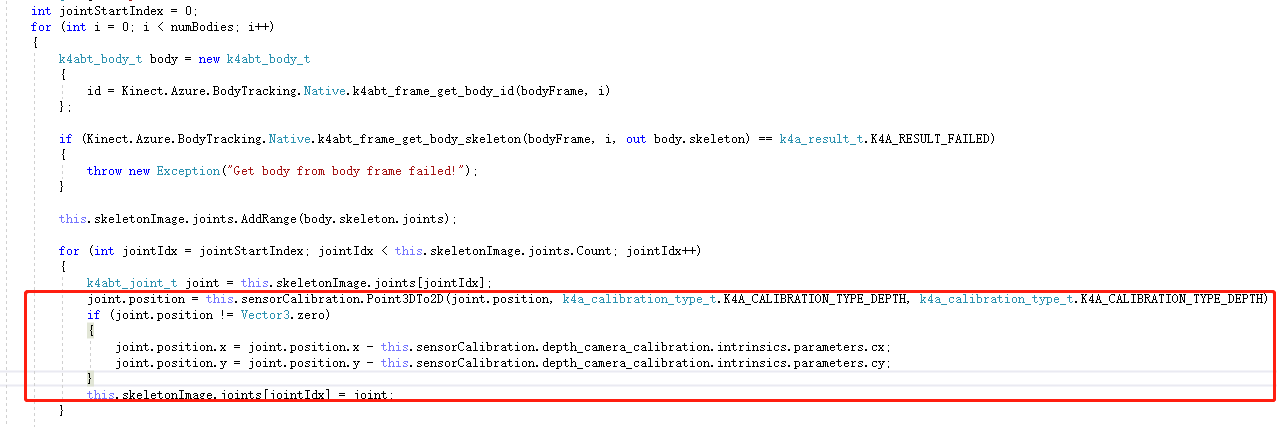
I find your offset is error, u can see my code.
And lost body pixels, maybe your arm is reflective, so...
But the body index map really not intact.
venscn
on 23 Jul 2019
@venscn
Sent.
See..
You're subtracting optical center (cx, cy) because you're using such coordinate system (with zero in the center of an depth map), while I'm using coordinate system where zero is the top-left corner of depth map. If I apply such subtraction in may case, it just shifts the whole skeleton out of the borders of depth map. That's all.
I'll send you ready-to-use application in ZIP-archive. You can play with it in your environment and make sure that it works correctly. (It is really annoying that I have to prove it...)
bibigone
on 23 Jul 2019
@bibigone
Laugh.
Im sorry, I understand that something went wrong.
The body index map need to wait for them to fix.
venscn
on 23 Jul 2019
@venscn
And lost body pixels, maybe your arm is reflective, so...
No. Arms are good visible on depth map. See original screenshot and MKV example I've just sent to you by email.
bibigone
on 23 Jul 2019
@bibigone
Ok, but i'm in china.
I don't have any vpn to visit the dropbox.
The vpn is expensive by me.
venscn
on 23 Jul 2019
Not related to the main issue but I tried out the viewer app by @bibigone and it is very nice. Thank you for sharing!
 cdedmonds
on 24 Jul 2019
cdedmonds
on 24 Jul 2019
@bibigone Thanks again for sharing us the recording files. We can repro this issue locally now. We will further investigate the problem and try to improve the quality in our future release.
yijiew
on 24 Jul 2019
@bibigone
Thanks for reporting this issue. Btw, does it work any better if you move forward, away from the rear wall?
 tobysharp
on 24 Jul 2019
tobysharp
on 24 Jul 2019
@tobysharp
Btw, does it work any better if you move forward, away from the rear wall?
I'll try it next week and come back to you with results and sample videos.
bibigone
on 25 Jul 2019
Sorry for so long delay here. It was records from our user. We cannot reproduce this issue in our rooms. And the user cannot record other MKV files in the same room because he is using Azure Kinect devices at some other installation. He promised to try to do it later.
bibigone
on 9 Aug 2019
Hi @bibigone , thanks again for sharing the test data. Our latest 0.9.3 SDK largely improves the robustness of the body detection. Please give it a try to see whether it helps mitigate this issue. It might not solve the problem completely. But we are still working on further improvements. Please stay tuned for future releases.
yijiew
on 23 Sep 2019
Hello @yijiew,
Thank you for the latest release of Body Tracking SDK. Indeed, it solves this issue and has other significant improvements.
I think you can close this issue as resolved.
bibigone
on 23 Sep 2019
Thanks @bibigone . We really appreciate your feedback and all the efforts to build the C# wrapper. Please feel free to create issues here like you did if you find anything we can improve :D
yijiew
on 23 Sep 2019
Related issues
 G-mel
·
4Comments
G-mel
·
4Comments
 yeongwoonIm
·
3Comments
yeongwoonIm
·
3Comments
 benjaminrhansen
·
4Comments
benjaminrhansen
·
4Comments
 devLupin
·
4Comments
devLupin
·
4Comments
 Elenaegr
·
3Comments
Elenaegr
·
3Comments
Most helpful comment
@bibigone Thanks again for sharing us the recording files. We can repro this issue locally now. We will further investigate the problem and try to improve the quality in our future release.