Azure-kinect-sensor-sdk: body tracking viewer error

All 21 comments
k4abt_simple_3d_viewer.exe
"The application cannot be started normally (Oxc0000142). Click OK to close the application."
 wes-b
on 15 Jul 2019
wes-b
on 15 Jul 2019
0xC0000142 = STATUS_DLL_INIT_FAILED
Check that you have all the required dependecies.
wes-b
on 15 Jul 2019
@chankamlam can you confirm that:
- CUDNN is installed and in your path
- The VC++ 14 runtime is installed
We are working to create better error messages for missing dependencies in a future release.
 cdedmonds
on 16 Jul 2019
cdedmonds
on 16 Jul 2019
How 2 check VC ++ 14 installed or not ,I have been install vs studio 2019, seems it must be already installed
 chankamlam
on 16 Jul 2019
chankamlam
on 16 Jul 2019
CUDNN is it meant CUDA? I have been installed CUDA 10, but my GPU Display card is low than 1070, is it the key point of the error
chankamlam
on 16 Jul 2019
@chankamlam cuDNN is a separate library than CUDA. It needs to be separately installed. Please follow the instruction here for detailed installation steps: https://docs.microsoft.com/en-us/azure/Kinect-dk/body-sdk-setup.
The body tracking SDK can run on some graphics card that is lower than 1070. We have tested to run it on GTX 1050Ti and it runs OK. May I ask what graphics card are you using?
 yijiew
on 16 Jul 2019
yijiew
on 16 Jul 2019
@yijiew i had installed CUDA10 before i opened it
chankamlam
on 17 Jul 2019
@chankamlam But did you install cuDNN? As I mentioned, cuDNN needs to be installed separately.
yijiew
on 17 Jul 2019
What s cuDNN? official website did not said that needs to installed the cuDNN,how 2 install that?
chankamlam
on 17 Jul 2019
@chankamlam please follow the directions here:
https://docs.microsoft.com/en-us/azure/Kinect-dk/body-sdk-setup
cdedmonds
on 17 Jul 2019
 venscn
on 18 Jul 2019
venscn
on 18 Jul 2019
@chankamlam please let us know whether you following the body tracking sdk setup process did fix your issue.
 rabbitdaxi
on 19 Jul 2019
rabbitdaxi
on 19 Jul 2019
Closing this issue since this seems to be a case of missing dependencies. @chankamlam please let reactivate if you have more details to share.
cdedmonds
on 20 Jul 2019
once you download the cudnn file, what do you do with it? Save it somewhere specific? Open it? I'm still getting error 0xc0000142
 twt6
on 1 Oct 2019
twt6
on 1 Oct 2019
@twt6 : you should copy the cudnn.dll to either the cuda folder or your project folder for it to be loaded correctly.
yijiew
on 1 Oct 2019
@yijiew
Thank you so much for the response! I'm pretty new to all of this.
I found a file called "cudnn64_7.dll". The path was CUDA > bin > cudnn64_7.dll. Is that the correct file?
I don't know for sure what you mean by cuda folder or project folder. I found this folder and tried it there but it didn't work:

twt6
on 1 Oct 2019
@yijiew
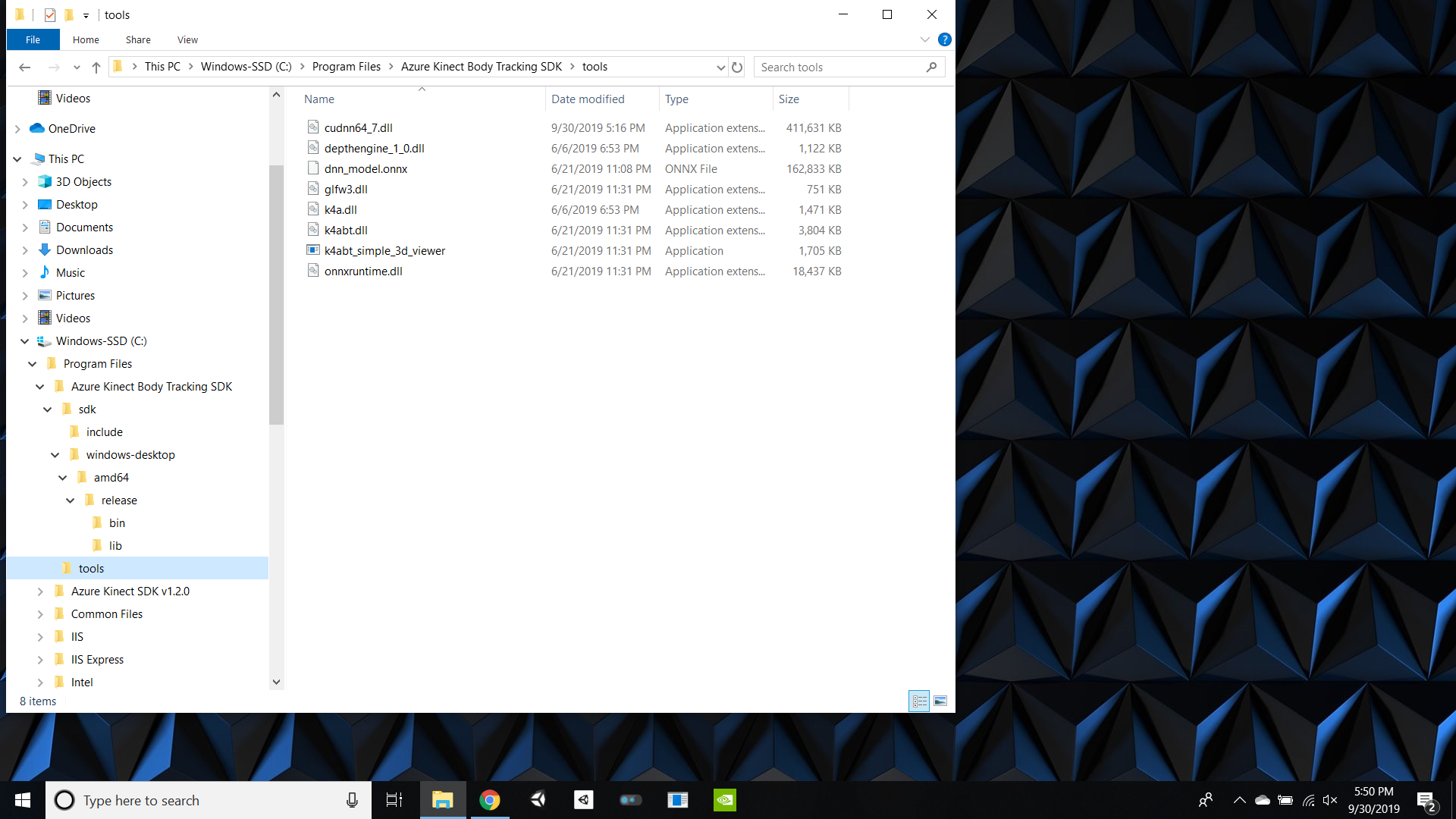
I tried it in this folder as well, still didn't work:
twt6
on 1 Oct 2019
@yijiew
I just tried this:
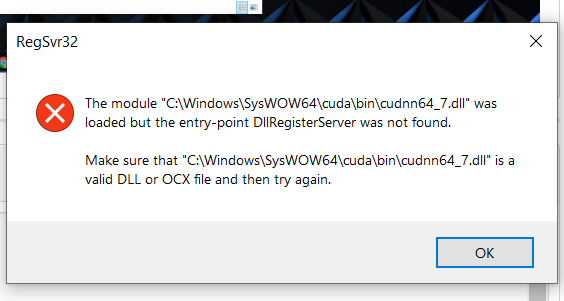
https://www.quora.com/How-do-I-register-DLL-files-in-a-Windows-10-64-bit
But it gave me this error:
twt6
on 1 Oct 2019
@twt6 What version of the SDK are you using? If you download the latest SDK (version 0.9.3), the cudnn64_7.dll should be already included in the tools folder and everything should work out of the box.
yijiew
on 1 Oct 2019
I am using 0.9.3. I have uninstalled and reinstalled it, and it still is not opening. We downloaded binaries on this page:
https://www.nuget.org/packages/Microsoft.Azure.Kinect.BodyTracking/0.9.3
and put them in the Bin folder. Still not working.
twt6
on 3 Oct 2019
Thank you for the info - I confirm that using the latest version with dependencies (I cloned some old projects which didn't include them) work very well.
@twt6 If you are using Visual Studio, you can simply remove and re-add the nuget package on References menu in your solution explorer. Or please check whether the firmware on the device is up-to-date or not.
 ianychoi
on 14 Oct 2019
ianychoi
on 14 Oct 2019
Related issues
 devLupin
·
4Comments
devLupin
·
4Comments
 benjaminrhansen
·
4Comments
benjaminrhansen
·
4Comments
 rfilkov
·
3Comments
rfilkov
·
3Comments
 RenderHeadsMrT
·
3Comments
RenderHeadsMrT
·
3Comments
 UnaNancyOwen
·
3Comments
UnaNancyOwen
·
3Comments
Most helpful comment
https://developer.nvidia.com/rdp/cudnn-archive