Azure-kinect-sensor-sdk: Getting IR Camera Image and passing it to Python code
Describe the bug
I am trying to use Azure Kinect DK's V3. IR Camera output for use in a deep learning application. My deep learning code is written in Python. Azure Kinect Sensor SDK has provided references in C and C++ only. Hence, I am compelled to get the IR capture using C Reference and send the obtained image buffer (output of k4a_image_get_buffer function) to the Python code via TCP sockets.
The following .BMP image is being obtained. On saving this as .png a completely black image is being saved.
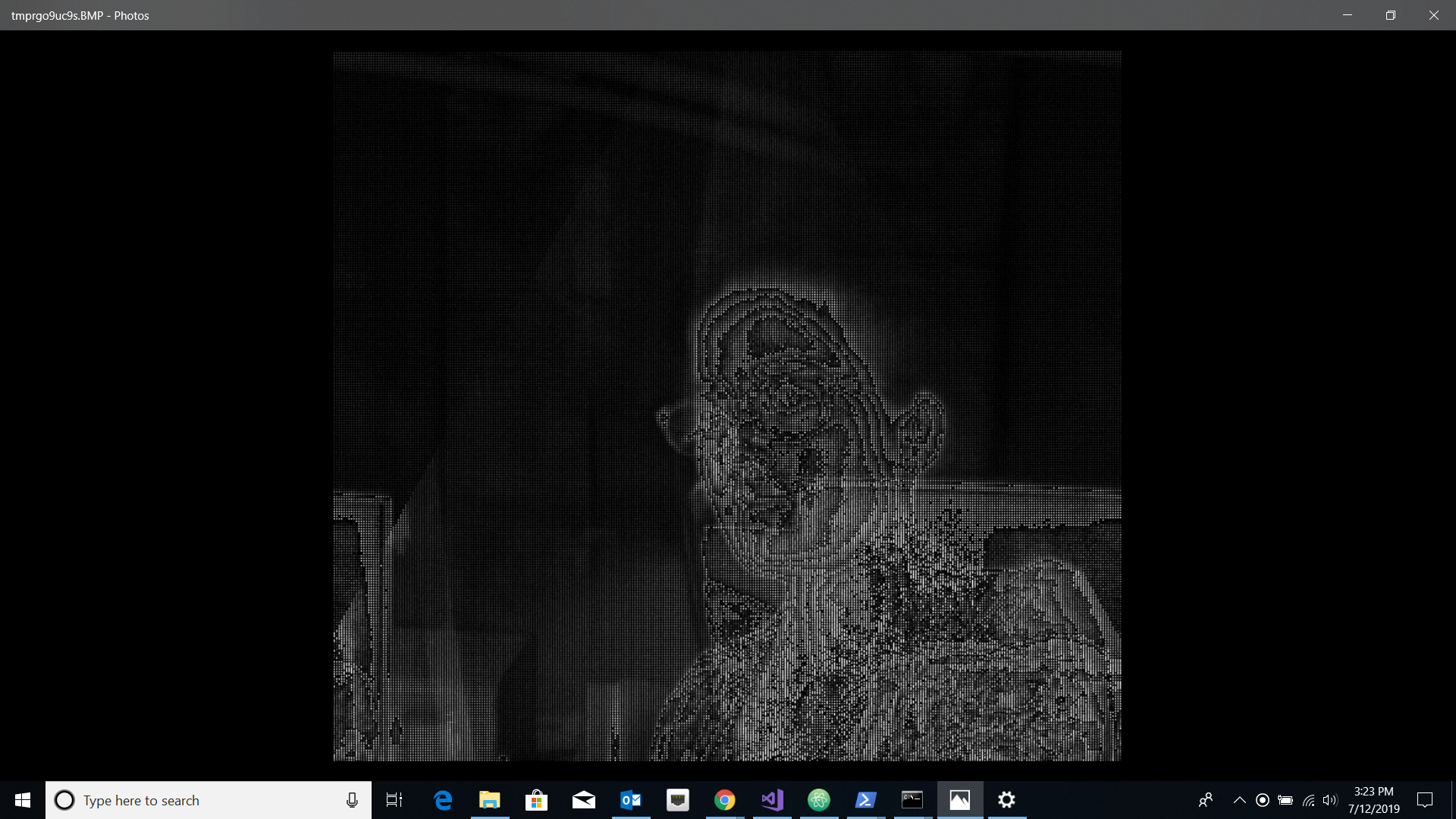
Python and C code Used
C code to use the Sensor SDK to obtain IR capture and send it to the Python Code.
#include "stdafx.h"

#pragma comment(lib,"ws2_32.lib") //Winsock Library
#pragma comment(lib, "k4a.lib")
#include "k4a/k4a.h"
#include <stdio.h>
#include <winsock2.h>
#include <Windows.h>

#include <string.h>
#include <WS2tcpip.h>

int main() {
    k4a_device_t device = NULL;
    k4a_capture_t capture;
    int32_t TIMEOUT_IN_MS = 1349400;
    k4a_device_open(K4A_DEVICE_DEFAULT, &device);
    k4a_device_configuration_t config = K4A_DEVICE_CONFIG_INIT_DISABLE_ALL;
    config.camera_fps = K4A_FRAMES_PER_SECOND_30;
    config.color_format = K4A_IMAGE_FORMAT_COLOR_MJPG;
    config.color_resolution = K4A_COLOR_RESOLUTION_2160P;
    config.depth_mode = K4A_DEPTH_MODE_NFOV_UNBINNED;
    k4a_device_start_cameras(device, &config);

    k4a_device_get_capture(device, &capture, TIMEOUT_IN_MS);

    k4a_image_t image = k4a_capture_get_ir_image(capture);

    int height = k4a_image_get_height_pixels(image);
    int width = k4a_image_get_width_pixels(image);

    uint8_t * imgData = k4a_image_get_buffer(image);

    const uint32_t arr_size = width * height;
    WSADATA wsa;
    SOCKET s;
    WSAStartup(MAKEWORD(2, 2), &wsa);
    s = socket(AF_INET, SOCK_STREAM, 0);
    const char* server_name = "localhost";
    const int server_port = 7000;

    struct sockaddr_in server_address;
    InetPton(AF_INET, _T("127.0.0.1"), &server_address.sin_addr.s_addr);
    server_address.sin_family = AF_INET;
    server_address.sin_port = htons(server_port);

    connect(s, (struct sockaddr *)& server_address, sizeof(server_address));

    //send array size
    send(s, (char *)&height, sizeof(int), 0);
    printf("sent array size");
    Sleep(3);
    send(s, (char *)&width, sizeof(int), 0);
    printf("sent array size");
    Sleep(3);

    //send array
        uint8_t v8 = 0;
    for (size_t i = 0; i < arr_size; ++i)
    {
        v8 = imgData[i];
        send(s, (char *)&v8, sizeof(uint8_t), 0);  //(char *)&
    }
    printf("sent array values");

    // close the socket
    closesocket(s);
    WSACleanup();
    k4a_image_release(image);
    k4a_device_close(device);
    return 0;
}
Python Code for receiving the image buffer and displaying the image.
import socket
import struct
from sys import getsizeof
import numpy as np
from PIL import Image

TCP_IP = '127.0.0.1'
TCP_PORT = 7000
BUFFER_SIZE =1024  # Normally 1024, but we want fast response

s = socket.socket(socket.AF_INET, socket.SOCK_STREAM)
s.bind((TCP_IP, TCP_PORT))
s.listen(1)

conn, addr = s.accept()
print('Connection address:', addr)
flag = 0

while 1:
    if(flag==0):
        height = conn.recv(BUFFER_SIZE)
        height = int.from_bytes(height, "little")
        if not height: break
        print("received data height: ", height)
        flag = 1
    elif(flag == 1):
        print("flag == 1")
        width = conn.recv(BUFFER_SIZE)
        width = int.from_bytes(width, "little")
        if not width: break
        print("\nreceived data width: ", width)
        flag = 2
    else:
        print("else")
        #f = open('picture_out.txt', 'w+')
        array = np.arange(height*width)
        col = 0
        for i in range(height*width):
            v8 = conn.recv(1)
            if not v8: break
            array[col] = struct.unpack('B', v8)[0]
            col += 1
        flag = 0
        array =  array.reshape(height, width)
        print(array)
        img = Image.fromarray(array)
        img.save('my.png')
        img.show()
conn.close()
Expected behavior
A clearer image is required which can be saved as .png or .jpg The image should just as the IR Camera image as shown in the Kinect Viewer Tool. I am not sure what is the mistake I am doing. Any help is highly appreciated. Are there any other sample examples of capture are also helpful. Please advice.
Desktop (please complete the following information):
- OS with Version: Windows 10 Pro 1803
- SDK Version: Azure Kinect Sensor SDK v1.1.0
- Firmware version:
Device Serial Number: 000238192112
Current Firmware Versions:
RGB camera firmware: 1.6.98
Depth camera firmware: 1.6.70
Depth config file: 6109.7
Audio firmware: 1.6.14
Build Config: Production
Certificate Type: Microsoft
 MrudulaSatya
All 8 comments
@MrudulaSatya the k4a_capture_get_ir_image function return a k4a_image_t contains the type of image format K4A_IMAGE_FORMAT_IR16 (search k4a_image_format_t in the https://microsoft.github.io/Azure-Kinect-Sensor-SDK/master/index.html), and the buffer size should be height * stride_bytes (you can use the k4a_image_get_stride_bytes to get the stride_bytes). Another way is you can cast the buffer to uint16_t* and indexing within the size of [width, height]. Later, if you need to convert the IR16 image to grayscale, you may need to normalize it with some dynamic range that appropriate to your visualization. Let us know whether that solved your issue and whether the current API documents help you here (or will talk to the team to improve the documents)
 rabbitdaxi
on 13 Jul 2019
rabbitdaxi
on 13 Jul 2019

Still receiving a granulated image.
Steps performed -
- Changed the buffer size to stride_bytes * height
- Normalized the image using opencv.normalize function. Tried various parameter configurations.
Could you please tell how the k4a Viewer is able to display such clear IR images? What is the image processing going behind it? I feel if I perform the same image processing, I also might end up getting such quality IR images.
It would really help fast-forward my job if you could provide some sample example code snippets to accomplish this task.
Any clue/help will be highly appreciated in this regard.
Thank you
MrudulaSatya
on 15 Jul 2019
The depth data from the camera uses 16-bit unsigned pixels. It looks like your python code is interpreting each byte as a pixel.
 cdedmonds
on 15 Jul 2019
cdedmonds
on 15 Jul 2019
@MrudulaSatya , the IR image is uint16_t data, even you fixed the buffer size with the right stride for the copy through the socket, you still need to cast the buffer to uint16_t* in your client and convert it to a grayscale image with the preferred 16bit to 8bit normalization method. One naive way is just linear mapping from uint16_t to grayscale by using some min/max value you prefer. The azure kinect viewer code is open sourced, here is the link to the function ColorizeGreyscale (https://github.com/microsoft/Azure-Kinect-Sensor-SDK/blob/develop/tools/k4aviewer/k4adepthpixelcolorizer.h), you can search this function in the k4aviewer source code under tools
rabbitdaxi
on 16 Jul 2019
@MrudulaSatya , please let us know whether the information we provided in this thread helped you solve your issue. Also, related to your ask for the example code, the k4aviewer source code which displays the clean IR is a good example you can take a look (it is under tools/k4aviewer).
rabbitdaxi
on 17 Jul 2019
This is C code i am using to get a proper IR image -
#include "stdafx.h"
#pragma comment(lib,"ws2_32.lib") //Winsock Library
#pragma comment(lib, "k4a.lib")
#include "k4a/k4a.h"
#include <stdio.h>
#include <winsock2.h>
#include <Windows.h>
#include <opencv2/highgui/highgui.hpp>
#include <string.h>
#include <WS2tcpip.h>
using namespace cv;
int main() {
k4a_device_t device = NULL;
k4a_capture_t capture;
int32_t TIMEOUT_IN_MS = 1349400;
k4a_device_open(K4A_DEVICE_DEFAULT, &device);
k4a_device_configuration_t config = K4A_DEVICE_CONFIG_INIT_DISABLE_ALL;
config.camera_fps = K4A_FRAMES_PER_SECOND_30;
config.color_format = K4A_IMAGE_FORMAT_COLOR_MJPG;
config.color_resolution = K4A_COLOR_RESOLUTION_2160P;
config.depth_mode = K4A_DEPTH_MODE_NFOV_UNBINNED;
k4a_device_start_cameras(device, &config);
k4a_device_get_capture(device, &capture, TIMEOUT_IN_MS);
k4a_image_t image = k4a_capture_get_ir_image(capture);
int height = k4a_image_get_height_pixels(image);
int width = k4a_image_get_width_pixels(image);
int strides = k4a_image_get_stride_bytes(image);
printf(" height: %d , %d ", height, width);
printf("stride: %d", strides);
uint8_t * imgData = k4a_image_get_buffer(image);
uint8_t * imgdata2 = (uint8_t*)malloc(strides*height*sizeof(uint8_t));
for (int i = 0; i < strides*height; i++) {
uint16_t pixelValue = *((uint16_t*)(imgData + i));
uint8_t nv = static_cast<uint8_t>((pixelValue - 0) * (double(65535) / (65535- 0)));
imgdata2[i] = nv;
}
const cv::Mat img(cv::Size(strides, height), CV_8U, imgdata2);
cv::namedWindow("foobar");
cv::imshow("foobar", img);
cv::waitKey(0);
k4a_image_release(image);
k4a_device_close(device);
return 0;
}
Obtained image:
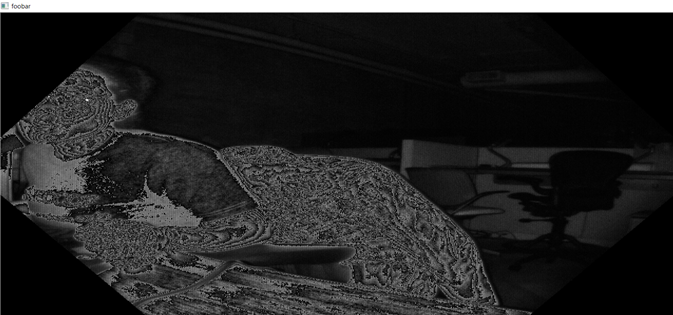
Could you please guide me through the image processing that need to be done in order to show a proper IR image?
Thank you!
MrudulaSatya
on 18 Jul 2019
@MrudulaSatya I slightly modified your code, it should work well now. But keep in mind, users may prefer to use the 16bit IR image directly. If one really need to convert to 8bit grayscale, then different user may choose different converting to grayscale method. The following example is one naïve way that just applies linear normalization with user specified min/max value (I choose range of 0 to 1000 to make the image brighter). As you can imaging, the IR image intensity value also depends on the scene/objects reflectivity and distance, you should choose your own min/max for your purpose. We will consider promoting similar code to example in out GitHub.
#include "k4a/k4a.h"
#include <vector>
#include <opencv2/highgui/highgui.hpp>

using namespace cv;

template<typename T>
inline void ConvertToGrayScaleImage(const T* imgDat, const int size, const int vmin, const int vmax, uint8_t* img)
{
    for (int i = 0; i < size; i++)
    {
        T v = imgDat[i];
        float colorValue = 0.0f;
        if (v <= vmin)
        {
            colorValue = 0.0f;
        }
        else if (v >= vmax)
        {
            colorValue = 1.0f;
        }
        else
        {
            colorValue = (float)(v - vmin) / (float)(vmax - vmin);
        }
        img[i] = (uint8_t)(colorValue * 255);
    }
}

int main() {
    k4a_device_t device = NULL;
    k4a_capture_t capture;
    int32_t TIMEOUT_IN_MS = 1349400;
    k4a_device_open(K4A_DEVICE_DEFAULT, &device);
    k4a_device_configuration_t config = K4A_DEVICE_CONFIG_INIT_DISABLE_ALL;
    config.camera_fps = K4A_FRAMES_PER_SECOND_30;
    config.color_format = K4A_IMAGE_FORMAT_COLOR_MJPG;
    config.color_resolution = K4A_COLOR_RESOLUTION_2160P;
    config.depth_mode = K4A_DEPTH_MODE_NFOV_UNBINNED;
    k4a_device_start_cameras(device, &config);

    k4a_device_get_capture(device, &capture, TIMEOUT_IN_MS);
    k4a_image_t image = k4a_capture_get_ir_image(capture);
    int height = k4a_image_get_height_pixels(image);
    int width = k4a_image_get_width_pixels(image);
    int strides = k4a_image_get_stride_bytes(image);
    printf(" height: %d , %d ", height, width);
    printf("stride: %d", strides);

    // One way to convert 16bit to 8bit with user specified min/max dynamic range
    uint8_t* imgData = k4a_image_get_buffer(image);
    uint16_t* irImg = reinterpret_cast<uint16_t*>(imgData);
    std::vector<uint8_t> grayScaleImg(width * height);
    int irMinValue = 0;
    int irMaxValue = 1000;
    ConvertToGrayScaleImage(irImg, width * height, irMinValue, irMaxValue, grayScaleImg.data());
    const cv::Mat img(cv::Size(width, height), CV_8U, grayScaleImg.data());

    cv::namedWindow("foobar");
    cv::imshow("foobar", img);
    cv::waitKey(0);

    k4a_image_release(image);
    k4a_capture_release(capture);
    k4a_device_close(device);
    return 0;
}
Thank you very much @rabbitdaxi My problem is solved.
MrudulaSatya
on 18 Jul 2019
Related issues
 Elenaegr
·
3Comments
Elenaegr
·
3Comments
 barakooda
·
3Comments
barakooda
·
3Comments
 UnaNancyOwen
·
3Comments
UnaNancyOwen
·
3Comments
 benjaminrhansen
·
4Comments
benjaminrhansen
·
4Comments
 d-walsh
·
3Comments
d-walsh
·
3Comments
Most helpful comment
@MrudulaSatya I slightly modified your code, it should work well now. But keep in mind, users may prefer to use the 16bit IR image directly. If one really need to convert to 8bit grayscale, then different user may choose different converting to grayscale method. The following example is one naïve way that just applies linear normalization with user specified min/max value (I choose range of 0 to 1000 to make the image brighter). As you can imaging, the IR image intensity value also depends on the scene/objects reflectivity and distance, you should choose your own min/max for your purpose. We will consider promoting similar code to example in out GitHub.