Azure-functions-durable-extension: 2.0.0 Not honouring host.json hubName
Description
I have a single C# Durable Function app with a staging slot. I have set the hubName in host.json but this does not seem to be honoured.
Expected behavior
Allow me to run a staging slot against the same storage account.
Actual behavior
The function runtime is unable to start. Microsoft.Azure.WebJobs.Extensions.DurableTask: Task Hub name must be specified in host.json when using slots. See documentation on Task Hubs for information on how to set this: https://docs.microsoft.com/azure/azure-functions/durable/durable-functions-task-hubs.
Session Id: 3cf1a9c74a9d465995114003685c9a2a
I have found DurableTaskOptions.cs which throws if (IsInNonProductionSlot() && this.isDefaultHubName)
Relevant source code snippets
{
    "version": "2.0",
    "extensions": {
        "durableTask": {
            "hubName": "%Version%",
            "azureStorageConnectionStringName": "AzureWebJobsStorage"
        }
    }
}
Version is my build number that I would like to reference from appsettings.
Known workarounds
Revert back to V1.8.3
App Details
- Durable Functions extension version 2.0.0
- Azure Functions runtime version 3.0 (v3-preview)
- Programming language used C#
I also had the same issues when reverting back to netcore2.1 and function v2 so this does not seem to be an issue with v3 preview.
If deployed to Azure
App name - eoipreprodfunc-westeurope
Func name GetHealthCheck
When 23Nov 9:00 - 14:00 GMT
Storage acc eoipreprodfuncstorage
 JonyTek
All 10 comments
Hi @JonyTek can you confirm that %Version% refers to an actual app setting name? Also , does the app work if you use a hard-coded app setting instead of an app settings reference?
 cgillum
on 23 Nov 2019
cgillum
on 23 Nov 2019
Hi @cgillum, thanks for the quick reply.
Yes, %Version% does refer to an app setting which I can confirm exists. With a hardcoded value the slot failed to start as there are now two function apps using the same storage account causing the error. I thought it could be due to a new host.json format?
JonyTek
on 24 Nov 2019
I have same error, it's working when run console locally in Visual Studio 2019, but when install to Azure, get that error. I try to change FrameWork to netstandard2.0, netcoreapp2.2, netcoreapp2.1... all time same error
The function runtime is unable to start. Microsoft.Azure.WebJobs.Extensions.DurableTask: Task Hub name must be specified in host.json when using slots. See documentation on Task Hubs for information on how to set this: https://docs.microsoft.com/azure/azure-functions/durable/durable-functions-task-hubs.
Here is host.json and it exists in Azure.
{
  "version": "2.0",
  "extensions": {
    "durableTask": {
      "hubName": "XXXXXJobsHub"
    }
  }
}
Here is solution file and packages...
<Project Sdk="Microsoft.NET.Sdk">
  <PropertyGroup>
    <TargetFramework>netstandard2.0</TargetFramework>
    <AzureFunctionsVersion>v2</AzureFunctionsVersion>
  </PropertyGroup>
  <ItemGroup>
    <PackageReference Include="Microsoft.Azure.WebJobs" Version="3.0.14" />
    <PackageReference Include="Microsoft.Azure.WebJobs.Extensions.DurableTask" Version="2.0.0" />
    <PackageReference Include="Microsoft.Azure.WebJobs.Extensions.ServiceBus" Version="4.0.0" />
    <PackageReference Include="Microsoft.Azure.WebJobs.Extensions.Storage" Version="3.0.10" />
    <PackageReference Include="Microsoft.Azure.WebJobs.ServiceBus" Version="2.3.0" />
    <PackageReference Include="Microsoft.CodeAnalysis.FxCopAnalyzers" Version="2.9.7">
      <PrivateAssets>all</PrivateAssets>
      <IncludeAssets>runtime; build; native; contentfiles; analyzers; buildtransitive</IncludeAssets>
    </PackageReference>
    <PackageReference Include="Microsoft.NET.Sdk.Functions" Version="1.0.29" />
    <PackageReference Include="Newtonsoft.Json" Version="12.0.3" />
    <PackageReference Include="Sendgrid" Version="9.12.0" />
    <PackageReference Include="StringTemplate4" Version="4.0.8" />
    <PackageReference Include="System.Drawing.Common" Version="4.6.1" />
    <PackageReference Include="WindowsAzure.Storage" Version="9.3.3" />
  </ItemGroup>
 juhariihela
on 24 Nov 2019
juhariihela
on 24 Nov 2019
@juhariihela Try reverting the Microsoft.Azure.WebJobs.Extensions.DurableTask library back 1.8.3. This worked for me. It's not an ideal solution but is a temporary work around to keep you moving if you're blocked.
JonyTek
on 25 Nov 2019
I was using this IDurableOrchestrationContext.LockAsync to control actions at the same time, it does not working, if rollback to version 1.8.3 :) But I can change logic so, that no need this LockAsync anymore...
juhariihela
on 25 Nov 2019
I also like how IDurableOrchestrationContext can be easily mocked in tests, you'll lose this also.
JonyTek
on 25 Nov 2019
running into the same thing. any update on this?
 mpaul31
on 3 Dec 2019
mpaul31
on 3 Dec 2019
@amdeel and @ConnorMcMahon are looking into this. It looks to be a bug and a fix is being worked on.
cgillum
on 3 Dec 2019
Encountered the same bug.
One more thing though, It's also on storage that something goes wrong.
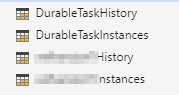
In the following image, the DurableTask history and instances tables are showing. They were newly created, after deploying with the host.json that you see below it. Note that for v1 the obfuscated tables were created, using the interpolated values from the app-settings. We passed in the literal value that was in the app-settings previously
Storage-account:
host.json v2.0
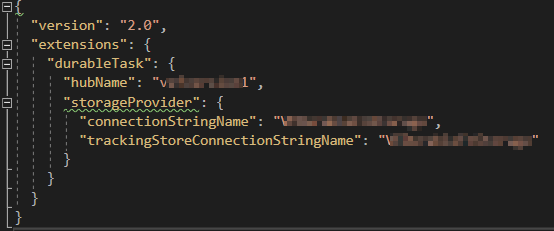
host.json v1
{
"version": "2.0",
"extensions": {
"durableTask": {
"hubName": "%TaskHubVersion%", // this was set to the obfuscated value from app-settings
"azureStorageConnectionStringName": "<
}
}
}
So in short, Durable Functions v2 does not seem to use the proper tables.
 Infionion
on 4 Dec 2019
Infionion
on 4 Dec 2019
Same issues here as the ones reported above.
Any expectation to when the bug fix is available so we can use the 2.0 version?
 nelsonmorais
on 4 Dec 2019
nelsonmorais
on 4 Dec 2019
Related issues
 shibayan
·
4Comments
shibayan
·
4Comments
 tommasobertoni
·
3Comments
tommasobertoni
·
3Comments
 ethanroday
·
4Comments
ethanroday
·
4Comments
 danielearwicker
·
3Comments
mpaul31
·
3Comments
danielearwicker
·
3Comments
mpaul31
·
3Comments
Most helpful comment
@amdeel and @ConnorMcMahon are looking into this. It looks to be a bug and a fix is being worked on.