Azure-functions-durable-extension: Synchronous deserialization of request content in HandleStartOrchestratorRequestAsync results in InvalidOperationException.
Description
Calling the Durable Functions HTTP API to start an orchestration when running in a 3.0-preview (3.0.1740) Azure Functions Host results in an InvalidOperationException from Kestrel due to changes in .NET Core 3.0 regarding synchronous operations:
{
    "Message": "Something went wrong while processing your request",
    "ExceptionMessage": "Synchronous operations are disallowed. Call ReadAsync or set AllowSynchronousIO to true instead.",
    "ExceptionType": "System.InvalidOperationException",
    "StackTrace": "   at Microsoft.AspNetCore.Server.Kestrel.Core.Internal.Http.HttpRequestStream.Read(Byte[] buffer, Int32 offset, Int32 count)\n   at System.Net.Http.DelegatingStream.Read(Byte[] buffer, Int32 offset, Int32 count)\n   at System.IO.StreamReader.ReadBuffer(Span`1 userBuffer, Boolean& readToUserBuffer)\n   at System.IO.StreamReader.ReadSpan(Span`1 buffer)\n   at System.IO.StreamReader.Read(Char[] buffer, Int32 index, Int32 count)\n   at Newtonsoft.Json.JsonTextReader.ReadData(Boolean append, Int32 charsRequired)\n   at Newtonsoft.Json.JsonTextReader.ParseValue()\n   at Newtonsoft.Json.JsonReader.ReadAndMoveToContent()\n   at Newtonsoft.Json.JsonReader.ReadForType(JsonContract contract, Boolean hasConverter)\n   at Newtonsoft.Json.Serialization.JsonSerializerInternalReader.Deserialize(JsonReader reader, Type objectType, Boolean checkAdditionalContent)\n   at Newtonsoft.Json.JsonSerializer.DeserializeInternal(JsonReader reader, Type objectType)\n   at Newtonsoft.Json.JsonSerializer.Deserialize(JsonReader reader, Type objectType)\n   at Newtonsoft.Json.JsonSerializer.Deserialize[T](JsonReader reader)\n   at Microsoft.Azure.WebJobs.Extensions.DurableTask.HttpApiHandler.HandleStartOrchestratorRequestAsync(HttpRequestMessage request, String functionName, String instanceId) in d:\\a\\r1\\a\\azure-functions-durable-extension\\src\\WebJobs.Extensions.DurableTask\\HttpApiHandler.cs:line 590\n   at Microsoft.Azure.WebJobs.Extensions.DurableTask.HttpApiHandler.HandleRequestAsync(HttpRequestMessage request) in d:\\a\\r1\\a\\azure-functions-durable-extension\\src\\WebJobs.Extensions.DurableTask\\HttpApiHandler.cs:line 200"
}
The synchronous read appears to be here.
See the Azure Functions Host issue regarding this breaking change in .NET Core 3.0.
Expected behavior
The read of the JSON request body should be async so that Kestrel's happy.
Actual behavior
The unhandled exception results in a 500 being returned from the HTTP API, as described above.
Known workarounds
Presumably setting AllowSynchronousIO to true in appsettings.json should work around the issue (at the cost to throughput), but I haven't been able to get that to work in the context of Azure Functions.
App Details
- Durable Functions extension version (e.g. v1.8.3):
2.0.0 - Azure Functions runtime version (1.0 or 2.0):
3.0.1740 - Programming language used: Rust 😄
 peterhuene
All 19 comments
I have the same issue with nodes.
 ltwlf
on 15 Nov 2019
ltwlf
on 15 Nov 2019
Thanks for reporting! We'll take a look.
BTW, very cool to see Durable Functions on rust!! :)
 cgillum
on 16 Nov 2019
cgillum
on 16 Nov 2019
.NET Core 3 doesn't allow synchronous reads of the request by default. I'm adding a flag to allow you to change this in the host (and to allow easier migration from v2), but we need to remove any sync reads from our extensions. I went through the HttpTrigger and cleaned it up but didn't look through Durable -- sorry about that.
@ConnorMcMahon, let me know if you run into any issues -- hopefully it's straightforward.
 brettsam
on 22 Nov 2019
brettsam
on 22 Nov 2019
Ah, closing the PRs seems to close issues. Leaving it as fix-ready until we release 2.1.
 ConnorMcMahon
on 3 Dec 2019
ConnorMcMahon
on 3 Dec 2019
Closing completed issues in preparation for the v2.1 release.
cgillum
on 18 Dec 2019
I'm getting this issue with node functions and can't work out how to fix it using extension bundles. At the moment the example durable function with node doesn't work.
 sampbarber
on 11 Feb 2020
sampbarber
on 11 Feb 2020
@sampbarber
We have a fix in 1.8.5 which will be going out in the next extension bundles release. In the meantime, you can mitigate this yourself by following the instructions in this issue.
ConnorMcMahon
on 12 Feb 2020
I'm trying to progress through the Azure developer exercises and seem to encounter this issue for the durable functions units. Is there any work around? I tried adding AllowSynchronousIO to app settings but it didn't help.
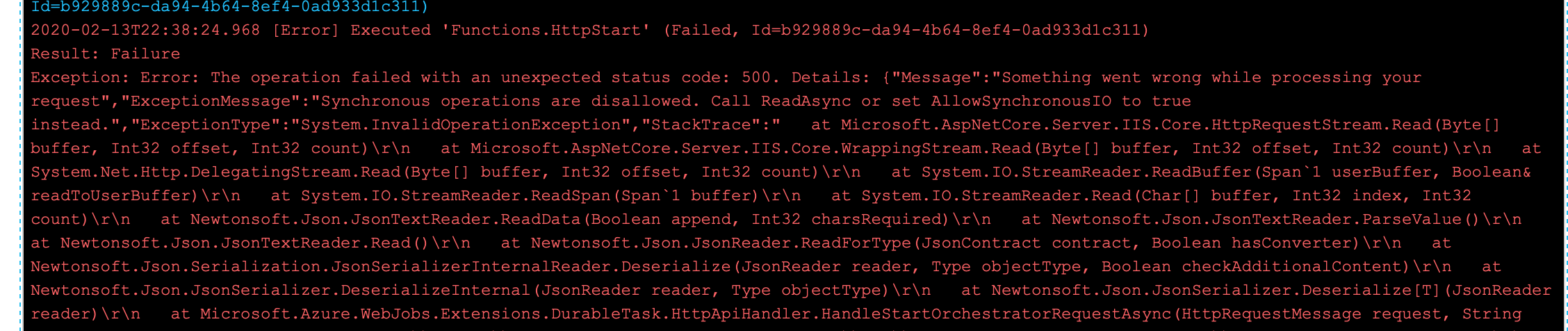
 ColonelDumpling
on 13 Feb 2020
ColonelDumpling
on 13 Feb 2020
I'm trying to progress through the Azure developer exercises and seem to encounter this issue for the durable functions units. Is there any work around? I tried adding AllowSynchronousIO to app settings but it didn't help.
Never mind me. Just tried with FUNCTIONS_V2_COMPATIBILITY_MODE set to true in the app settings. Seems to have worked.
ColonelDumpling
on 14 Feb 2020
@ColonelDumpling
As a heads up, this bug should be fixed in the latest release for both Durable 1.x (v1.8.5) and Durable 2.x (v2.1.1). If you still require the compatibility mode with either of those versions, please let us know!
ConnorMcMahon
on 14 Feb 2020
@ConnorMcMahon I ran into this while following Microsoft Learn durable functions right now. This is with the sandbox and making everything from scratch. Where I think it then uses v3. Is it still an issue there?
 Rutix
on 18 Feb 2020
Rutix
on 18 Feb 2020
I tried adding FUNCTIONS_V2_COMPATIBILITY_MODE set to true, but still getting that same exact error... Just like @Rutix by following the mircrosoft learn durable functions..
 Adeolamorren
on 23 Feb 2020
Adeolamorren
on 23 Feb 2020
FUNCTIONS_V2_COMPATIBILITY_MODE works for me... Thanks.
 ddjimmy
on 5 Mar 2020
ddjimmy
on 5 Mar 2020
I tried adding FUNCTIONS_V2_COMPATIBILITY_MODE set to true, but still getting that same exact error... Just like @Rutix by following the mircrosoft learn durable functions..
Could you try the following? It worked for me.
Add 2 new Application setting as :
Name : FUNCTIONS_V2_COMPATIBILITY_MODE
Value : true
Name : AllowSynchronousIO
Value : true
Restart the app.
 balazzii
on 6 Mar 2020
balazzii
on 6 Mar 2020
Could you try the following? It worked for me.
Worked perfectly for me, at least in the context of the Microsoft Learning Durable functions module.
 lucaslra
on 16 Mar 2020
lucaslra
on 16 Mar 2020
still th
Could you try the following? It worked for me.
Worked perfectly for me, at least in the context of the Microsoft Learning Durable functions module.
same problem still with me...
Adeolamorren
on 18 Mar 2020
What is very strange to me is that this is happening using Microsoft's own binaries. I am doing this:
var request = await req.Content.ReadAsAsync<MyRequest>();
This fails with the above error.
However, if I do this:
var body = await req.Content.ReadAsStringAsync();
That works perfectly fine. I guess the workaround is to read the string and then manually deserialize it.
Anyone have any idea why ReadAsAsync is blocking internally?
 chitoiur
on 31 Jul 2020
chitoiur
on 31 Jul 2020
@chitoiur that is pretty odd. Perhaps it's related to the JSON serializer being used by ReadAsAsync<T>? For example, I wouldn't be surprised if older versions of Newtonsoft.Json have this problem. In any case, I don't think this is related to Durable Functions, so this might not be the best place to discuss the problem. However, if it is indeed a problem you only run into with _Azure Functions_ generally, then the underlying version of Newtonsoft.Json could potentially be an area for you to investigate further.
cgillum
on 31 Jul 2020
Interesting. That would make sense actually about Newtonsoft. Thanks for the input!
chitoiur
on 31 Jul 2020
Related issues
 jakingmsft
·
4Comments
jakingmsft
·
4Comments
 kaftw
·
4Comments
cgillum
·
4Comments
kaftw
·
4Comments
cgillum
·
4Comments
 tommasobertoni
·
3Comments
tommasobertoni
·
3Comments
 SimonLuckenuik
·
3Comments
SimonLuckenuik
·
3Comments
Most helpful comment
Could you try the following? It worked for me.
Add 2 new Application setting as :
Name : FUNCTIONS_V2_COMPATIBILITY_MODE
Value : true
Name : AllowSynchronousIO
Value : true
Restart the app.