Azure-docs: Documentation incorrect: authentication key nowhere to be found
_Authentication key
When you sign up for Translator, you get a personalized access key unique to your subscription. This key is required on each call to the Translator.
Retrieve your authentication key by first selecting the appropriate subscription.
Select Keys in the Resource Management section of your subscription's details.
Copy either of the keys listed for your subscription_
There is no Resource Management section under the active Subscription. Neither is there a Keys section. The documentation is incorrect, and I have no idea where my key is.
Document Details
⚠ Do not edit this section. It is required for docs.microsoft.com ➟ GitHub issue linking.
- ID: 9fd84f50-4742-c33e-7529-75431e3f5ad8
- Version Independent ID: af5b83b4-427a-cdc0-90ec-5d9836630374
- Content: Get started - Translator - Azure Cognitive Services
- Content Source: articles/cognitive-services/Translator/translator-how-to-signup.md
- Service: cognitive-services
- Sub-service: translator-text
- GitHub Login: @swmachan
- Microsoft Alias: swmachan
 LoekvanKooten
All 5 comments
@LoekvanKooten You can get the keys to your resource from the translator resource you created on azure portal. Here is a screen shot of where the key should be available.
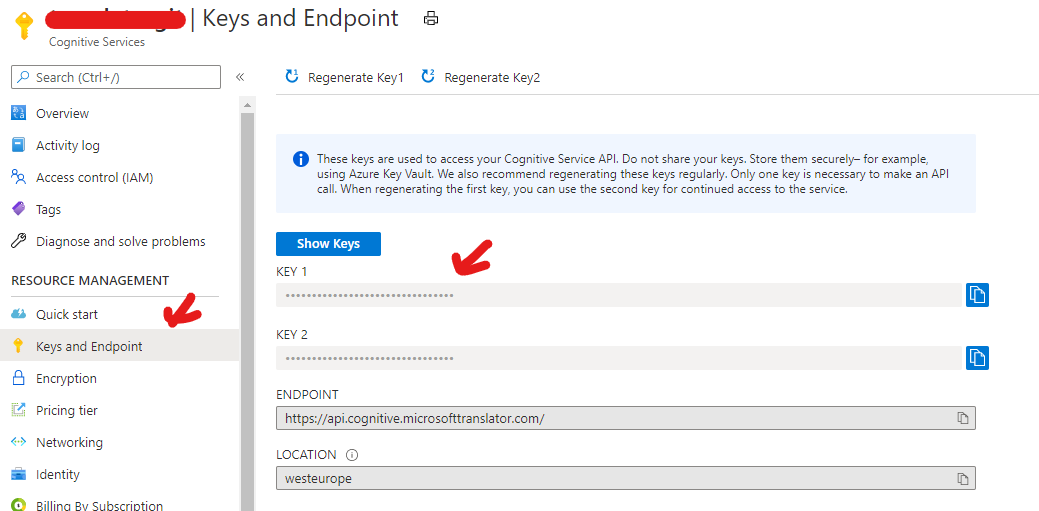
The documentation details selecting the required subscription from the Azure portal and then selecting the keys of our resource by locating it in your subscription. This is same as the above since you have already selected the subscription(top right corner) you would like to use.
 RohitMungi-MSFT
on 17 Nov 2020
RohitMungi-MSFT
on 17 Nov 2020
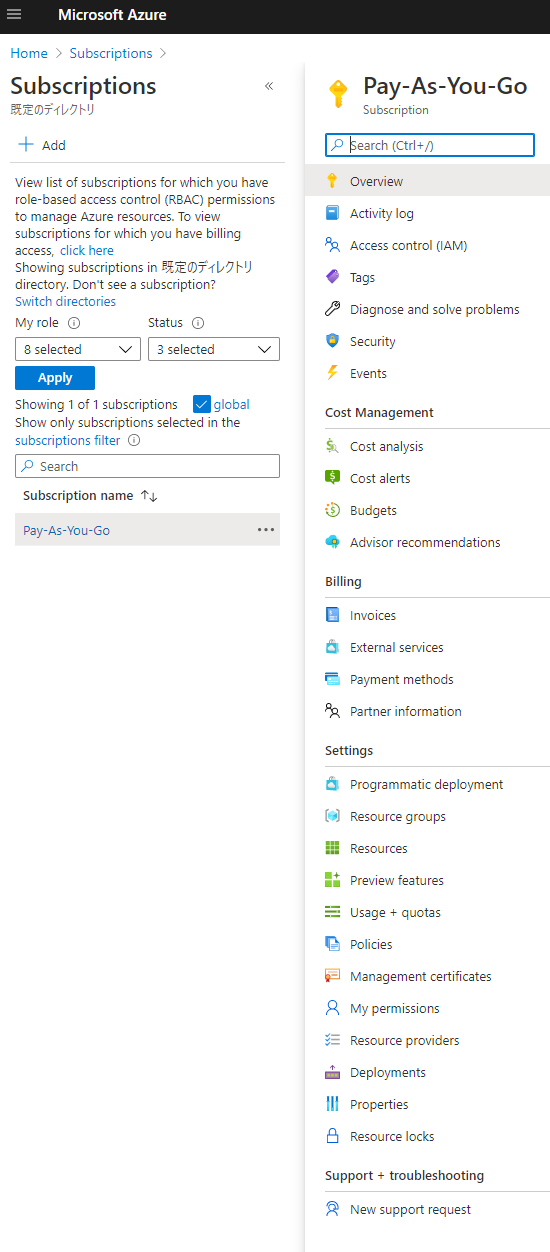
Thank you, but this is what my screen looks like:
LoekvanKooten
on 17 Nov 2020
You are looking at your subscriptions page. Please search for the translator resource you created from azure portal by going to your home page.
RohitMungi-MSFT
on 17 Nov 2020
That screen looks like this:

LoekvanKooten
on 17 Nov 2020
Got it! That was a Resource Group, not a Resource. This is a bit of a maze to be honest.
Thank you very much for your help!
LoekvanKooten
on 17 Nov 2020
Related issues
 mrdfuse
·
3Comments
mrdfuse
·
3Comments
 behnam89
·
3Comments
behnam89
·
3Comments
 jharbieh
·
3Comments
jharbieh
·
3Comments
 ianpowell2017
·
3Comments
ianpowell2017
·
3Comments
 Favna
·
3Comments
Favna
·
3Comments