Azure-docs: How can access tokens contain the "roles" claim
I am using the OAuth 2.0 auth code grant flow to acquire access tokens, and I hope the token could have roles claim as described in the doc, which should be populated with the roles the user was assigned to on the target application for user tokens.
I have configured my application in Azure Portal in which the appRole property in the manifest is as below, and I assigned one role to a login user.
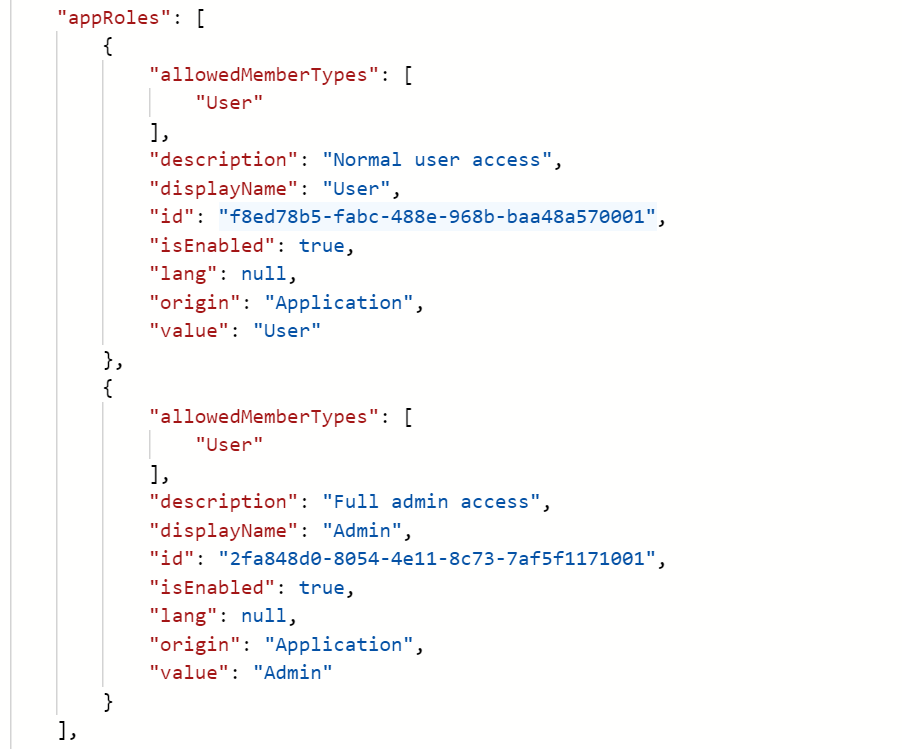
However, after receiving tokens by Azure AD, I can only find the roles claim in id token rather than access token. So my question is
- Is my understanding of this claim in access tokens incorrect: this claim should be populated with the
appRoleproperty of a login user? - How can I get it in access tokens?
- Is there a way to make the
rolesclaim contains the group information of a login user?
Thanks.
Document Details
⚠ Do not edit this section. It is required for docs.microsoft.com ➟ GitHub issue linking.
- ID: 2471c08b-befe-8e1a-df08-f13e116c231e
- Version Independent ID: 0d827d33-2906-6352-9398-13863def9354
- Content: Microsoft identity platform access tokens - Microsoft identity platform
- Content Source: articles/active-directory/develop/access-tokens.md
- Service: active-directory
- Sub-service: develop
- GitHub Login: @hpsin
- Microsoft Alias: hirsin
 yiliuTo
All 7 comments
@yiliuTo Thanks for reaching out. We will investigate and update the thread accordingly.
 vipulsparsh
on 2 Nov 2020
vipulsparsh
on 2 Nov 2020
Hello @yiliuTo thank you for sharing the query. The appRoles that you create in your App Manifest, first needs to be assigned to the user in that app. Let's check the steps below:
I created the following appRoles in the app manifest:
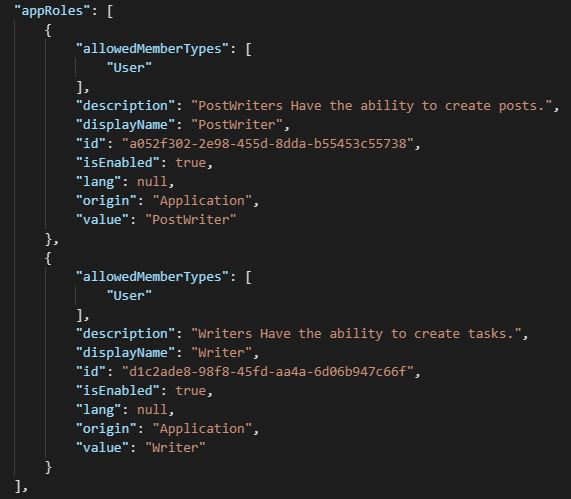
After the appRoles are created in the app manifest, you need to assign them to a user who is already added to access this application under Users and Groups section in the enterprise application.
Then you can request for an access token using the Auth-Code Grant Flow. I tested this and I am sharing the sample request for you to try:
To request the code from /authorize endpoint:
For V1.0 Endpoint: https://login.microsoftonline.com/soumimsft.onmicrosoft.com/oauth2/authorize?client_id={App_ID}&response_type=code&redirect_uri={redirect_uri}&response_mode=fragment&resource={App_ID}&state=12345
For V2.0 Endpoint: https://login.microsoftonline.com/soumimsft.onmicrosoft.com/oauth2/v2.0/authorize?client_id={App_ID}&response_type=code&redirect_uri={redirect_uri}&response_mode=fragment&scope={App_ID/.default}&state=12345
To request the access-token from /token endpoint:
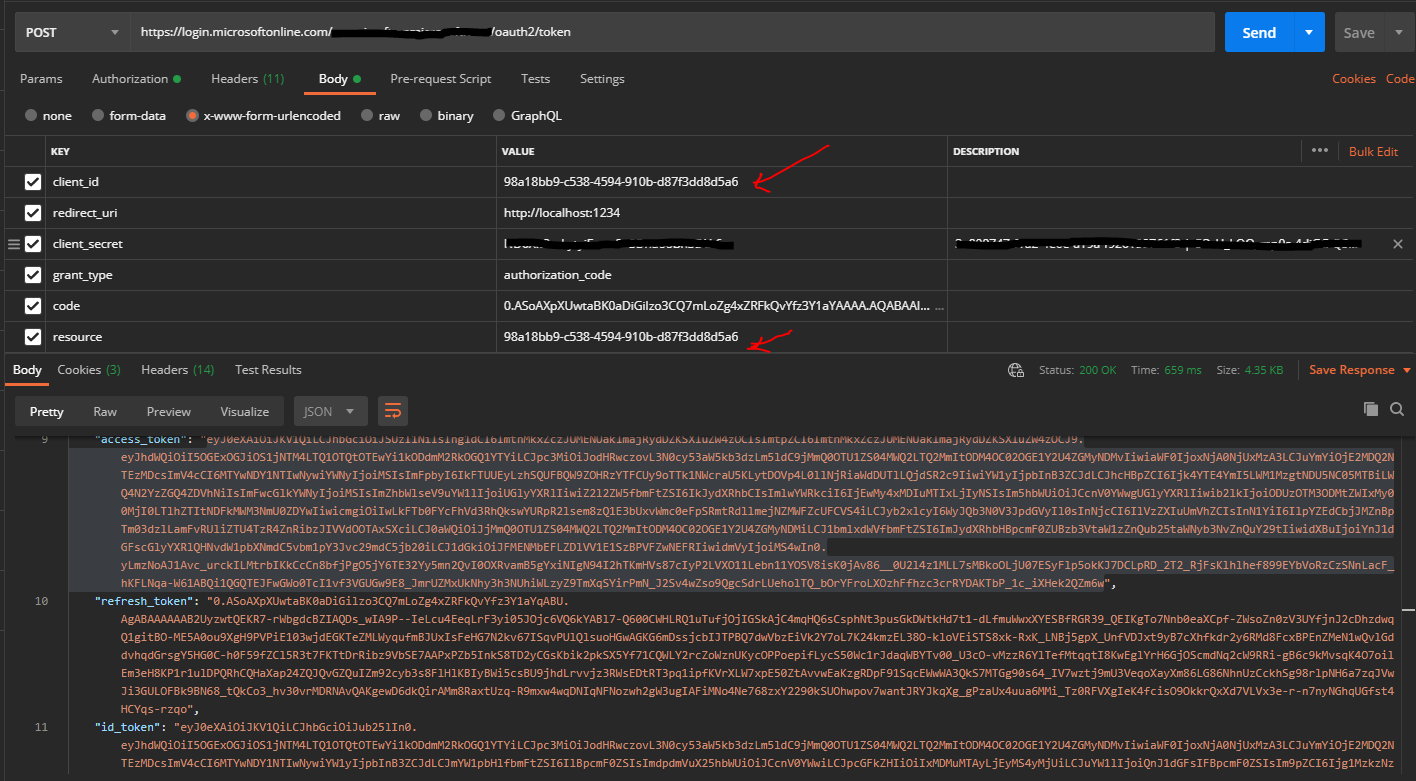
For V1.0 Endpoint:
For V2.0 Endpoint:
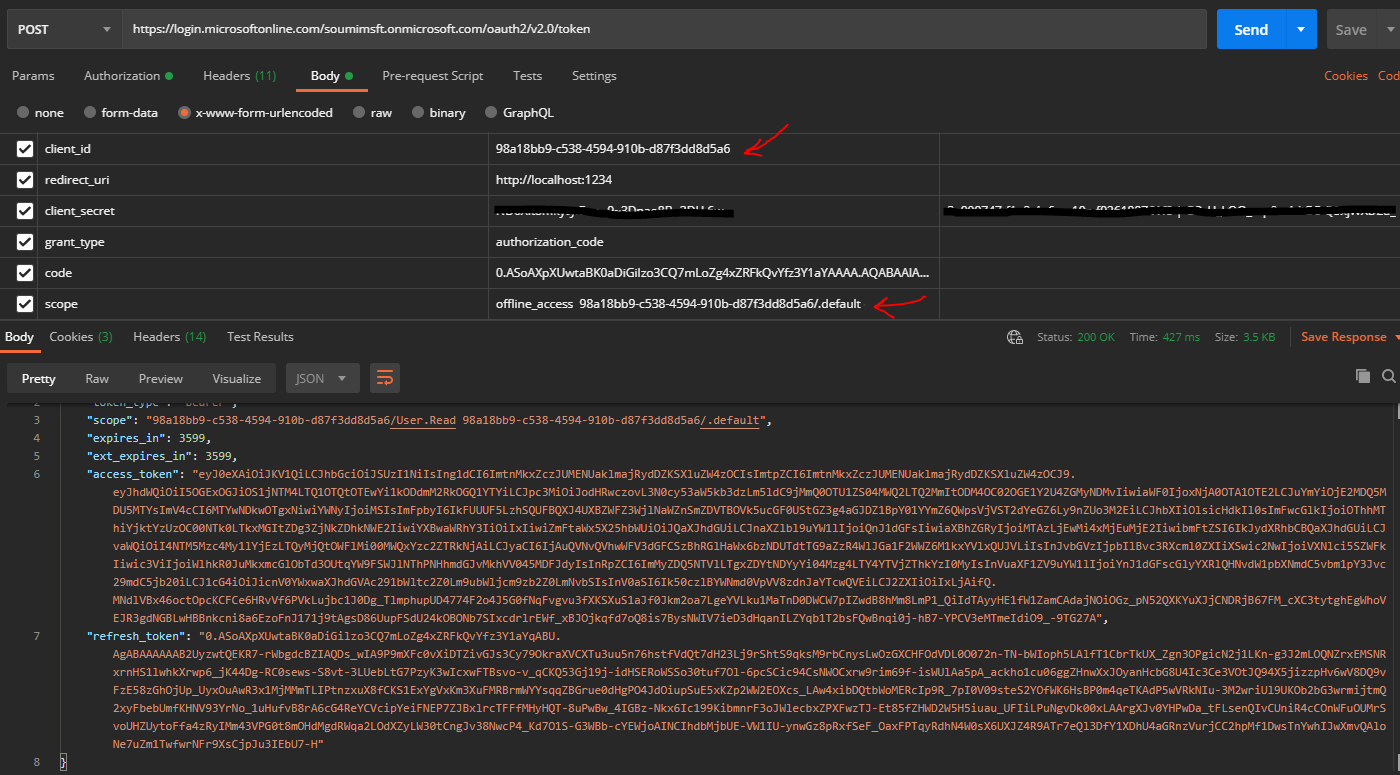
Note: Here you would find that the clientId and the resource have the same value. This is required to fetch the token with the app roles in it.
Access-Token:
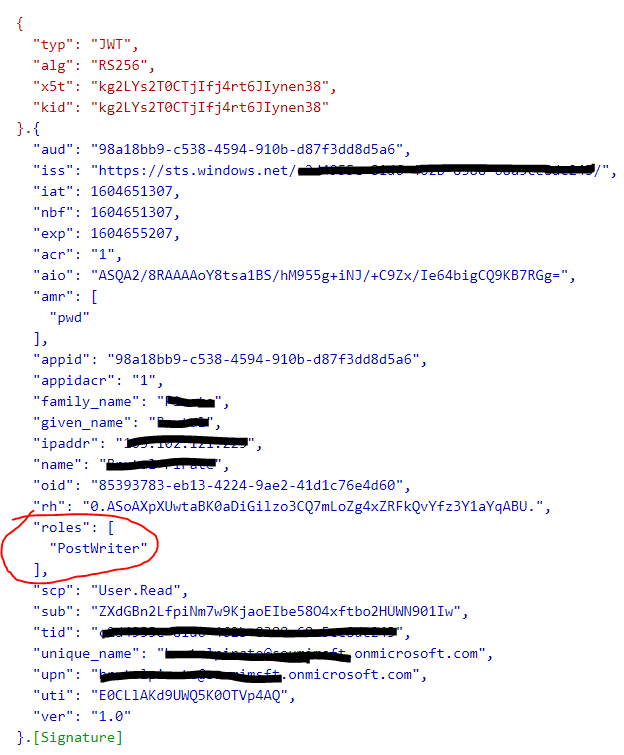
How can I get it in access tokens?
Ans: With the above request, I am sure you can fetch the access-token, as Auth-Code grant flow if done, it returns access-token by default.
Is there a way to make the roles claim contains the group information of a login user?
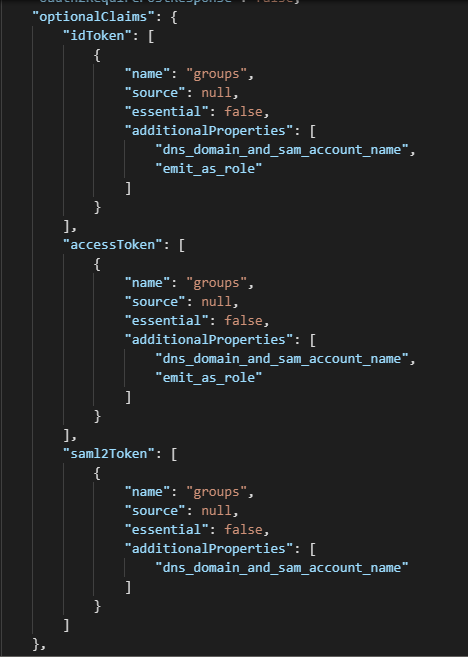
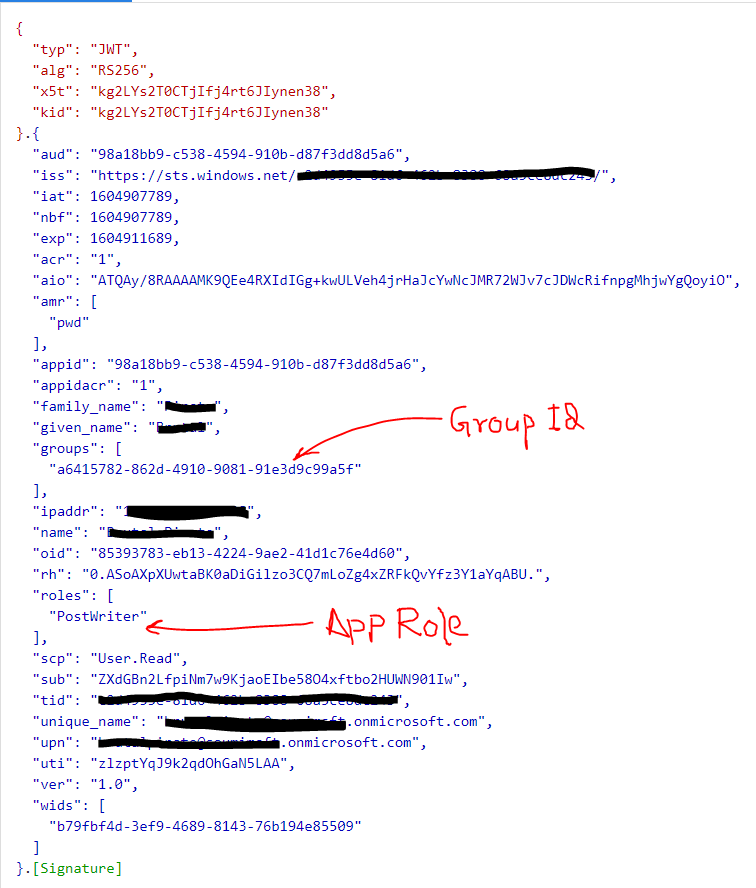
Ans: This is also possible. You can do that by configuring the Group Optional Claims and adding "emit_as_roles" to you the optionalClaims schema in the manifest. You can find more details on the configuration here: https://docs.microsoft.com/en-us/azure/active-directory/develop/active-directory-optional-claims#configuring-groups-optional-claims
I tested the same and sharing the findings below[Please find the screenshots below]:
Optional Claims Configuration in App Manifest:
After configuring the option group claims in the app manifest, fetch the access-token from AAD and you should find the following details in the access-token:
Hope this helps.
 souravmishra-msft
on 6 Nov 2020
souravmishra-msft
on 6 Nov 2020
Thanks you so much for such a detailed reply @souravmishra-msft , I can get roles claim now with your help. Now I have a few new questions:
- Does
rolesclaim exist only when theresourceorscope(I use the V2 endpoints) parameter in access-token request is set as the client-id or client-id/.default, because the concept of appRole is defined in applcations? In my scenorios, I hope my application could acquire an access token of a specific resource and permission, e.g.,https://graph.microsoft.com/user.read, and when I set thescopeas _https://graph.microsoft.com/user.read_ instead ofclient-id/.default, then then access token doesn't contain theroles.
- Another two questions are about the
groupsclaim in access token: Why does this claim only exists when theaudof an access token is not Graph API likehttps://graph.microsoft.com? And is there a way to make the content ofgroupsclaim to be groups' name instead of groups' object-id?
Thanks~
yiliuTo
on 9 Nov 2020
Hello @yiliuTo, I have updated my previous response, I would request you to please check that once again as I have added few more details and also corrected one of the points.
To get the group claims in the access-token, you need to use the optional group claims. I have updated the previous answer of mine with the new details on Group claims and how to add them in access_token.
Coming to the second part, where you mentioned "Why does this claim only exists when the aud of an access token is not Graph API like https://graph.microsoft.com?", As you remember, while configuring the roles, we are configuring it on the Application's manifest as a property of that application and not for Graph, hence the App Roles property is local to that application where you configured this. So, whenever you want the app-roles to be present in the access-token, you need to mention that app-id where the app-roles are configured. In our test case, we had configured it in that same app, for which we requested the token and hence both the appID/ClientID and the scope/resource parameter had to contain the same clientID.
Hope this helps. Please feel free to let us know if there are more queries around this so that we can help you better.
souravmishra-msft
on 9 Nov 2020
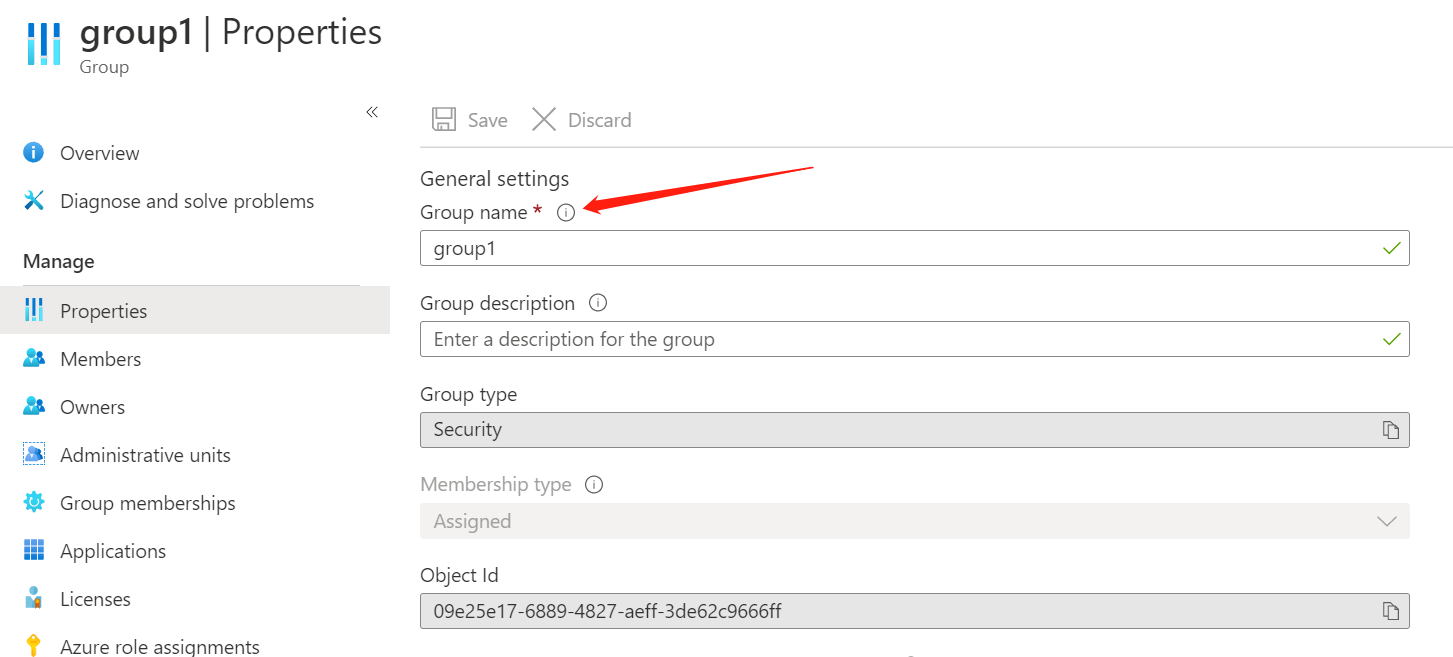
@souravmishra-msft thank you for your explanation and updates! My new question is about the optional group claims, is there a way to configure the display value of groups claim? I want it to display the name of groups instead of object-id. I have read about these docs: doc1 and doc2, however, all the source attributes to be selected to display I found are as below:
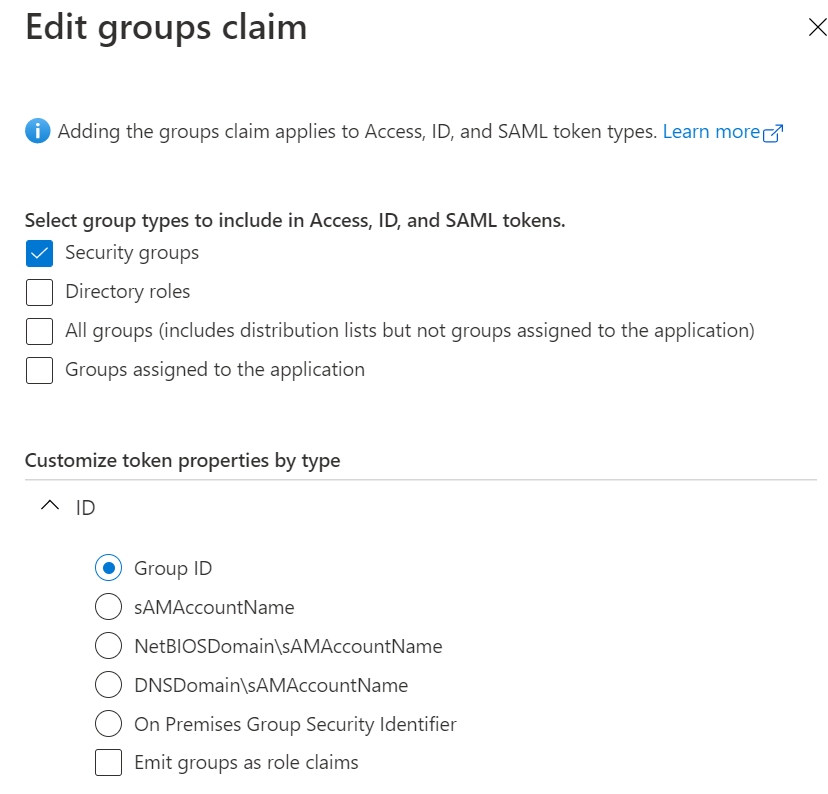
while the value I hope could be displayed in the groups claim is the group name:
yiliuTo
on 10 Nov 2020
Hello @yiliuTo, You cannot get the Group Names (for groups created in AzureAD) in tokens. You only get the group ids as claims in the issued tokens by AAD. Usually, this is good, since the id cannot be changed, unlike the name which can change.
If you want to do authorization based on groups, you can set the ids in a configuration file and then check with the id.
If you want the names for some other purpose, you'll need to query the group's details from Microsoft Graph API. You can find the API documentation here: https://docs.microsoft.com/en-us/graph/api/resources/groups-overview?view=graph-rest-1.0
Hope this helps.
souravmishra-msft
on 10 Nov 2020
Thanks for your help~~
yiliuTo
on 10 Nov 2020
Related issues
 varma31
·
3Comments
varma31
·
3Comments
 ianpowell2017
·
3Comments
ianpowell2017
·
3Comments
 jharbieh
·
3Comments
jharbieh
·
3Comments
 paulmarshall
·
3Comments
paulmarshall
·
3Comments
 mrdfuse
·
3Comments
mrdfuse
·
3Comments