Azure-docs: Unable to see my DevOps organizations
Hi,
Here is the link to docs
Steps to reproduce:
1) Click Azure devOps organizations in portal

2) Click My DevOps organizations
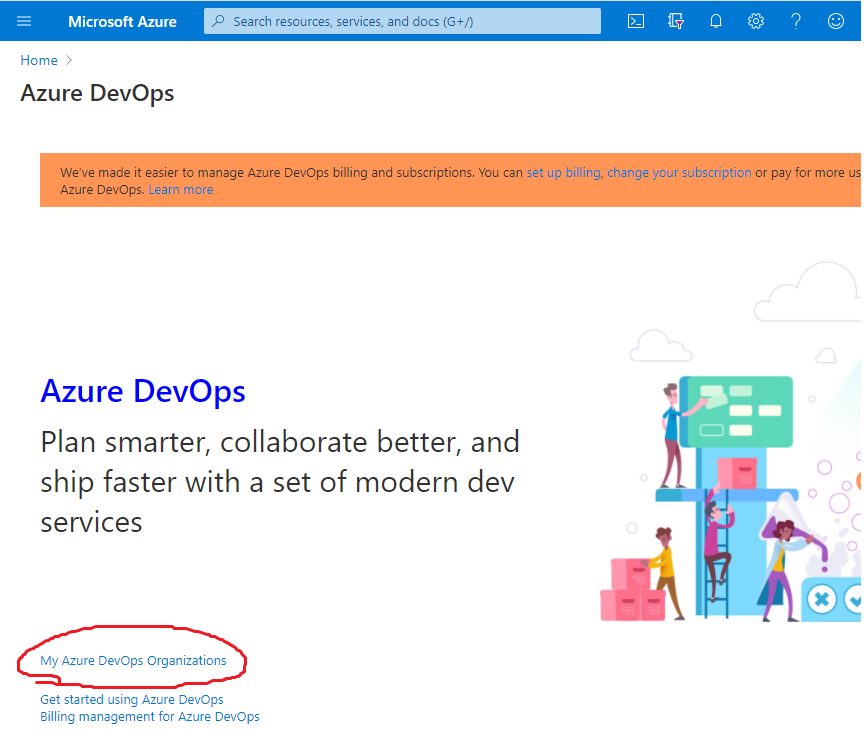
3) This is what I see:

Copy/past:
Enhancement failed for 'tfs.controls._type_3'.
c @ vss-bundle-view-vBB4fHYsTDVdoaQgkQnyrST3swm8Q6mS5LnimHBgtDvk=:69
me?mkt=en-US:43 Uncaught Error: Cannot find template with ID home-index
    at L.b.C.L.b.v.makeTemplateSource (vss-bundle-view-vBB4fHYsTDVdoaQgkQnyrST3swm8Q6mS5LnimHBgtDvk=:141)
    at L.b.C.L.b.v.renderTemplate (vss-bundle-view-vBB4fHYsTDVdoaQgkQnyrST3swm8Q6mS5LnimHBgtDvk=:141)
    at T (vss-bundle-view-vBB4fHYsTDVdoaQgkQnyrST3swm8Q6mS5LnimHBgtDvk=:78)
    at b.j.Ka (vss-bundle-view-vBB4fHYsTDVdoaQgkQnyrST3swm8Q6mS5LnimHBgtDvk=:146)
    at g (vss-bundle-view-vBB4fHYsTDVdoaQgkQnyrST3swm8Q6mS5LnimHBgtDvk=:113)
    at Object.L.b.j (vss-bundle-view-vBB4fHYsTDVdoaQgkQnyrST3swm8Q6mS5LnimHBgtDvk=:115)
    at Object.L.b.va (vss-bundle-view-vBB4fHYsTDVdoaQgkQnyrST3swm8Q6mS5LnimHBgtDvk=:146)
    at update (vss-bundle-view-vBB4fHYsTDVdoaQgkQnyrST3swm8Q6mS5LnimHBgtDvk=:148)
    at X.b.j.W (vss-bundle-view-vBB4fHYsTDVdoaQgkQnyrST3swm8Q6mS5LnimHBgtDvk=:82)
    at g (vss-bundle-view-vBB4fHYsTDVdoaQgkQnyrST3swm8Q6mS5LnimHBgtDvk=:113)
ImageSprite.png:1 Failed to load resource: the server responded with a status of 404 ()
After several refreshes, I'm able to see my organization. So, it is not critical.
Thanks
Document Details
⚠ Do not edit this section. It is required for docs.microsoft.com ➟ GitHub issue linking.
- ID: b1b9dd76-4131-bf69-f9bc-c7f7ef562609
- Version Independent ID: 8d3bfbae-3398-c0a2-ca4d-c4782a3b4370
- Content: Create a new organization, project collection - Azure DevOps
- Content Source: docs/organizations/accounts/create-organization.md
- Product: devops
- Technology: devops-accounts
- GitHub Login: @chcomley
- Microsoft Alias: chcomley
 captain-yossarian
All 4 comments
@captain-yossarian Thank you for your feedback! We will review and update as appropriate.
 mike-urnun-msft
on 16 Aug 2020
mike-urnun-msft
on 16 Aug 2020
@captain-yossarian That is the correct page, however it should look something like this:
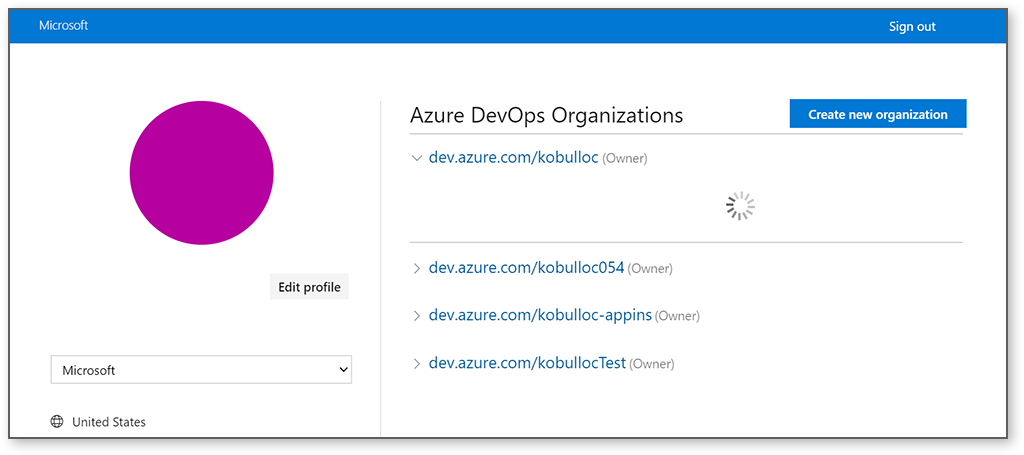
Are you able to get this consistently? I've found one other similar report. If you are still running into this please let us know as we'd like to work with you to get this resolved.
 kobulloc-MSFT
on 19 Aug 2020
kobulloc-MSFT
on 19 Aug 2020
@kobulloc-MSFT no worries, after I made 5-6 page refreshes it worked.
This erro is not deterministic
captain-yossarian
on 19 Aug 2020
@captain-yossarian Thank you for the update! I'll follow up with the product group to make sure that they are aware of the issue.
From a documentation standpoint it doesn't look like there's anything that needs to be updated so we'll close this as resolved, but if you have any additional questions about the documentation just tag me in your reply and we'll continue the conversation.
kobulloc-MSFT
on 19 Aug 2020
Related issues
 JamesDLD
·
3Comments
JamesDLD
·
3Comments
 ianpowell2017
·
3Comments
ianpowell2017
·
3Comments
 jharbieh
·
3Comments
jharbieh
·
3Comments
 spottedmahn
·
3Comments
spottedmahn
·
3Comments
 DeepPuddles
·
3Comments
DeepPuddles
·
3Comments