Azure-docs: Changing Account Domain results in RRSessionException
[Enter feedback here]
If I set the account domain to eastus2.mixedreality.azure.com, the RemoteRenderingCoordinator script throws an error and fails to create or connect to a session. If the account domain is westus2.mixedreality.azure.com it functions fine.
The tutorial page specifically says to change the Account domain to match your settings. So this broke the tutorial for me until I figured out what was triggering the error.
Document Details
⚠ Do not edit this section. It is required for docs.microsoft.com ➟ GitHub issue linking.
- ID: eb3fc294-6247-9b15-9a2c-0dde9eb86e2e
- Version Independent ID: 814b28ae-71cc-4bfd-040e-be6eead22035
- Content: Viewing a remotely rendered model - Azure Remote Rendering
- Content Source: articles/remote-rendering/tutorials/unity/view-remote-models/view-remote-models.md
- Service: azure-remote-rendering
- GitHub Login: @michael-house
- Microsoft Alias: v-mihous
 ARGs-code
All 7 comments
@ARGs-code - Thanks for brining this to our attention. We will investigate it further and update you shortly.
 MonikaReddy-MSFT
on 9 Jul 2020
MonikaReddy-MSFT
on 9 Jul 2020
@ARGs-code Thanks for the feedback!
Could you please let us know any error logs completely or any error log screen grabs ? to better understand the issue.
Please mask/hide any sensitive info while uploading error logs or screen grabs from your machine.
 SatishBoddu-MSFT
on 10 Jul 2020
SatishBoddu-MSFT
on 10 Jul 2020
@ARGs-code Could you please refer the Supported Regions for Azure remote Rendering.
If I set the account domain to eastus2.mixedreality.azure.com,....
The official Microsoft Documentation page provides list of supported regions as of now. Which do not include eastus2
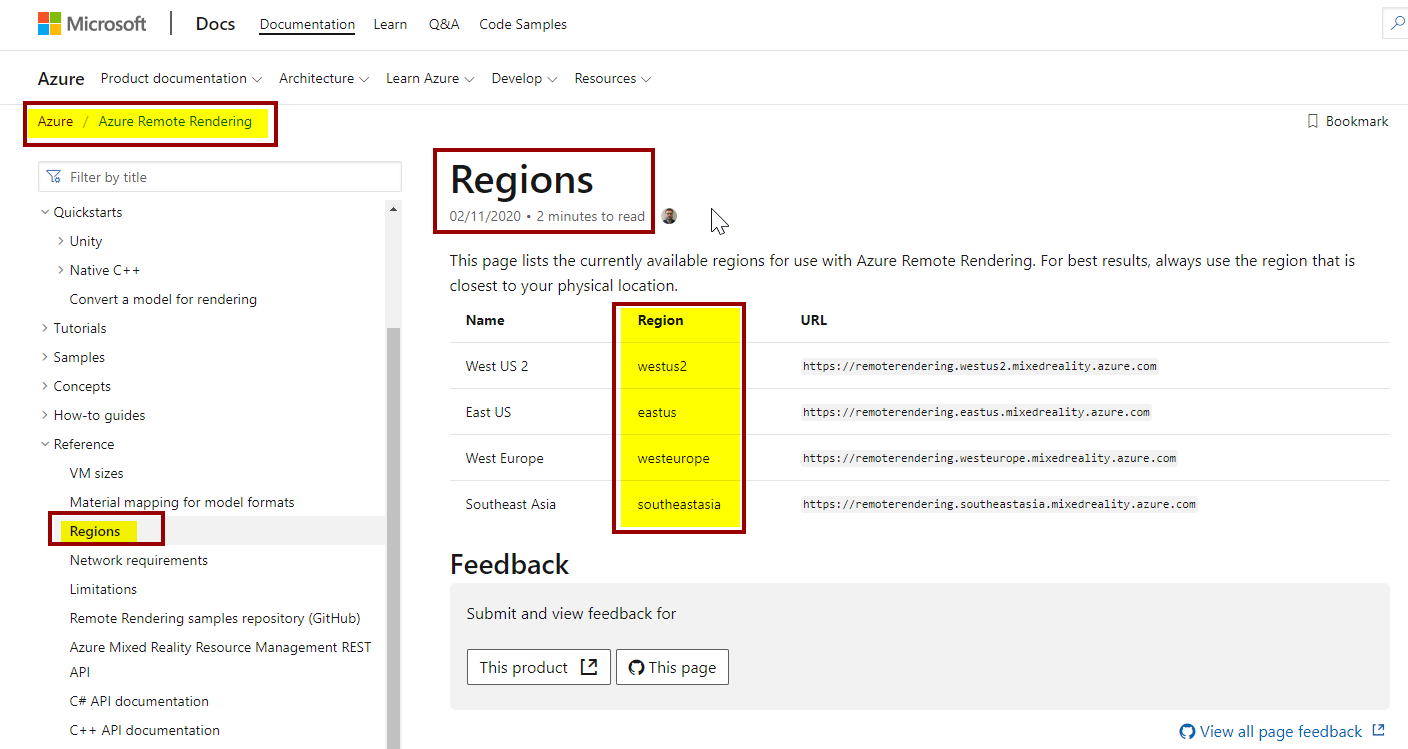
Please let us know your use case scenario in this matter, so that we can further help!
SatishBoddu-MSFT
on 10 Jul 2020
@ARGs-code
Just checking back! Please let us know if you need further help.
SatishBoddu-MSFT
on 15 Jul 2020
Well, that is interesting. Thank you @SatishBoddu-MSFT .
I had thought that eastus2 was supported because the model conversion process works with eastus2 and my Azure Remote Rendering asset on Azure runs on eastus2 as well..... so this is confusing to me.
Thank you for pointing out this documentation.
If eastus2 is not supported, should I open up a different ticket since using eastus2 works with the model conversion process and eastus fails? Or is that working as intended?
I get the following error if I try to perform a model conversion on eastus, and the default ARRConfig.json provided by the documentation has eastus2 listed as one of the supported regions.

ARGs-code
on 15 Jul 2020
@ARGs-code The powershell example scripts incorrectly lists "eastus2" as the name of the eastus region service URL. This error will be fixed in an upcoming release. So in the meanwhile please use "eastus2" when using the conversion script, but it will actually use the eastus region.
Sorry for the confusion and thanks for helping us to improve Azure Remote Rendering
 rikogeln
on 15 Jul 2020
rikogeln
on 15 Jul 2020
We will now proceed to close this thread. If there are further questions regarding this matter, please tag me in your reply. We will gladly continue the discussion and we will reopen the issue.
SatishBoddu-MSFT
on 20 Jul 2020
Related issues
 Favna
·
3Comments
Favna
·
3Comments
 bityob
·
3Comments
bityob
·
3Comments
 ianpowell2017
·
3Comments
ianpowell2017
·
3Comments
 JeffLoo-ong
·
3Comments
JeffLoo-ong
·
3Comments
 JamesDLD
·
3Comments
JamesDLD
·
3Comments
Most helpful comment
@ARGs-code The powershell example scripts incorrectly lists "eastus2" as the name of the eastus region service URL. This error will be fixed in an upcoming release. So in the meanwhile please use "eastus2" when using the conversion script, but it will actually use the eastus region.
Sorry for the confusion and thanks for helping us to improve Azure Remote Rendering