Azure-docs: Disable x-ms-routing-name
Hello!
I found this in the docs:
After a client is automatically routed to a specific slot, it's "pinned" to that slot for the life of that client session. On the client browser, you can see which slot your session is pinned to by looking at the x-ms-routing-name cookie in your HTTP headers.
How can we disable this feature of pinning client session to a slot? I don't want this behavior because if I change traffic to a different slot, some users might still be routed to the pinned slot from x-ms-routing-name cookie (even if we set traffic to 0%).
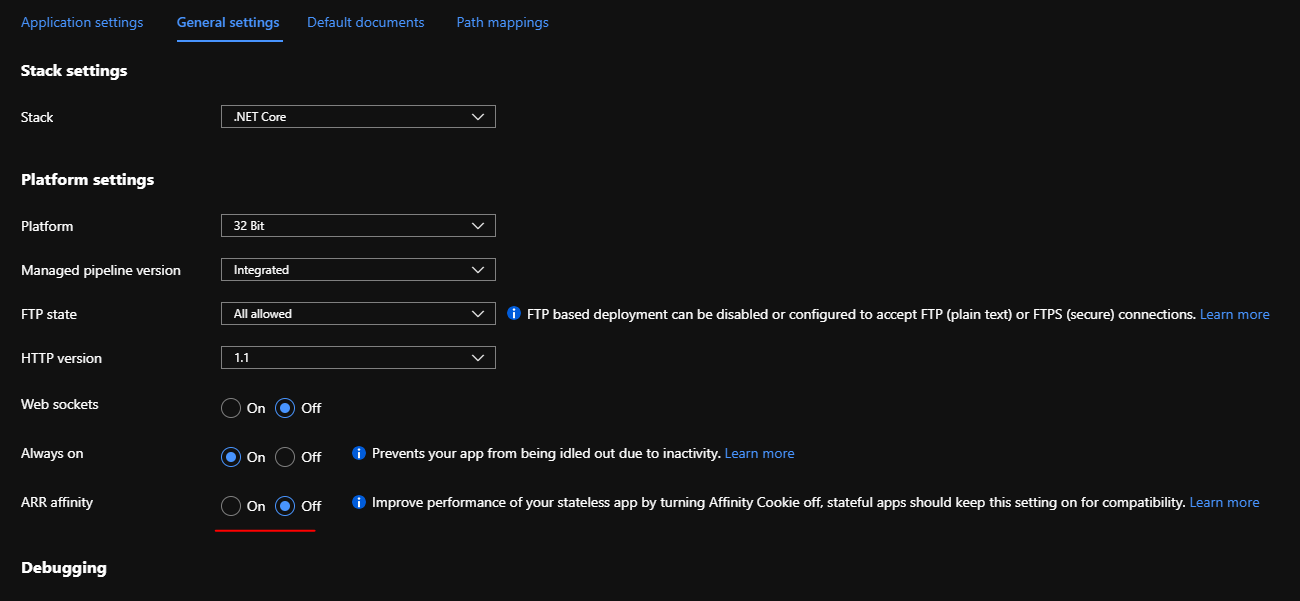
ARR Affinity is "Off" in the app config (for slot config as well).
Document Details
⚠ Do not edit this section. It is required for docs.microsoft.com ➟ GitHub issue linking.
- ID: f6e09089-1ae2-8943-5ce2-9d48f458c81f
- Version Independent ID: ba780cba-f604-b0a4-a81a-23c7d2384762
- Content: Set up staging environments - Azure App Service
- Content Source: articles/app-service/deploy-staging-slots.md
- Service: app-service
- GitHub Login: @cephalin
- Microsoft Alias: cephalin
 AlissonRS
All 11 comments
@AlissonRS, Thanks for the question! We are taking a look into this and will get back to you soon.
 AjayKumar-MSFT
on 7 Jul 2020
AjayKumar-MSFT
on 7 Jul 2020
Thanks @AjayKumar-MSFT
I believe if there was a way to just disable these two cookies x-ms-routing-name and TiPMix (they are coming from response headers that Azure create, probably in some proxy server), it would do the trick. But I'm not sure if this is possible at all.
AlissonRS
on 7 Jul 2020
Apologies for the delay, AlissonRs.
If I understand your scenario correctly, as mentioned in the same document - By default, new slots are given a routing rule of 0%, shown in grey. When you explicitly set this value to 0% (shown in black text), your users can access the staging slot manually by using the x-ms-routing-name query parameter. But they won't be routed to the slot automatically because the routing percentage is set to 0. This is an advanced scenario where you can "hide" your staging slot from the public while allowing internal teams to test changes on the slot.
Kindly ensure that the setting is saved/workaround: Go into TiP settings for the web application, make a change (to enable the Save button).
Just to highlight, if you are using cookie-capable browsers for testing, you may observe the default behavior. When there is no cookie (initial request), the rule selection will apply. The selected rule will be stored in browser cookie, so that the same client browser session will pin to just previously selected rule. You may test using CURL (which won’t pass back the cookie) etc.
You may checkout this similar discussion thread ‘How to disable “Testing in Production” in Azure’.
Kindly let us know if this helps or you need further assistance.
AjayKumar-MSFT
on 12 Jul 2020
Hi @AjayKumar-MSFT no worries, thanks for your reply.
I had already read the two links you provided before opening this issue.
The solution in StackOverflow thread you shared is to remove the routingRules from the settings, or delete zero from the slot page and save to make it grayed out, which is the same as "stop using slots". If I was to not use slots, I wouldn't have this question to begin with, so this is not really a solution.
You said:
The selected rule will be stored in browser cookie, so that the same client browser session will pin to just previously selected rule
In my honest opinion, this is incorrect behavior from Azure, no browser session should be pinned to anything if you don't have ARR Affinity enabled in the web app. All requests make to the app should always respect the route traffic configured for the slots, and these headers/cookies behavior of pinning browser session to slots defeats the idea of changing traffic route percentages between slots. But this is another subject, I'm not trying to suggest changes in how all of this works, I just wanted to know:
How can we stop creating x-ms-routing-name and TiPMix cookies?
AlissonRS
on 12 Jul 2020
Apologies for the delay! The Azure Portal has only two gesture to add/update, but not remove. Even when you set to 0, you still have a rule with 0%. As long as rules exist, those cookie will be set.
To remove all rules (effectively disable the cookie), you may use Resource Explorer - https://resources.azure.com/.
Navigate to the site/config/web item and look for routingRules and set to empty array as below.
"routingRules": [],
Hope this help! We will now proceed to close this thread. If there are further questions regarding this matter, please tag me in your reply. We will gladly continue the discussion.
AjayKumar-MSFT
on 16 Jul 2020
@AjayKumar-MSFT thanks.
This defeats the purpose of updating traffic route percentage, as the router will ignore whatever percentage you configure because of cookies.
Let's say I deployed a new feature in a slot and added 20% traffic to it, some users will get the feature (and a cookie). If I realize something is failing, I want to redirect all users back to main slot while we fix the issue. But this can't be done. Removing routingRules will prevent new users to get the cookies, but users that already had the cookie from the feature slot will still be redirected to that slot, no matter what I do. If I stop the slot or remove it, the users will get errors from Azure.
The cookie conflicts with traffic percentage, as the router will ignore whatever percentage you set because of the cookie. This seems like a bug, is there a place we can report/suggest a fix?
AlissonRS
on 16 Jul 2020
Alisson, I'm checking on this internally and will get back to you soon.
AjayKumar-MSFT
on 22 Jul 2020
Alisson, Apologies for the delay!
When rule is set to 0% the cookie is still respected. The 0% scenario was done so only users with link that has the query string, can navigate to the slot. Cookie is to ‘pin’ the user session to a slot- Case/scenario for a browser where the slot has expected changes pushed, to load the page there are multiple requests for js and images and, as http calls, they are still subject to routing percentage coin-flip but not ideal to randomize them. Query string is to have a predictable landing on first request – e.g. share the link with beta users. I was unable to repro this behavior, if you're experiencing the issue, please let us know.
AjayKumar-MSFT
on 30 Jul 2020
Hi @AjayKumar-MSFT , no worries, thanks for taking the time to look into this.
The problem is exactly the cookie. There shouldn't be cookies pinning user sessions to slots. The percentage should be always respected. As I mentioned in my previous message, if a slot has bad code deployed, I want to set percentage to 0% so users won't be routed to it anymore, but the Cookie won't allow this behavior because user is now pinned to the bad slot and there is nothing I can do to prevent that, and I can't call my customers and ask them to delete their cookies, that'd be awful.
There should be an option for us to just disable these cookies, they defeat the purpose of using percentage for different slots, and they are not helping at all.
I can't use slots for releasing new features for a subset of users (as this product says it does) because of these cookies.
AlissonRS
on 30 Jul 2020
@AjayKumar-MSFT I'll put it another way so you might understand what I'm trying to say since I opened this issue. Imagine the following scenario:
I have 2 slots:
- production (stable) = 100%
- beta (new features) = 0%
I deployed new features in beta slot, and changed it to 20%, as I want a subset of users to get these new features (I won't send links with query string to them, nor will I put a button so they can opt-in, I want them to automatically get the new features).
- production (stable) = 80%
- beta (new features) = 20%
Few hours later, I realize the beta slot is throwing exceptions in some pages of my application. Bad Code. So I want all users to be routed back to the prod stable slot until the developers fix the issue and deploy again to beta slot. So I change:
- production (stable) = 100%
- beta (new features) = 0%
Because of the cookies, the users that already had the cookie pinned to the beta slot will keep getting errors, and there is nothing I can do to avoid that. I can't call my customers and ask them to delete their cookies.
Conclusion: slots are not helpful for this scenario because of the cookies. So I'll ask you again, where can I report this as a bug or ask this feature to allow disabling this Cookie?
AlissonRS
on 30 Jul 2020
Thanks again for sharing detailed information/scenario, it helps, much appreciate the update and follow-up.
For product feedback, you can always post suggestion on UserVoice here -https://feedback.azure.com/forums/169385-web-apps - All of the feedback you share in these forums will be monitored and reviewed by the Microsoft engineering teams responsible for building Azure.
Apologies for not making it clear, if it's a product bug, we will relay and report the issue to our product engineering team internally. I will investigate on this issue further and keep you posted. Also, I wish to engage with you offline, please send an email with subject line “Attn:Ajay” to AzCommunity[at]Microsoft[dot]com referencing this thread, Azure subscription ID, I will follow-up with you.
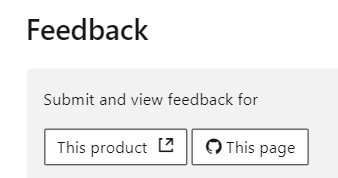
Also, just to share additional details on the feedback mechanism, this channel is reserved for ‘Azure docs’ feedback; for sharing documentation related feedback and suggesting content improvements. Every Azure docs has a 'Feedback' option at the end section, which links to Uservoice (for product related feedback) and GitHub page (for documentation related feedback).
AjayKumar-MSFT
on 30 Jul 2020
Related issues
 behnam89
·
3Comments
behnam89
·
3Comments
 Favna
·
3Comments
Favna
·
3Comments
 ianpowell2017
·
3Comments
ianpowell2017
·
3Comments
 AronT-TLV
·
3Comments
AronT-TLV
·
3Comments
 JamesDLD
·
3Comments
JamesDLD
·
3Comments
Most helpful comment
Thanks again for sharing detailed information/scenario, it helps, much appreciate the update and follow-up.
For product feedback, you can always post suggestion on UserVoice here -https://feedback.azure.com/forums/169385-web-apps - All of the feedback you share in these forums will be monitored and reviewed by the Microsoft engineering teams responsible for building Azure.
Apologies for not making it clear, if it's a product bug, we will relay and report the issue to our product engineering team internally. I will investigate on this issue further and keep you posted. Also, I wish to engage with you offline, please send an email with subject line “Attn:Ajay” to AzCommunity[at]Microsoft[dot]com referencing this thread, Azure subscription ID, I will follow-up with you.
Also, just to share additional details on the feedback mechanism, this channel is reserved for ‘Azure docs’ feedback; for sharing documentation related feedback and suggesting content improvements. Every Azure docs has a 'Feedback' option at the end section, which links to Uservoice (for product related feedback) and GitHub page (for documentation related feedback).
