Azure-docs: Missing of Implicit Grant Section in Authentication Advanced Settings
According to the screenshot in the documentation, we should be able to specify the tokens to be issued by the authorisation endpoint, as shown below.
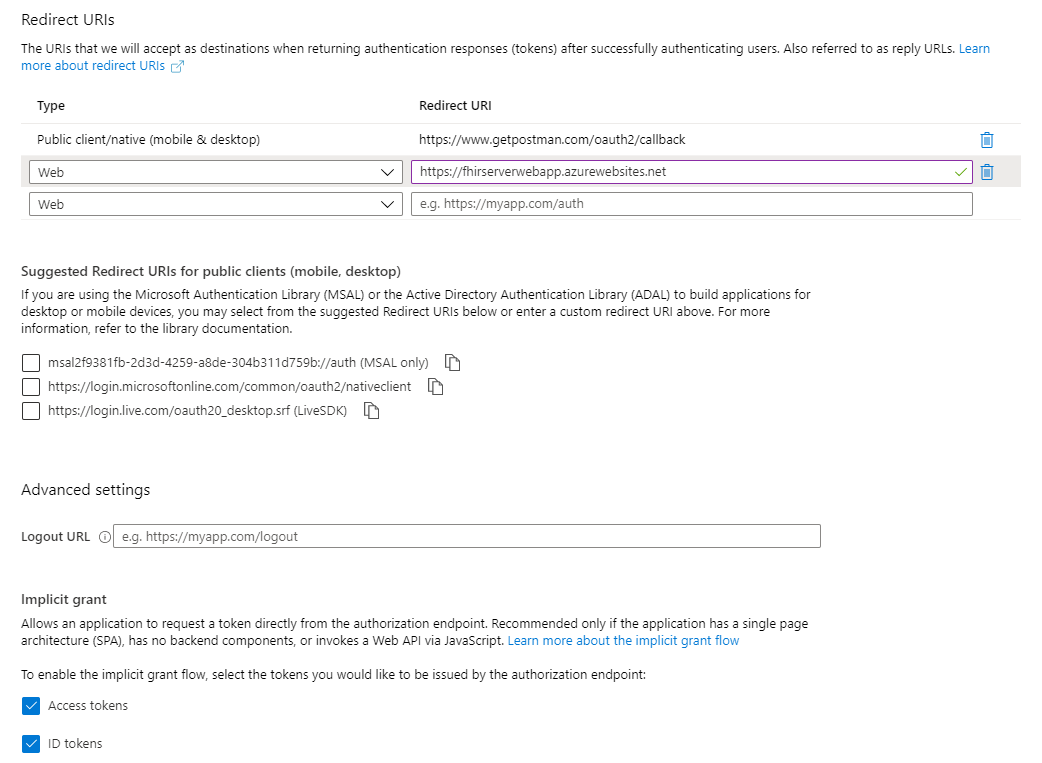
However, this "Implicit Grant" section is no longer visible under the Advanced Settings section in the latest Azure Portal, as shown in the following screenshot.
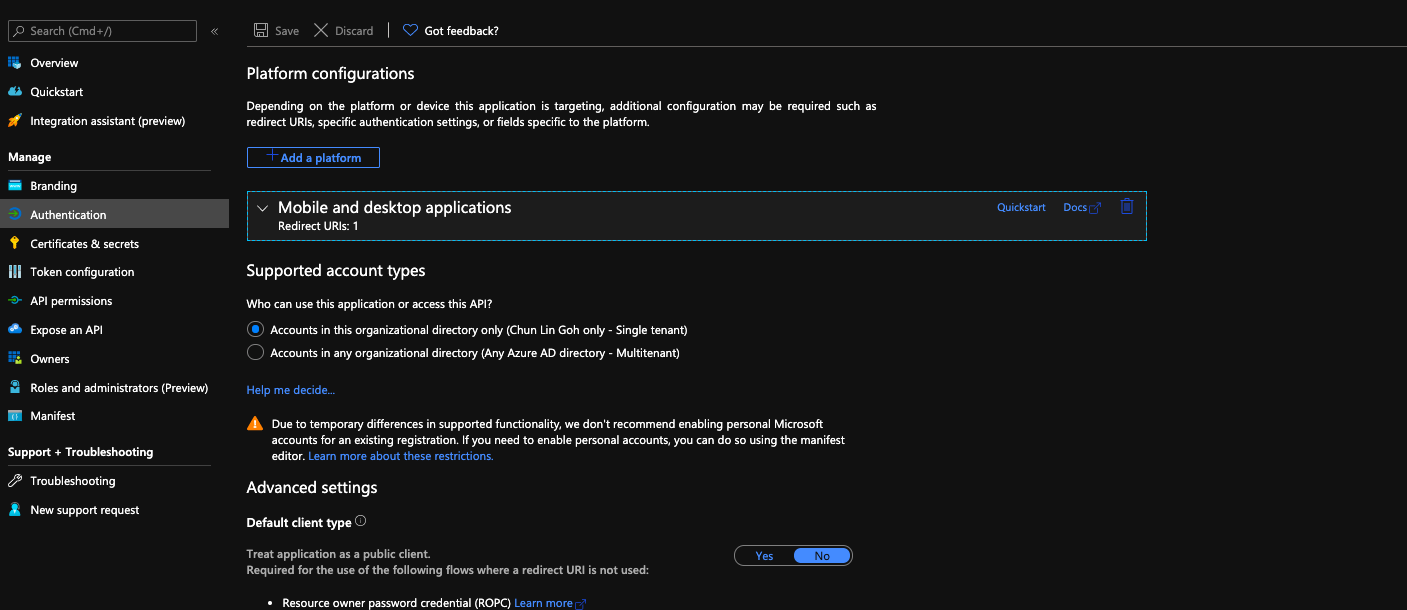
Please review and update the documentation to the latest Azure Portal setup.
Thank you!
Document Details
⚠ Do not edit this section. It is required for docs.microsoft.com ➟ GitHub issue linking.
- ID: 4c226d80-2f60-0a3e-c66f-edaf3bcd0891
- Version Independent ID: cb1869bc-b6a5-1d1c-3792-f0247660c681
- Content: Web App Tutorial - Client Application Setup
- Content Source: articles/healthcare-apis/tutorial-web-app-public-app-reg.md
- Service: healthcare-apis
- Sub-service: fhir
- GitHub Login: @CaitlinV39
- Microsoft Alias: cavoeg
 goh-chunlin
All 13 comments
@goh-chunlin Thanks for your feedback! We will investigate and update as appropriate.
 SaurabhSharma-MSFT
on 4 Jul 2020
SaurabhSharma-MSFT
on 4 Jul 2020
@goh-chunlin, Thank you for reaching out. I believe, the implicit grant section in the second screenshot is not visible because platform chosen is "Mobile and Desktop Applications". Since for Mobile or Desktops apps (native app) doesnt support Implicit flow, hence its not listed with the platform chosen as the Mobile and Desktop application. If you select Web as the platform, you should be able to see the implicit grant section.
Hope this helps.
Do let me know if any more queries around this, so that we can help you further.
 souravmishra-msft
on 7 Jul 2020
souravmishra-msft
on 7 Jul 2020
@goh-chunlin, Just wanted to follow up with you to check if there are any more queries around this. If not do let us know so that we can close this thread.
souravmishra-msft
on 8 Jul 2020
@goh-chunlin, Just wanted to follow up with you to check if there are any more queries around this. If not do let us know so that we can close this thread.
souravmishra-msft
on 9 Jul 2020
Understood, @souravmishra-msft
However, if the readers have to follow the tutorial given, they will reach the 2nd screenshot instead of the 1st screenshot and the readers will be confused and not sure where to continue next. Hence, I'd like to suggest to change the 1st screenshot which is currently used in the documentation to the 2nd one.
Please share with me your thoughts on this.
Thanks for your time attending to this.
goh-chunlin
on 9 Jul 2020
Dear @souravmishra-msft,
In fact, in the same documentation, the last step of the previous section says the following.
Name your application and set up the redirect URI to https://www.getpostman.com/oauth2/callback
So it is actually talking about allowing us to send request to the client application from the Postman. Hence, we know it's not talking about Web.
But right after the step, the documentation goes on with the following.
Next, set the correct authentication options. Select Authentication from the left-hand side. Check the Access Token and ID token boxes.
This is where the confusion comes in because this "next step" is not needed for the Postman.
goh-chunlin
on 9 Jul 2020
I have created a PR to reflect my suggestion on the changes following the new GUI of Azure Portal: #58692
goh-chunlin
on 9 Jul 2020
@goh-chunlin, I get it. This clears things and understanding. I will wait for the PR approval and would keep the thread open until then. Please feel free to reachout in case you would need any help with that PR.
souravmishra-msft
on 10 Jul 2020
 hansenms
on 15 Jul 2020
hansenms
on 15 Jul 2020
@goh-chunlin Your Pull request has been moved to internal repo and is awaiting review from the team . You may not be able to see the same as its only accessible internally . Once it is reviewed we will have it updated here.
Thank you.
 shashishailaj
on 17 Jul 2020
shashishailaj
on 17 Jul 2020
@moiradillon12 Could you please review the PR and update once it has been merged? Thank you for your help.
reassign:moiradillon12
shashishailaj
on 17 Jul 2020
moiradillon is not a valid GitHub ID, or is not a collaborator on this repo.
 PRMerger13
on 17 Jul 2020
PRMerger13
on 17 Jul 2020
The documentation has been updated in PR #58692.
goh-chunlin
on 31 Jul 2020
Related issues
 Favna
·
3Comments
Favna
·
3Comments
 behnam89
·
3Comments
behnam89
·
3Comments
 ianpowell2017
·
3Comments
ianpowell2017
·
3Comments
 mrdfuse
·
3Comments
mrdfuse
·
3Comments
 Agazoth
·
3Comments
Agazoth
·
3Comments