Azure-docs: Confused about Security Center Logs
I'm trying to trigger a Logic App based on Advanced Threat Protection scans of my blob containers. I cannot for the life of me locate WHERE these logs are written to.
This is beginning to get frustrating.
Where are ATP logs stored and how can I programmatically access them to take action.
Thank you!
Document Details
⚠ Do not edit this section. It is required for docs.microsoft.com ➟ GitHub issue linking.
- ID: 8267e218-3748-2820-3eee-80479705eec2
- Version Independent ID: 8c6d5fce-6383-a0f8-7df3-f5e0a77bbad6
- Content: Data Collection in Azure Security Center
- Content Source: articles/security-center/security-center-enable-data-collection.md
- Service: security-center
- GitHub Login: @memildin
- Microsoft Alias: memildin
 ericthomas1
All 4 comments
@ericthomas1 We are sorry for this inconvenience. We will try to find this and update this thread as soon as we have more information on this.
 shashishailaj
on 25 Jun 2020
shashishailaj
on 25 Jun 2020
@ericthomas1 Security Center uses the Log Analytics agent to collect and store data. Log analytics stores all the data in workspaces. It can be the default workspace created by Security center or any exiting one which you might have linked with security center.
To find which workspace are you using for security center. Go to :
1) Login to Azure portal.
2) Go to security center dashboard.
3) Select Pricing & Settings

4) Select your subscription from right pane.
5) Select Data Collection :
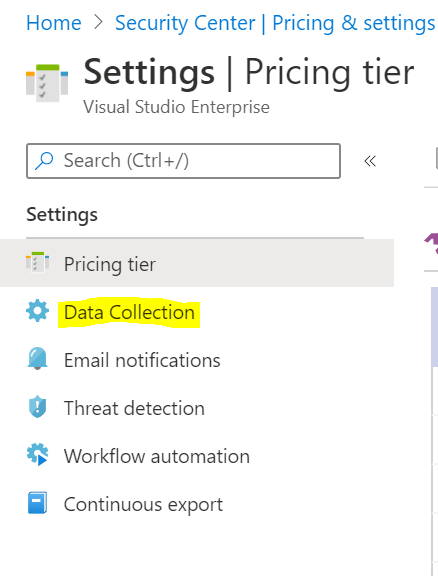
6) Here you can see your workspace configuration to identify workspace your security center is using.
7) Once done, search workspace in Azure portal
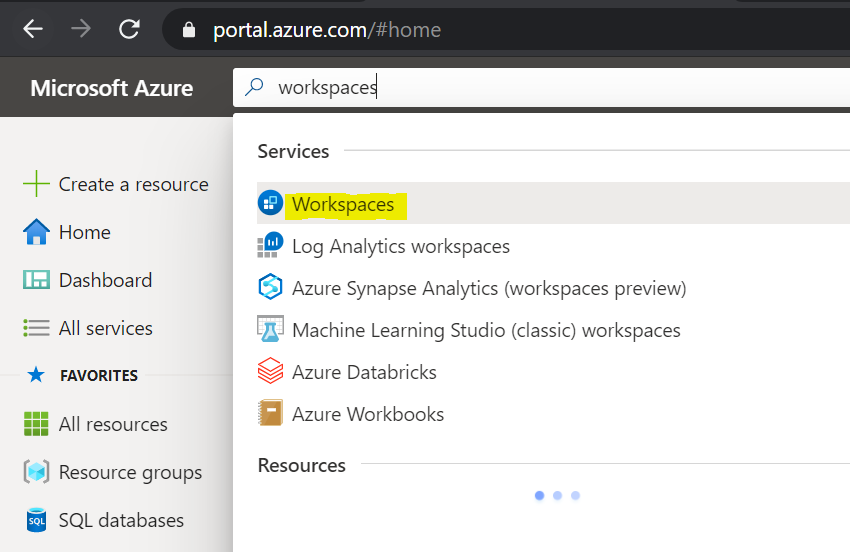
8) You can then select your workspace and it will have your security center data stored which you can use with Logic Apps.
Let us know if you have any questions or need anything else.
 vipulsparsh
on 25 Jun 2020
vipulsparsh
on 25 Jun 2020
I don't have permissions to view anything past step 4. Trying to find the correct person to speak with at my org.
ericthomas1
on 25 Jun 2020
@ericthomas1 Sure, let us know if you need any further help. We will close this for now, you can always comment here to get this re-opened.
vipulsparsh
on 26 Jun 2020
Related issues
 ianpowell2017
·
3Comments
ianpowell2017
·
3Comments
 JamesDLD
·
3Comments
JamesDLD
·
3Comments
 spottedmahn
·
3Comments
spottedmahn
·
3Comments
 Favna
·
3Comments
Favna
·
3Comments
 DeepPuddles
·
3Comments
DeepPuddles
·
3Comments