Azure-docs: Need admin approval
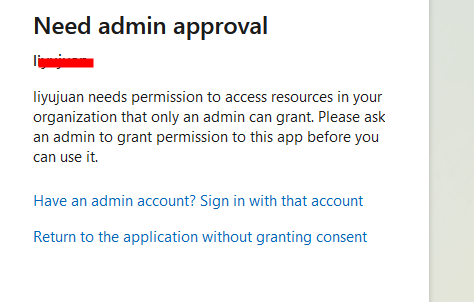
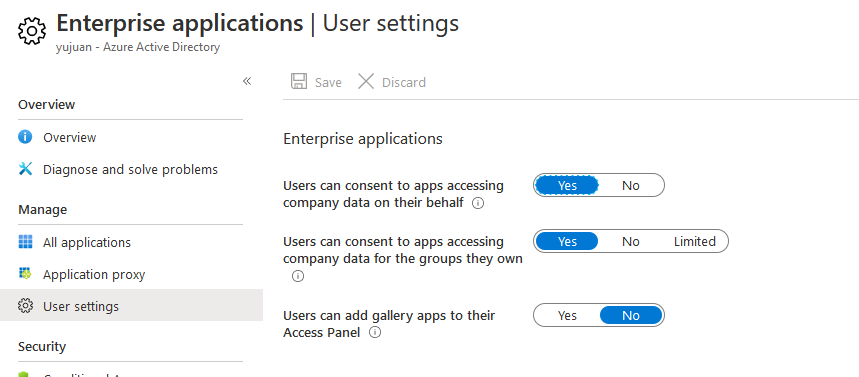
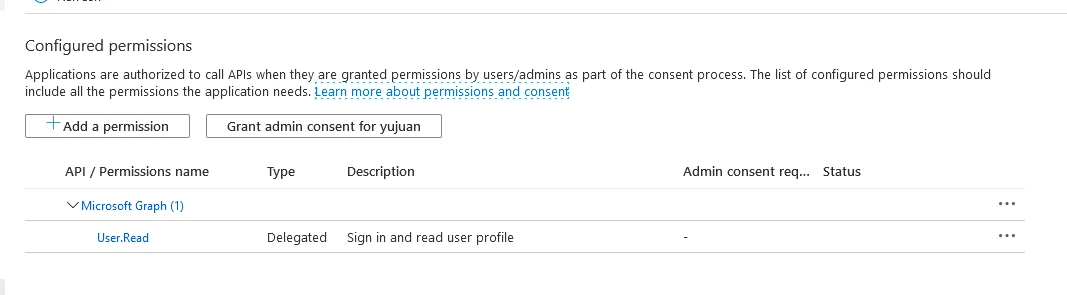
 atcaoyufei
All 8 comments
@atcaoyufei, Thanks for leveraging Azure docs feedback channel to raise this question. Could you please share the Azure documentation for which this feedback is applicable to and also describe more details about your scenario?
 AjayKumar-MSFT
on 4 Jun 2020
AjayKumar-MSFT
on 4 Jun 2020
Organization A Create Application
Organization B member authorized to log in
Need admin approval
atcaoyufei
on 7 Jun 2020
@atcaoyufei, Thanks for the response and sharing additional details.
As mentioned in my previous post, it would greatly help, if you could share the Azure documentation for which this feedback is applicable to? I beleive you are referring to this documentation 'Configure the admin consent workflow (preview)', please do confirm on the same or share the specific Azure document for a focused assistance.
As I do understand you have configured the admin consent workflow, could you also please share some more details about your problem so we can assist you better while I check on this with the Azure Active Directory subject matter expert.
AjayKumar-MSFT
on 7 Jun 2020
@atcaoyufei There are certain permissions that require admin approval only. For example in below screenshot, the permissions where admin consent required is set to 'Yes' would not accept user consent. Only the permissions where admin consent required is set to '-' can be consented by users.
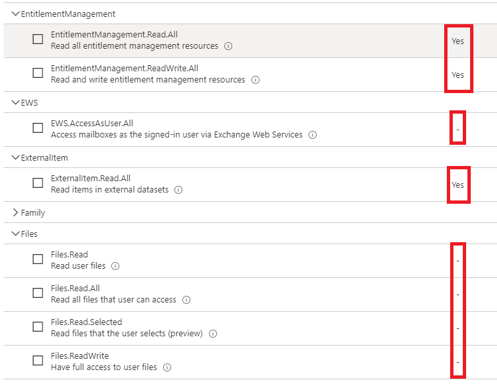
So regardless of whether this option is set to yes or no:

only administrator can consent to the permissions for which admin consent required is 'Yes'.
 amanmcse
on 8 Jun 2020
amanmcse
on 8 Jun 2020
scope: offline_access Files.ReadWrite.All
@amanmcse
atcaoyufei
on 8 Jun 2020
@atcaoyufei Could you please share the complete request URL which initiate the consent framework?
amanmcse
on 8 Jun 2020
@amanmcse
https://login.microsoftonline.com/common/oauth2/v2.0/authorize?client_id=4bb69ea8-1fd8-4dcf-a493-d023f7e8e432&redirect_uri=https%3A%2F%2Fp
y-index.github.io&response_type=code&state=debug&scope=offline_access+Files.ReadWrite.All&prompt=consent
atcaoyufei
on 9 Jun 2020
@atcaoyufei I constructed same URL with the client_id of the application in my tenant and not getting the "Need Admin Approval" message. You can test with below URL:
https://login.microsoftonline.com/common/oauth2/v2.0/authorize?client_id=b6f346ba-c900-4633-9f0d-e8000d97dc8e&redirect_uri=https://py-index.github.io&response_type=code&state=debug&scope=offline_access+Files.ReadWrite.All&prompt=consent
You can try registering a new application and try again. If you still face this issue, I would suggest you to open a Support Request as this is not expected behavior and require deeper troubleshooting.
amanmcse
on 9 Jun 2020
Related issues
 Favna
·
3Comments
Favna
·
3Comments
 AronT-TLV
·
3Comments
AronT-TLV
·
3Comments
 DeepPuddles
·
3Comments
DeepPuddles
·
3Comments
 ianpowell2017
·
3Comments
ianpowell2017
·
3Comments
 mrdfuse
·
3Comments
mrdfuse
·
3Comments