Azure-docs: Clarification on Key Vault CLI command and permissions requirements
Within the Give Key Vault access to your storage account section of the article it states to set the --assignee parameter to "https://vault.azure.net". It is unclear is this is meant to be a hard coded parameter or the URL of the newly created KeyVault i.e. https://MyKeyVaultName.vault.azure.net.
Also it would be useful to understand the required permissions to run the Azure CLI commands as I am currently getting the below exception when running the az role assignment create line. I have ensured that I have Owner level permissions on both the new KeyVault and Storage account on I have Application Admin permissions on the AD tenant.
az : ERROR: Insufficient privileges to complete the operation.
At line:1 char:1
+ az role assignment create --role "Storage Account Key Operator Servic ...
+ ~~~~~~~~~~~~~~~~~~~~~~~~~~~~~~~~~~~~~~~~~~~~~~~~~~~~~~~~~~~~~~~~~~~~~
    + CategoryInfo          : NotSpecified: (ERROR: Insuffic... the operation.:String) [], RemoteException
    + FullyQualifiedErrorId : NativeCommandError
Document Details
⚠ Do not edit this section. It is required for docs.microsoft.com ➟ GitHub issue linking.
- ID: 8b568009-2a35-c627-cfa0-ff5cbfde027e
- Version Independent ID: 07fc2d02-be89-1170-3b37-9e65808d5d89
- Content: Manage storage account keys with Azure Key Vault and the Azure CLI
- Content Source: articles/key-vault/secrets/overview-storage-keys.md
- Service: key-vault
- Sub-service: secrets
- GitHub Login: @msmbaldwin
- Microsoft Alias: mbaldwin
 PhilipAnthonyMurray
All 9 comments
@PhilipAnthonyMurray Thanks for your feedback! We will investigate and update as appropriate.
 SaurabhSharma-MSFT
on 28 May 2020
SaurabhSharma-MSFT
on 28 May 2020
@PhilipAnthonyMurray
I was able to look into your issue and will post my findings below.
Findings:
Based off the screenshot below, you can see that the actual "https://vault.azure.net", needs to be used when you run the az role assignment command. Otherwise, if you assign the actual vault URL that you plan to use, you'll receive a "Cannot find user or service principal..." error message.
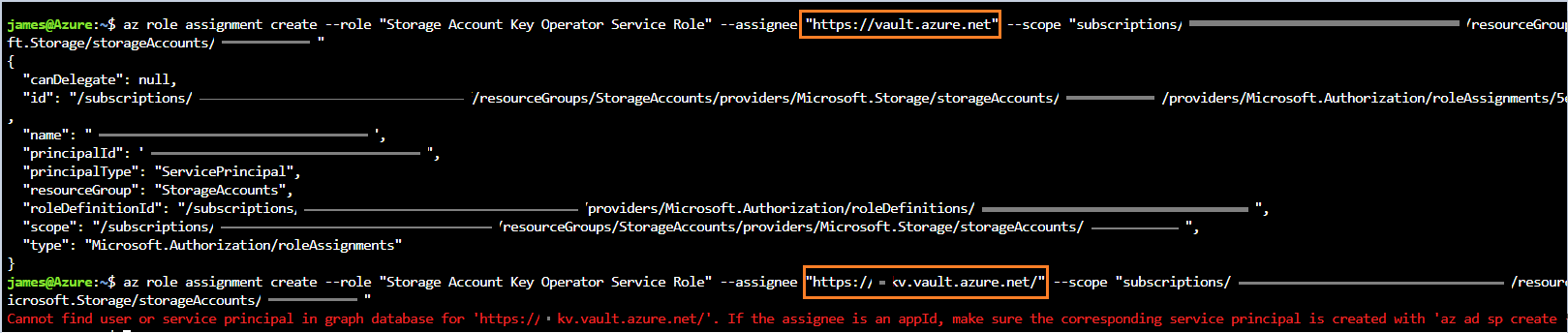
- Additionally, you can check if the role was added by going to your:
Storage Account -> Access Control(IAM) -> Role assignments -> Find "Azure Key Vault"

In order to add role assignments, you'll need _Microsoft.Authorization/roleAssignments/write_ and _Microsoft.Authorization/roleAssignments/delete permissions_, such as User Access Administrator or Owner.
- You can find more info here, Add or Remove Azure Role Assignments
- If you need to assign administrator roles in Azure Active Directory, see View and assign administrator roles in Azure Active Directory.
Additional link for your reference:
https://docs.microsoft.com/en-us/cli/azure/role/assignment?view=azure-cli-latest#az-role-assignment-create
 JamesTran-MSFT
on 29 May 2020
JamesTran-MSFT
on 29 May 2020
@PhilipAnthonyMurray
Thank you for your time and patience, I will now proceed to close this thread. If you would like to continue the discussion feel free to reach out on Microsoft Q&A or create a new issue.
JamesTran-MSFT
on 1 Jun 2020
Thanks for the information @JamesTran-MSFT although when I run the below statement I get another error
az login

az account set --subscription "-----"

az role assignment create --role "Storage Account Key Operator Service Role" --assignee 'https://vault.azure.net' --scope "/subscriptions/-----/resourceGroups/-----/providers/Microsoft.Storage/storageAccounts/keyrotationdatalake"
az : ERROR: Insufficient privileges to complete the operation.
At line:1 char:1
+ az role assignment create --role "Storage Account Key Operator Servic ...
+ ~~~~~~~~~~~~~~~~~~~~~~~~~~~~~~~~~~~~~~~~~~~~~~~~~~~~~~~~~~~~~~~~~~~~~
    + CategoryInfo          : NotSpecified: (ERROR: Insuffic... the operation.:String) [], RemoteException
    + FullyQualifiedErrorId : NativeCommandError
I have checked my RBAC permissions on the keyrotationdatalake storage account and I am an owner
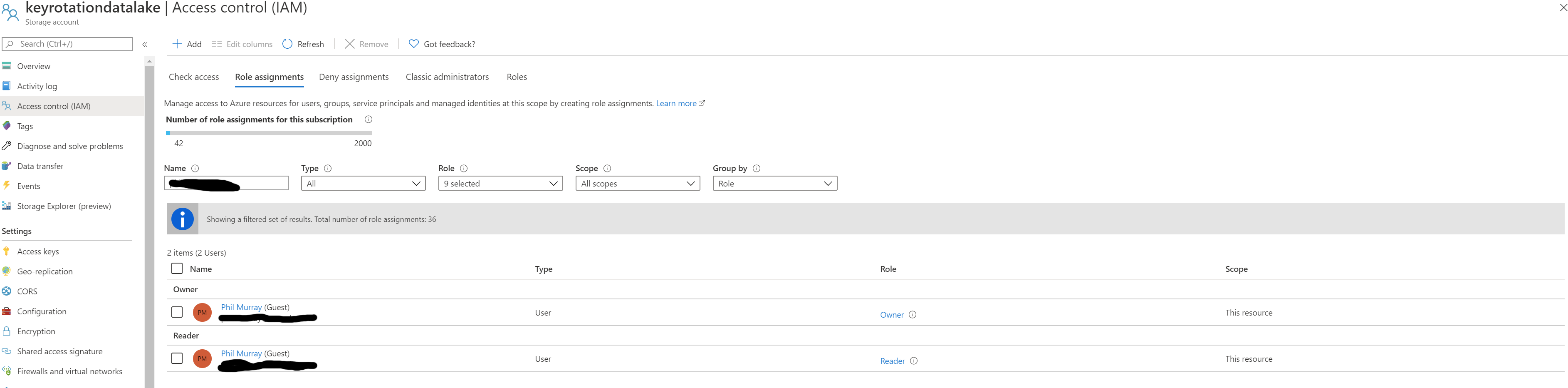
Are there any further permissions required to perform this action?
I changed to another account that also had Application Administrator access on the associated Azure AD tenant and the above statement worked as expected.
PhilipAnthonyMurray
on 2 Jun 2020
@PhilipAnthonyMurray
Thank you for the follow up and additional information.
Since you were able to run this command successfully on another account. For testing purposes, can you:
-Add the "owner" role to your Key Vault and re-run the command to see if that resolves the issue.
-If that doesn't work, we can also add the "owner" role at the "subscription" level rather than resource level to see if that helps with your issue.
Links:
Add/Remove Azure role Assignments
Please let me know if that helps.
JamesTran-MSFT
on 3 Jun 2020
Thanks @JamesTran-MSFT.
I don't have the privileges to add roles at the Subscription level and the Managed Service Provider will not grant them. Both of the accounts I was using only had Owner level access at the resource level with the second one have Application Admin access to the Azure AD tenant.
I am happy with the resolution as it stands but the documentation may need updating if this behaviour is intended.
PhilipAnthonyMurray
on 3 Jun 2020
@PhilipAnthonyMurray
Thank you for the quick and detailed response.
I'm happy to hear you're satisfied with the solution, and I understand that the documentation may need to be updated if a user needs Application Admin access on top of resource level permissions.
Thank you for your time and patience throughout this issue.
JamesTran-MSFT
on 3 Jun 2020
sorry for bringing up a closed thread, but @PhilipAnthonyMurray, what exactly did you do to resolve the issue?
 derbenevivan
on 16 Jul 2020
derbenevivan
on 16 Jul 2020
@derbenevivan As @JamesTran-MSFT stated in the answer the value of the --assignee option on the command line should be explicitly set to https://vault.azure.net and not the name of your own Key Vault.
As for the RBAC permissions it appears that the command needs to be run under and account with Owner level permissions.
PhilipAnthonyMurray
on 16 Jul 2020
Related issues
 monteledwards
·
3Comments
monteledwards
·
3Comments
 mrdfuse
·
3Comments
mrdfuse
·
3Comments
 bdcoder2
·
3Comments
bdcoder2
·
3Comments
 spottedmahn
·
3Comments
spottedmahn
·
3Comments
 ianpowell2017
·
3Comments
ianpowell2017
·
3Comments
Most helpful comment
@derbenevivan As @JamesTran-MSFT stated in the answer the value of the --assignee option on the command line should be explicitly set to https://vault.azure.net and not the name of your own Key Vault.
As for the RBAC permissions it appears that the command needs to be run under and account with Owner level permissions.