Azure-docs: How to set a custom scope to be v2.0?
Currently, when a client requests an access token for a custom scope through
https://login.microsoftonline.com/{tenant_id}/oauth2/v2.0/token
that access token's ver is 1.0. This is counter-productive because the claim iss,
https://sts.windows.net/{tenant_id}/
is not equal to the the key iss on the openid-configuration at
https://login.microsoftonline.com/{tenant_id}/v2.0/.well-known/openid-configuration
This makes it difficult to validate the token, as the receiving end of the token cannot rely on the information provided by the .well-known to validate the token (issuer in this case).
There is already documentation (on an important box) about tokens not needing to have the same version. However, there is no documentation on how to specifically ask for a v2.0 token by the client, or, alternatively, make the custom scope make the token be v2.0 by default.
Document Details
⚠ Do not edit this section. It is required for docs.microsoft.com ➟ GitHub issue linking.
- ID: d0e44e68-9746-eaa2-2042-9ceb87dc21f3
- Version Independent ID: 2753443b-7ec4-44f8-2a6c-30faa4f9d450
- Content: Why update to Microsoft identity platform (v2.0)
- Content Source: articles/active-directory/azuread-dev/azure-ad-endpoint-comparison.md
- Service: active-directory
- Sub-service: azuread-dev
- GitHub Login: @rwike77
- Microsoft Alias: ryanwi
 jorgecarleitao
All 5 comments
@jorgecarleitao
Thanks for your feedback! We will investigate and update as appropriate.
 MarileeTurscak-MSFT
on 19 Apr 2020
MarileeTurscak-MSFT
on 19 Apr 2020
@jorgecarleitao You can expose a custom scope for v2.0 Access token by using below steps:
- Navigate to the application that you want to own the custom scope.
- In the Expose an API blade, set the App ID URI e.g., https://your_verified_domain/api
- Click on add scope, e.g., read. The custom scope would be exposed as https://your_verified_domain/api/read
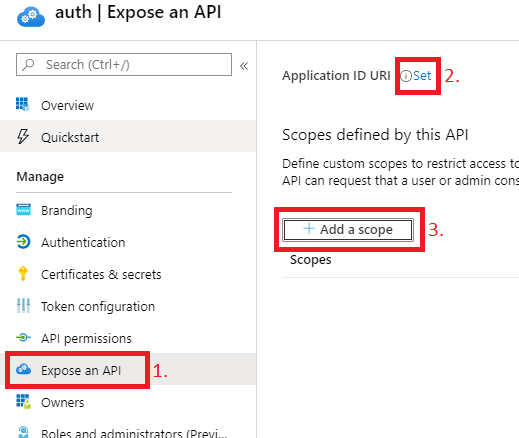
- Set the value of
accessTokenAcceptedVersionparameter in App Manifest to 2. - Now when you request an access token for this scope, it will be version 2.0 token.
 amanmcse
on 21 Apr 2020
amanmcse
on 21 Apr 2020
@jorgecarleitao I am closing the thread. Feel free to tag me in your reply if you have any further question.
amanmcse
on 22 Apr 2020
@amanmcse , thanks for the tip. That does not solve the issue that I raised: that just answered my question. The issue I raised is about having that documented on the official documentation, as I outlined on the initial thread:
However, there is no documentation on how to specifically ask for a v2.0 token by the client, or, alternatively, make the custom scope make the token be v2.0 by default.
It would be useful for that documentation to be available, or at least for it to point to another URL for it.
EDIT: if it is not clear, IMO adding to the documentation makes that information available to everyone.
jorgecarleitao
on 22 Apr 2020
@jorgecarleitao I will update the document. Thank you.
amanmcse
on 22 Apr 2020
Related issues
 behnam89
·
3Comments
behnam89
·
3Comments
 Ponant
·
3Comments
Ponant
·
3Comments
 bityob
·
3Comments
bityob
·
3Comments
 paulmarshall
·
3Comments
paulmarshall
·
3Comments
 spottedmahn
·
3Comments
spottedmahn
·
3Comments