Azure-docs: Managed Identity for App Service Slots
There is an Identity Menu item and page to enable System Assigned, however if the slot is named something generic such as dev, staging etc...Tracing it in Azure AD or configure its roles is not possible.
Document Details
⚠ Do not edit this section. It is required for docs.microsoft.com ➟ GitHub issue linking.
- ID: f57d3177-ce9e-ebfa-03a7-45beb8ca3212
- Version Independent ID: a59df23d-f3ac-9809-61d3-5741e31f020a
- Content: Managed identities - Azure App Service
- Content Source: articles/app-service/overview-managed-identity.md
- Service: app-service
- GitHub Login: @mattchenderson
- Microsoft Alias: mahender
 finsharp
All 6 comments
@finsharp, Thanks for the question! We are taking a look into this and will get back to you soon.
 AjayKumar-MSFT
on 1 Apr 2020
AjayKumar-MSFT
on 1 Apr 2020
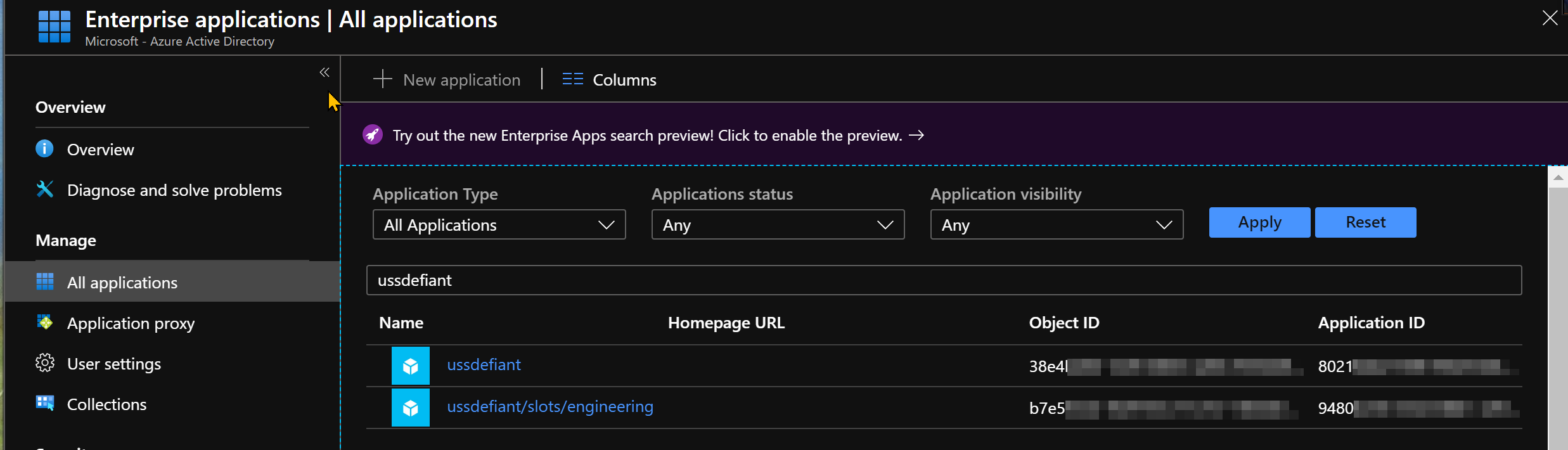
Can you elaborate further on what you're attempting to trace @finsharp? I successfully added a managed identity to a web and slot apps and can see those identities in Enterprise Applications.
 RyanHill-MSFT
on 2 Apr 2020
RyanHill-MSFT
on 2 Apr 2020
@RyanHill-MSFT I didn't know managed identity for slots would be [webAppName]/slots/[slotName]. As such I couldn't find the slot. Thanks :-)
Can you search by ObjectID? Is that available?
finsharp
on 6 Apr 2020
@RyanHill-MSFT after enabling the system managed identity for the azure staging web app. I couldn't able to see that in the enterprise application! In your screenshot, you can able to see that
May I know why is that for working for me? Do I need to wait for more time to reflect in the azure ad?
 jayendranarumugam
on 14 Jun 2020
jayendranarumugam
on 14 Jun 2020
@jayendranarumugam I wanted to follow up to see if your system identities ever showed up?
RyanHill-MSFT
on 30 Jun 2020
Hi @RyanHill-MSFT thanks for the replay. It showed up after some time. Maybe we need to wait for couple of hours to reflect back in the enterprise application
jayendranarumugam
on 30 Jun 2020
Related issues
 ianpowell2017
·
3Comments
ianpowell2017
·
3Comments
 mrdfuse
·
3Comments
mrdfuse
·
3Comments
 bityob
·
3Comments
bityob
·
3Comments
 Agazoth
·
3Comments
Agazoth
·
3Comments
 JeffLoo-ong
·
3Comments
JeffLoo-ong
·
3Comments
Most helpful comment
Can you elaborate further on what you're attempting to trace @finsharp? I successfully added a managed identity to a web and slot apps and can see those identities in Enterprise Applications.