Azure-docs: Excel (Business) step - Add row to table - expression file path not working
Hello,
I tried to find documentation in the subject but fell short until now.
I am trying to use Logic Apps in order to update a table when a trigger occurs.
I have two different tables and the path to those two tables are in the trigger.
I am using an Expression in the path to "File" instead of manually clicking to get to this path and so that depending on the trigger, the app knows whether to go in file1 or in file2.
_Can we use Expression to access a file and if yes could I have an example?_
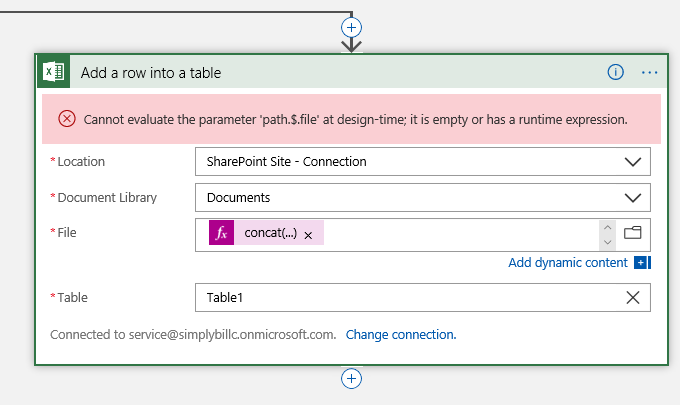
UPDATE
realizing that the "manual way" gets the ID of the folder instead of the path, I have tried with a dynamic way to get:
1) the path to the file => not working
2) the id of the file => not working
Help would be appreciated.
Thank you,
Renaud
 sbi-rviot
All 4 comments
@sbi-rviot Thank you for the valuable feedback,we are investigating the issue.
 AdamS-MSFT
on 14 Aug 2019
AdamS-MSFT
on 14 Aug 2019
@Adam-Smith-MSFT , do you need more details in order to help?
I realize that the "manual way" gets the ID of the folder instead of the path, when I am dynamically writing the path.
Nonetheless, for my flow, writing the path would solve my issue.
Thank you again.
sbi-rviot
on 16 Aug 2019
Hi @sbi-rviot - It's likely your expression in the File field isn't evaluating as string value as per its reference doc - did you review your Run History to see if the expression is being evaluated into that string value that points to valid excel file?
Since this channel is for driving improvements for MS Docs, I request that you open a thread on MSDN forums for your question (with a screenshot of your Run History, omit any private info) and tag me here with its URL so that I can be notified and make sure your thread gets answered.
We will now proceed to close this thread for now. If there are any questions regarding specific MS Docs, please reopen it and we will gladly continue the discussion.
 mike-urnun-msft
on 20 Aug 2019
mike-urnun-msft
on 20 Aug 2019
ok!
I found the solution. but thank you!
sbi-rviot
on 20 Aug 2019
Related issues
 AronT-TLV
·
3Comments
AronT-TLV
·
3Comments
 ianpowell2017
·
3Comments
ianpowell2017
·
3Comments
 DeepPuddles
·
3Comments
DeepPuddles
·
3Comments
 jamesgallagher-ie
·
3Comments
jamesgallagher-ie
·
3Comments
 behnam89
·
3Comments
behnam89
·
3Comments