Azure-docs: 403 Unauthorized Patient Postman Tutorial
I have been following the tutorial here: https://docs.microsoft.com/en-gb/azure/healthcare-apis/access-fhir-postman-tutorial
I have set up the OSS version of FHIR.
I seem to be able to successfully get a token via postman however when I query the /Patient endpoint I get an 403 error.
{
"resourceType": "OperationOutcome",
"id": "18b62608-e7ee-4b67-86db-7d5f3f8e7854",
"issue": [
{
"severity": "error",
"code": "forbidden",
"diagnostics": "Authorization failed."
}
]
}
Any suggestions would be greatly appreciated.
Document details
⚠ Do not edit this section. It is required for docs.microsoft.com ➟ GitHub issue linking.
- ID: a9d1459d-b21b-7a56-d484-50c20a95c628
- Version Independent ID: 9adb2b55-d08f-aa34-7d6f-5fa87e1603ae
- Content: Postman FHIR server in Azure tutorial - Azure API for FHIR
- Content Source: articles/healthcare-apis/access-fhir-postman-tutorial.md
- Service: healthcare-apis
- Sub-service: fhir
- GitHub Login: @hansenms
- Microsoft Alias: mihansen
 GlenQu
All 20 comments
Please verify that the object id (token claim oid) is in the list of allowed object ids for the service:
More information here:
https://docs.microsoft.com/en-us/azure/healthcare-apis/find-identity-object-ids
 hansenms
on 6 Aug 2019
hansenms
on 6 Aug 2019
Thanks for your response. Is this true for the open source version? it was my understanding this just applied to the Fully Managed Azure API for FHIR®.
GlenQu
on 6 Aug 2019
In the OSS server, you need to make sure that you have the right app roles. You have to configure which roles have which privileges and then ensure that your user or service principal has those app roles.
hansenms
on 6 Aug 2019
Perfect. I am now able to access. Thanks for your help.
GlenQu
on 7 Aug 2019
I have the same issue using the Azure API for FHIR even though I was successful in getting an access token.
 dikokob
on 5 Nov 2019
dikokob
on 5 Nov 2019
What is the error message you are seeing? Do you get a 401 or a 403? What response headers do you see?
hansenms
on 5 Nov 2019
@hansenms just sorted it out.
Had to Register a resource application since I enabled Smart On FHIR proxy. Thanks
dikokob
on 5 Nov 2019
Hi, I have the same issue (403 Forbidden - Authorization failed.) using the Azure API for FHIR with Postman.
I can successfully query the FHIR endpoints only using the Access Token obtained using the administration login.
Using Access Token for other accounts, assigned to particular roles (https://docs.microsoft.com/en-gb/azure/active-directory/manage-apps/methods-for-assigning-users-and-groups) in the app context, I can't get any FHIR resources.
what am I doing wrong? Thanks
 Ap0lli0n
on 18 Feb 2020
Ap0lli0n
on 18 Feb 2020
A 403 is usually an indication that the user/principal on who's behalf the token was issues is not in the list of allowed object IDs. Please inspect the token (e.g. with https://jwt.ms) and check the oid claim of the token. The object id had to be in the list of allowed object ids.
https://docs.microsoft.com/en-us/azure/healthcare-apis/find-identity-object-ids
hansenms
on 18 Feb 2020
Thank you @hansenms. The oid value in the token is equal to the logged user oid, adding it to the list of allowed object ids (in the Authentication panel of Azure API for FHIR) Postman works properly.
But, should I really add all the user's oids in that list? What better way to do it? Would it be possible to add groups of users?
Thanks
Ap0lli0n
on 19 Feb 2020
We don't support group oids (yet) in this system. We will though in the not so distant future. But for now individual users have to be added. I will close this out, since it seems to be resolved.
please-close
hansenms
on 19 Feb 2020
I am facing the issue of 403 Forbidden through postman tutorial when trying to access /Patient resource.
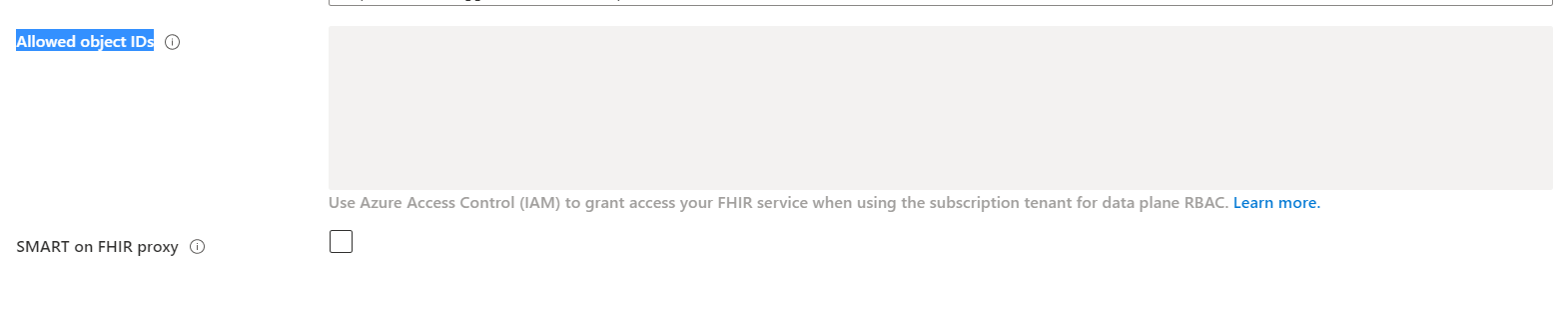
In my audience i have added a valid URI and Allowed Object IDs is disabled. Token is also getting generated successfully through postman.
Below is the Authentication Setting
Authority: https://login.microsoftonline.com/XXXXXXXXXXXXXXXX
Audience: https://XXXXXXXX.azurehealthcareapis.com
Allowed Object IDs: diabled
note: Use Azure Access Control (IAM) to grant access your FHIR service when using the subscription tenant for data plane RBAC.
SMART on FHIR proxy: unchecked
{
"resourceType": "OperationOutcome",
"id": "ee7e49d7d4cf234381f938e8d1570f5b",
"issue": [
{
"severity": "error",
"code": "forbidden",
"diagnostics": "Authorization failed."
}
]
}
 swapnilbjadhav
on 27 May 2020
swapnilbjadhav
on 27 May 2020
As noted on your other comment, you need to use Azure RBAC to assign a role to the user or principal accessing the service.
https://docs.microsoft.com/en-us/azure/healthcare-apis/configure-azure-rbac
hansenms
on 27 May 2020
@hansenms It works for me when i provide the Object Id of the User(Admin). But i have created a Service Principal with the same User and i am passing the Object Id of Service Principal in the Allowed Object Ids textarea of Azure FHIR API and it doesn't get's authorized hence 403 issue.
swapnilbjadhav
on 16 Jun 2020
Nice! After adding the 'FHIR Data Contributor' role it works. Someone should add this to the docs.
 divurgentuser
on 26 Jun 2020
divurgentuser
on 26 Jun 2020
Hi, I have the same issue (403 Forbidden - Authorization failed.) using the Azure API for FHIR with Postman. I am able to get access token but when I hit /Patient end point I am getting 403 forbidden Authorization failed error...
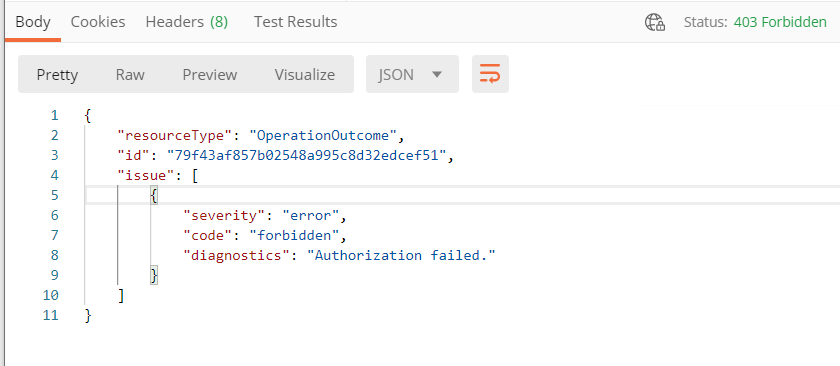
I am unable to add object id to the "Allowed object IDs" in FHIR, it is grayed out.
I also tried adding "FHIR Data Contributor" role to Azure FHIR service still no luck.

can someone help me on this?
 prashanthvenumula
on 2 Jul 2020
prashanthvenumula
on 2 Jul 2020
Please check your token and make sure that the oid claim of the token corresponds to that client you have added and also verify that you are indeed running in Azure RBAC mode (and not local RBAC mode). See https://docs.microsoft.com/en-us/azure/healthcare-apis/configure-azure-rbac#confirm-azure-rbac-mode
Finally, commenting on closed issues is tricky. We often miss those, so if you have an issue, please open a new one.
hansenms
on 2 Jul 2020
Sorry for commenting here, Yes I am using Azure RBAC mode only(not local RBAC), I observed oid in my token is not the object id of my client, Can I know how can add my object id as oid in the token?
prashanthvenumula
on 3 Jul 2020
You need to add the user, if that is you, then your user, to the list of FHIR Data Contributors. In your screenshot, you have added your client application, not the user getting the token.
hansenms
on 3 Jul 2020
Thank you so much its working after adding my self as FHIR Data Contributor... Thank you again :)
prashanthvenumula
on 3 Jul 2020
Related issues
 JeffLoo-ong
·
3Comments
JeffLoo-ong
·
3Comments
 monteledwards
·
3Comments
monteledwards
·
3Comments
 jebeld17
·
3Comments
jebeld17
·
3Comments
 jharbieh
·
3Comments
jharbieh
·
3Comments
 ianpowell2017
·
3Comments
ianpowell2017
·
3Comments