Azure-docs: Container Live Stream Authentication Issue
Up until late last week the container live stream functionality has been working great on my 3 AKS clusters. I believe in the last week something has changed and is impacting the AAD authentication in the AKS Insights Blade for Containers leveraging container live stream. Whenever it tries to authenticate me, it just continuously spins, downloads an auth.html file, and never comes back.
I have updated my AAD client application based on the new documentation updates to have the following reply url for my client object: https://afd.hosting.portal.azure.net/monitoring/Content/iframe/infrainsights.app/web/base-libs/auth/auth.html
Additionally allowed the implicitly grant Access tokens and ID tokens.
Any assistance would be greatly appreciated.
Document Details
⚠ Do not edit this section. It is required for docs.microsoft.com ➟ GitHub issue linking.
- ID: a113bacb-b999-8f0d-a66b-748e60e5c4d7
- Version Independent ID: d7766575-5ef8-4f9a-49e5-2dbd7696d18e
- Content: View Azure Monitor for containers logs in real time
- Content Source: articles/azure-monitor/insights/container-insights-live-logs.md
- Service: azure-monitor
- GitHub Login: @MGoedtel
- Microsoft Alias: magoedte
 Kenneth-Abrams
All 13 comments
Thanks for your comment. We are actively investigating and will get back to you shortly. Thanks for your patience.
 femsulu
on 12 Jun 2019
femsulu
on 12 Jun 2019
@Kenneth-Abrams - The changes published yesterday for setting up AAD were to align with changes implemented by Azure AD to remove insecure use of wildcards in URIs. Because your issue is not related to an actual doc issue, I suggest you open a support case to have it properly reviewed and triaged by one of our engineers. #please-close
 MGoedtel
on 12 Jun 2019
MGoedtel
on 12 Jun 2019
I have the same issue and it can be reproduced in any environment.
The URL specified in the article is incorrect, as per the article suggestion
Request Id: f2054eb4-441d-4370-8938-86438d0a2b00
Correlation Id: 843a6d68-24c5-4f13-b967-c13aeda04624
Timestamp: 2019-06-13T08:43:53Z
Message: AADSTS700054: response_type 'id_token' is not enabled for the application.
Advanced diagnostics: Enable
If you plan on getting support for an issue, turn this on and try to reproduce the error. This will collect additional information that will help troubleshoot the issue.
After adding implicitly grant Access tokens and ID tokens and the URI specified in the article:
another error shows up:
Request Id: 6a20e43e-cf9d-4f49-a1cc-dfb662fc2f00
Correlation Id: a4d902a7-fc4b-48aa-9f4e-f97e3396bbe6
Timestamp: 2019-06-13T08:45:05Z
Message: AADSTS50011: The reply url specified in the request does not match the reply urls configured for the application: '4de0c081-449b-4bc3-b4ad-ee0ac9169d3e'.
Advanced diagnostics: Enable
If you plan on getting support for an issue, turn this on and try to reproduce the error. This will collect additional information that will help troubleshoot the issue.
then it takes you to the URI and downloads auth.html
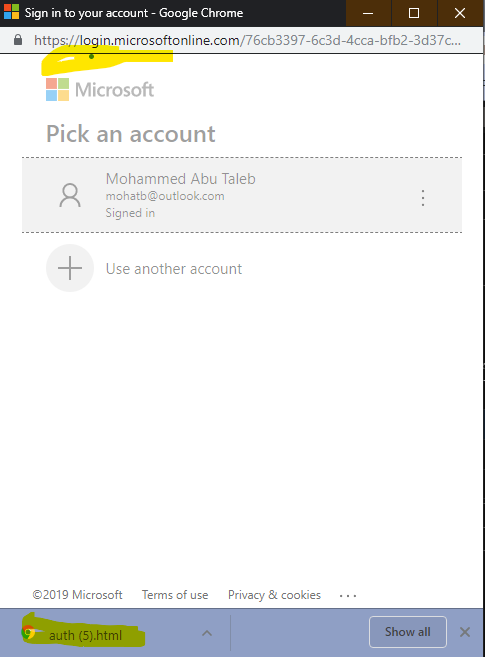
 mohatb
on 13 Jun 2019
mohatb
on 13 Jun 2019
@Kenneth-Abrams & @mohatb - Let me escalate this with the engineer who I worked with on this to get to the bottom of this problem. @femsulu - Please reopen this issue. Thanks.
MGoedtel
on 13 Jun 2019
@MGoedtel thanks I appreciate it. This should be much easier than support run around because is it an AKS issue, and Azure Monitor issue, and Azure AAD issue 😄. Either way I love what you guys do.
Kenneth-Abrams
on 13 Jun 2019
@bragi92
 vishiy
on 13 Jun 2019
vishiy
on 13 Jun 2019
@Kenneth-Abrams & @mohatb - Engineering has tracked down the underlying problem with a service dependency and and they are working to deploy a fix. I don't have an ETA but will update this issue once I have something concrete/confirmed. Thanks.
MGoedtel
on 13 Jun 2019
Should be fixed. Please ensure browser cache is cleared before trying out. Thanks.
vishiy
on 17 Jun 2019
@vishiy Is it really fixed? I tried it out today and I got the error message that the reply url by the app does not match the reply url provided in the request.
Finally, with some debugging and changing the url to https://monitoring.hosting.portal.azure.net/monitoring/Content/iframe/infrainsights.app/web/base-libs/auth/auth.html I got it working again.
Does the url has changed?
 neumanndaniel
on 11 Aug 2019
neumanndaniel
on 11 Aug 2019
@vishiy Is it really fixed? I tried it out today and I got the error message that the reply url by the app does not match the reply url provided in the request.
Finally, with some debugging and changing the url to
https://monitoring.hosting.portal.azure.net/monitoring/Content/iframe/infrainsights.app/web/base-libs/auth/auth.htmlI got it working again.Does the url has changed?
Same thing happened to me over the weekend, live streaming of the aks logs started failing auth with invalid reply url. Thanks @neumanndaniel, I was about to start debugging myself when I came across your response, updating / adding https://monitoring.hosting.portal.azure.net/monitoring/Content/iframe/infrainsights.app/web/base-libs/auth/auth.html resolved my issue as well.
 gvanderberg
on 12 Aug 2019
gvanderberg
on 12 Aug 2019
Thanks @neumanndaniel. Yes the URL was updated we've updated the docs to include both the monitoring. and afd. URL's in the AAD app.
 bragi92
on 15 Aug 2019
bragi92
on 15 Aug 2019
The (uri-decoded) redirect_uri in popup window looks like https://monitoring.hosting.portal.azure.net/monitoring/Content/iframe/infrainsights.app/web/base-libs/auth/auth.html&state=xxxx&prompt=select_account&client-request-id=xxxx&x-client-SKU=Js&x-client-Ver=1.0.17&nonce=xxxx, it still gives the error:
AADSTS50011: The reply url specified in the request does not match the reply urls configured for the application: xxxx
is there a workaround?
 am11
on 27 Nov 2019
am11
on 27 Nov 2019
Hi @am11 Did you try following the instructions mentioned here : https://docs.microsoft.com/en-us/azure/azure-monitor/insights/container-insights-livedata-setup#configure-ad-integrated-authentication
Is it still not working when you have https://monitoring.hosting.portal.azure.net/monitoring/Content/iframe/infrainsights.app/web/base-libs/auth/auth.html added as a base URL?
bragi92
on 4 Dec 2019
Related issues
 ianpowell2017
·
3Comments
ianpowell2017
·
3Comments
 JamesDLD
·
3Comments
JamesDLD
·
3Comments
 jamesgallagher-ie
·
3Comments
jamesgallagher-ie
·
3Comments
 monteledwards
·
3Comments
monteledwards
·
3Comments
 jebeld17
·
3Comments
jebeld17
·
3Comments
Most helpful comment
@vishiy Is it really fixed? I tried it out today and I got the error message that the reply url by the app does not match the reply url provided in the request.
Finally, with some debugging and changing the url to
https://monitoring.hosting.portal.azure.net/monitoring/Content/iframe/infrainsights.app/web/base-libs/auth/auth.htmlI got it working again.Does the url has changed?