At present, the only way to migrate a database from Hyperscale to non-Hyperscale is to export/import using a BACPAC file
There is no "Export" button in Portal, it is so scary to migrate because if for any reason database is dropped from the Azure, we loose all the data, there is no statement about how to restore if logical server was deleted.
Document Details
⚠ Do not edit this section. It is required for docs.microsoft.com ➟ GitHub issue linking.
- ID: 80e91c6d-6b32-5f29-a604-9a7857ed920c
- Version Independent ID: bd7b284c-9cc5-c656-875b-d9b72568cb2e
- Content: Azure SQL Database Hyperscale Overview
- Content Source: articles/sql-database/sql-database-service-tier-hyperscale.md
- Service: sql-database
- GitHub Login: @stevestein
- Microsoft Alias: sstein
 ackava
All 19 comments
@ackava Thanks for the question! We will check on this issue and get back to you soon.
 SadiqhAhmed-MSFT
on 16 May 2019
SadiqhAhmed-MSFT
on 16 May 2019
@ackava Could you please confirm, whether the concern here is no "Export" button in Portal or can we restore hyperscale SQL database.
If the concern is about restoring the hyperscale SQL database. You can refer Backup and Restore URL for Hyperscale.
If the problem is with Export button, i'll check the same and confirm.
Hope it helps.
 angoyal-msft
on 21 May 2019
angoyal-msft
on 21 May 2019
I did get help from tech support on how to export backup with SSMS, but there is no export button in the portal.
ackava
on 21 May 2019
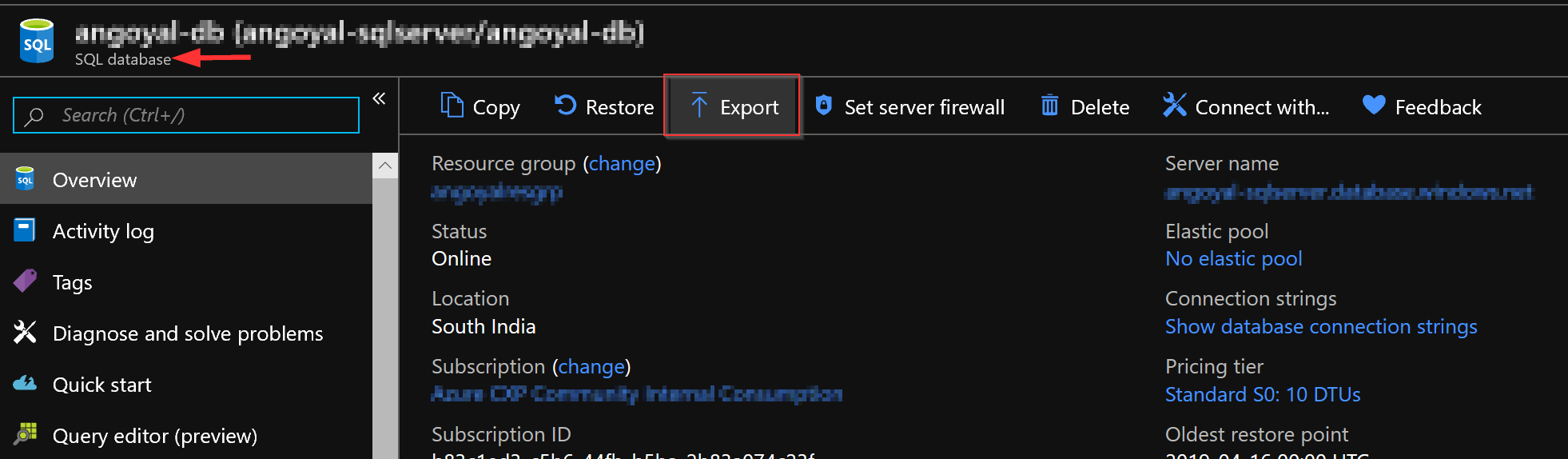
@ackava For the specific database you wish to have exported, there is an Export button. Please ensure you are looking at the Database in the portal and not the SQL Server.
 Mike-Ubezzi-MSFT
on 21 May 2019
Mike-Ubezzi-MSFT
on 21 May 2019
We will now proceed to close this thread. If there are further questions regarding this matter, please comment and we will gladly continue the discussion.
Mike-Ubezzi-MSFT
on 21 May 2019
@Mike-Ubezzi-MSFT
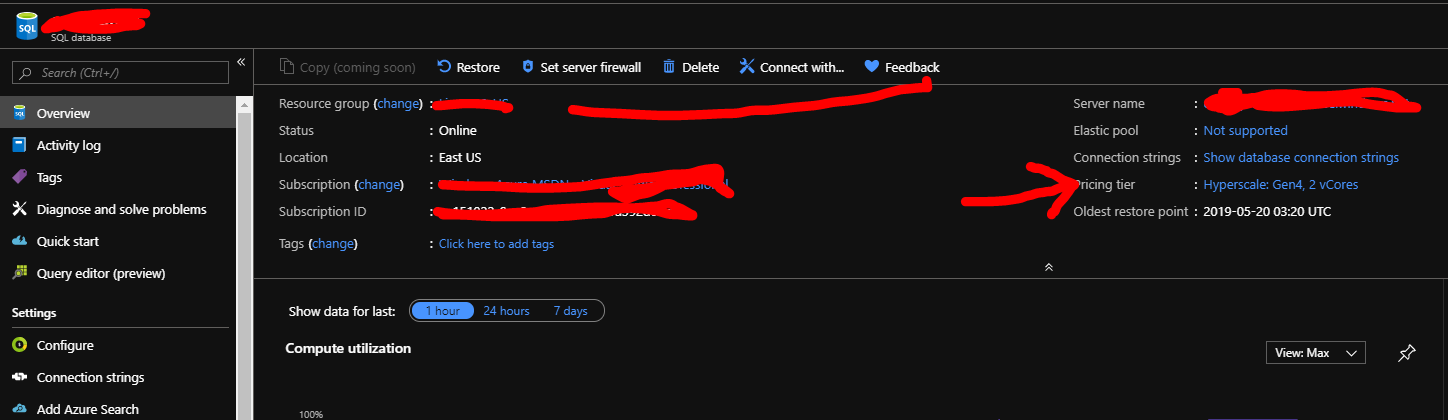
There is no export button for hyperscale tier,
ackava
on 22 May 2019
@Mike-Ubezzi-MSFT @SadiqhAhmed-MSFT Hyperscale DB is still missing the backup button in the portal.
 juho-hanhimaki
on 28 May 2019
juho-hanhimaki
on 28 May 2019
@juho-hanhimaki @SadiqhAhmed-MSFT The Hyperscale deployment option (Link) has a different back-up mechanism:
- Nearly instantaneous database backups (based on file snapshots stored in Azure Blob storage) regardless of size with no IO impact on Compute
Please also see Backup and restore (Link)
Mike-Ubezzi-MSFT
on 28 May 2019
Additional information in the Known Limitations (Link):
- You cannot restore a Hyperscale database into a non-Hyperscale database, nor can you restore a non-Hyperscale database into a Hyperscale database.
Mike-Ubezzi-MSFT
on 28 May 2019
At present, the only way to migrate a database from Hyperscale to non-Hyperscale is to export/import using a BACPAC file.
https://docs.microsoft.com/en-us/azure/sql-database/sql-database-service-tier-hyperscale#known-limitations
Export button should still be there to help export the BACPAC file to blob storage. But i guess there are other methods available to generate the BACBAC file.
juho-hanhimaki
on 28 May 2019
@juho-hanhimaki I am seeing different information that indicates that operation is not supported, as the full text reads:
Migration to Hyperscale is currently a one-way operation
Once a database is migrated to Hyperscale, it cannot be migrated directly to a non-Hyperscale service tier. At present, the only way to migrate a database from Hyperscale to non-Hyperscale is to export/import using a BACPAC file.
So, investigating Product Issue versus Doc Bug.
Mike-Ubezzi-MSFT
on 28 May 2019
@stevestein and @CarlRabeler There appears to be some contradictory information and looking for clarification.
Mike-Ubezzi-MSFT
on 28 May 2019
@juho-hanhimaki export to a bacpac is supported. The comment about migration to the hyperscale service tier being a one-way operation is referring to changing it to a different service tier - it is not referring to exporting the data itself.
@stevestein
 CarlRabeler
on 28 May 2019
CarlRabeler
on 28 May 2019
Then, the .bacpac export would need to be initiated either via SSMS (Link) or PowerShell (Link).
The issue is that the export button is missing from the Azure Portal.
Mike-Ubezzi-MSFT
on 28 May 2019
@Mike-Ubezzi-MSFT This is a product bug rather than a documentation bug - please re-assign appropriately.
CarlRabeler
on 28 May 2019
@juho-hanhimaki @ackava This is being reported and tracked internally. We will now proceed to close this thread. If there are further questions regarding this matter, please comment and we will gladly continue the discussion.
Mike-Ubezzi-MSFT
on 29 May 2019
Then, the .bacpac export would need to be initiated either via SSMS (Link) or PowerShell (Link).
The issue is that the export button is missing from the Azure Portal.
PowerShell shows this error:
New-AzSqlDatabaseExport: 40822: This feature is not available for the selected database's edition (Hyperscale).
 nandun5
on 23 Jun 2020
nandun5
on 23 Jun 2020
@nandun5 Yes, with Hyperscale the export functionality is not available at this time. It has to do with the distributed functions architecture and with storage based file-snapshot as the method for backups, the export functionality is disabled.
Mike-Ubezzi-MSFT
on 23 Jun 2020
@Mikie : In the above thread , it was commented that SQL Hyperscale can be exported using SSMS. Is that true ? OR there is no ways by which SQL Hyperscale DB can be changed to non-hyperscale SQL DB or SQL server running on a VM
 FretzNuson
on 8 Jul 2020
FretzNuson
on 8 Jul 2020
Related issues
 ianpowell2017
·
3Comments
ianpowell2017
·
3Comments
 spottedmahn
·
3Comments
spottedmahn
·
3Comments
 paulmarshall
·
3Comments
paulmarshall
·
3Comments
 bdcoder2
·
3Comments
bdcoder2
·
3Comments
 monteledwards
·
3Comments
monteledwards
·
3Comments