Azure-docs: Error 400 when deploying to STANDARD_PB6s
Error 400 when deploying to PBS
Hello All,
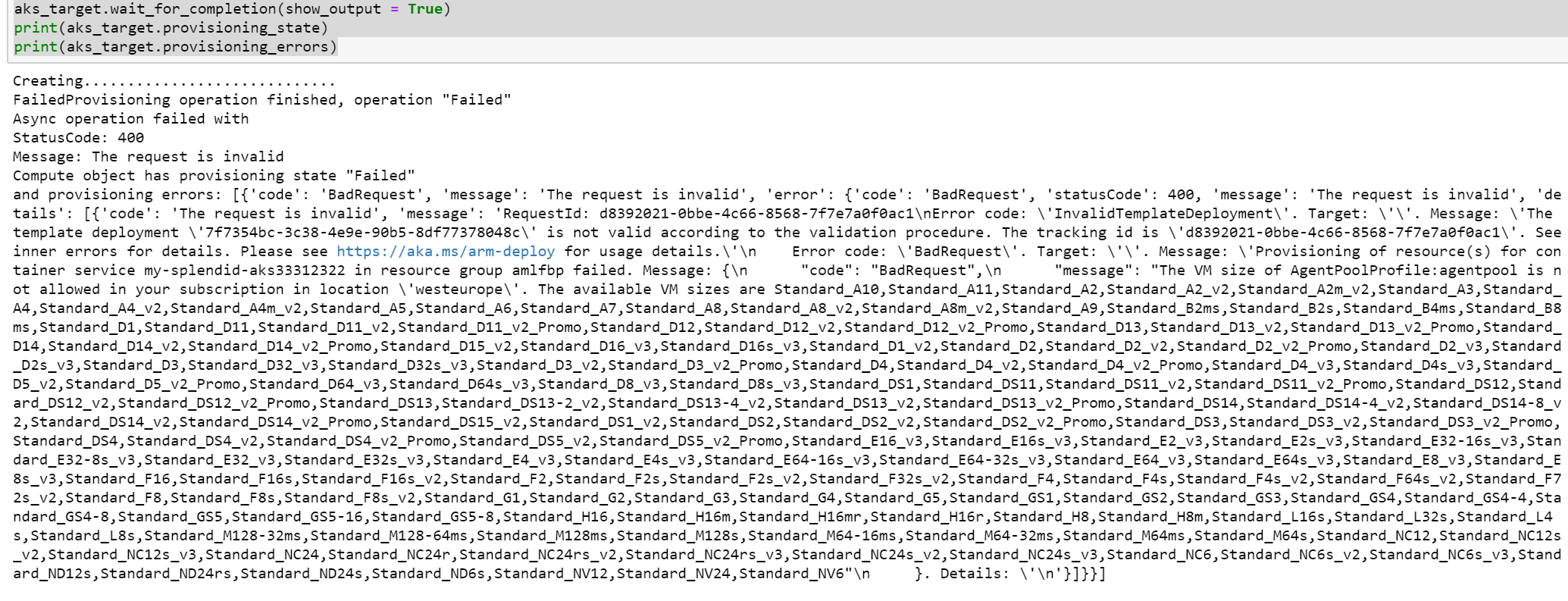
I have an issue when trying to deploy to FPGA while trying to follow the documentation .
It seems that azureml client does not list STANDARD_PB6s as a possible VM type.
I am working on azure notebooks, tried to pip install --upgrade both azureml-sdk and azureml-accel-models, and tried to switch to eastus as well.
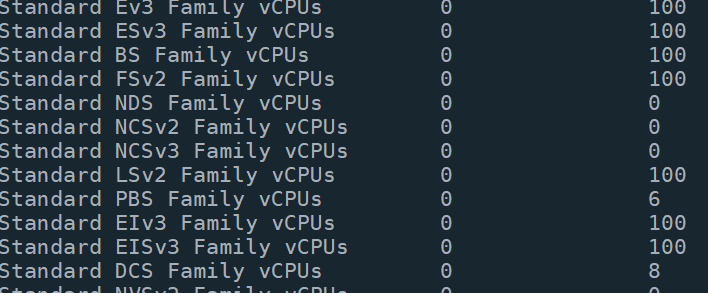
What is surprising, the PBS family appears correctly in the list of quotas.
 AleksCallebat
All 13 comments
@AleksCallebat Thanks for the Comment. We are actively investigating and will get back to you soon.
 SadiqhAhmed-MSFT
on 16 May 2019
SadiqhAhmed-MSFT
on 16 May 2019
Similar Issue- Failed to create vm_size = "Standard_PB6s".
from azureml.core.compute import AksCompute, ComputeTarget
prov_config = AksCompute.provisioning_configuration(vm_size = "Standard_PB6s",
agent_count = 1)
aks_name = 'my-aks-cluster'
aks_target = ComputeTarget.create(workspace = ws,
name = aks_name,
provisioning_configuration = prov_config)
 vrishni
on 21 May 2019
vrishni
on 21 May 2019
@AlekseiPolkovnikov This may be a quota issue for the FPGA SKU. Please send me an email at [email protected] with your Azure Subscription ID, the region you are trying to deploy and the URL of this thread. We would like to work with you. Thanks
 ram-msft
on 22 May 2019
ram-msft
on 22 May 2019
@AlekseiPolkovnikov We will now proceed to close this thread. If there are further questions regarding this matter, please tag me in your reply. We will gladly continue the discussion and we will reopen the issue.
ram-msft
on 24 May 2019
Hi!
I am facing the same issue. Trying to follow the quickstart notebook (https://github.com/Azure/MachineLearningNotebooks/blob/master/how-to-use-azureml/deployment/accelerated-models/accelerated-models-quickstart.ipynb).
I get the same 400 Bad request error when trying to deploy the an Image to Standard_PB6s.
My subscription is: Free Trial
ML worskapce location: East US 2
@ram-msft Should I send an email as well?
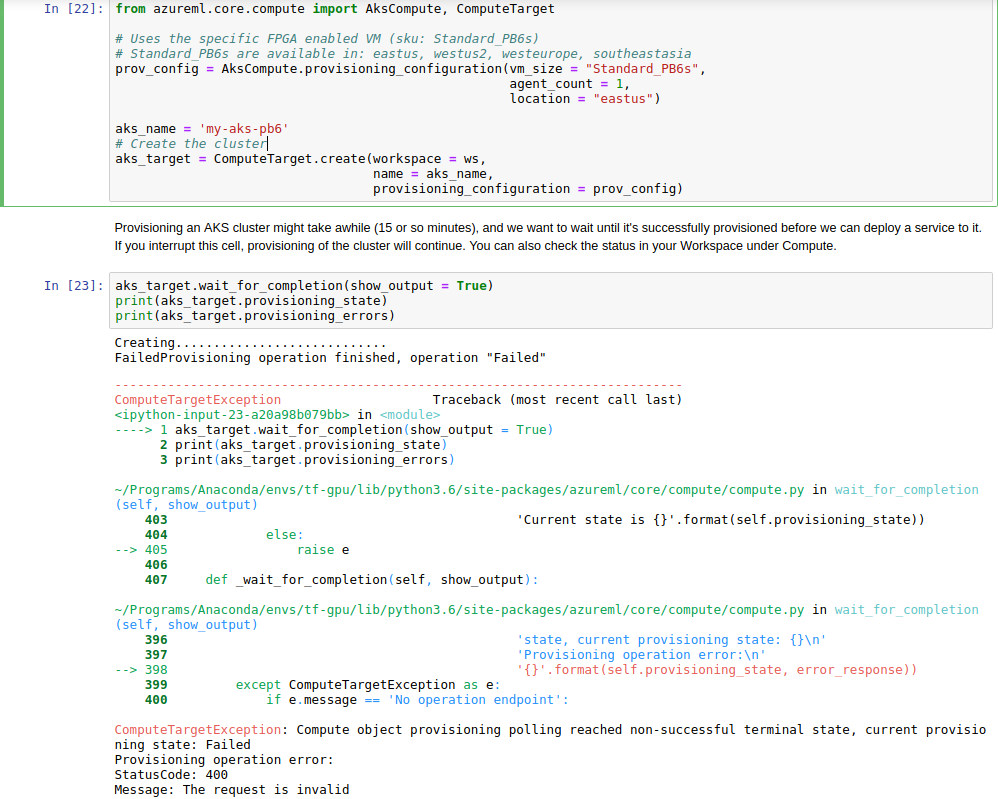
I get the same error as mentioned above:
RequestId: 95a976d1-2c40-4854-b437-bddb947f4b82 Error code: 'InvalidTemplateDeployment'. Target: ''. Message: 'The template deployment '1fad51b5-fe83-4e2e-8b25-800f3d84e82d' is not valid according to the validation procedure. The tracking id is '95a976d1-2c40-4854-b437-bddb947f4b82'. See inner errors for details. Please see https://aka.ms/arm-deploy for usage details.' Error code: 'BadRequest'. Target: ''. Message: 'Provisioning of resource(s) for container service my-aks-pb60f3138739c1 in resource group demo-rg failed. Message: { "code": "BadRequest", "message": "The VM size of AgentPoolProfile:agentpool is not allowed in your subscription in location 'eastus'. The available VM sizes are Standard_A10,Standard_A11,Standard_A2,Standard_A2_v2,Standard_A2m_v2,Standard_A3,Standard_A4,Standard_A4_v2,Standard_A4m_v2,Standard_A5,Standard_A6,Standard_A7,Standard_A8,Standard_A8_v2,Standard_A8m_v2,Standard_A9,Standard_B2ms,Standard_B2s,Standard_B4ms,Standard_B8ms,Standard_D1,Standard_D11,Standard_D11_v2,Standard_D12,Standard_D12_v2,Standard_D13,Standard_D13_v2,Standard_D14,Standard_D14_v2,Standard_D15_v2,Standard_D16_v3,Standard_D16s_v3,Standard_D1_v2,Standard_D2,Standard_D2_v2,Standard_D2_v3,Standard_D2s_v3,Standard_D3,Standard_D32_v3,Standard_D32s_v3,Standard_D3_v2,Standard_D4,Standard_D4_v2,Standard_D4_v3,Standard_D4s_v3,Standard_D5_v2,Standard_D64_v3,Standard_D64s_v3,Standard_D8_v3,Standard_D8s_v3,Standard_DS11_v2,Standard_DS12_v2,Standard_DS13-2_v2,Standard_DS13-4_v2,Standard_DS13_v2,Standard_DS14-4_v2,Standard_DS14-8_v2,Standard_DS14_v2,Standard_DS15_v2,Standard_DS1_v2,Standard_DS2_v2,Standard_DS3_v2,Standard_DS4_v2,Standard_DS5_v2,Standard_E16_v3,Standard_E16s_v3,Standard_E2_v3,Standard_E2s_v3,Standard_E32-16s_v3,Standard_E32-8s_v3,Standard_E32_v3,Standard_E32s_v3,Standard_E4_v3,Standard_E4s_v3,Standard_E64-16s_v3,Standard_E64-32s_v3,Standard_E64_v3,Standard_E64s_v3,Standard_E8_v3,Standard_E8s_v3,Standard_F16,Standard_F16s,Standard_F2,Standard_F2s,Standard_F4,Standard_F4s,Standard_F8,Standard_F8s,Standard_H16,Standard_H16m,Standard_H16mr,Standard_H16r,Standard_H8,Standard_H8m,Standard_M128-32ms,Standard_M128-64ms,Standard_M128ms,Standard_M128s,Standard_M64-16ms,Standard_M64-32ms,Standard_M64ms,Standard_M64s,Standard_NC12s_v2,Standard_NC12s_v3,Standard_NC24rs_v2,Standard_NC24rs_v3,Standard_NC24s_v2,Standard_NC24s_v3,Standard_NC6s_v2,Standard_NC6s_v3,Standard_ND12s,Standard_ND24rs,Standard_ND24s,Standard_ND6s" }. Details: '
 grofattila
on 1 Jun 2019
grofattila
on 1 Jun 2019
@grofattila Yes, Please send an email with subscription id and the above mentioned details.
ram-msft
on 3 Jun 2019
If you are not able to deploy, please fill out a request form here with your subscription ID and region you want to deploy to: https://aka.ms/accelerateAI
Some subscription IDs may need to be added to an allowed list, even though they may already have quota.
Thanks!
 tedway
on 3 Jun 2019
tedway
on 3 Jun 2019
@tedway This issue happened to me too. Could we update the Azure docs to have this information so that the customers get less confused with the error? Thank you!
Some subscription IDs may need to be added to an allowed list, even though they may already have quota. If you are not able to deploy, please fill out a request form here with your subscription ID and region you want to deploy to: https://aka.ms/accelerateAI
 loomlike
on 6 Feb 2020
loomlike
on 6 Feb 2020
@loomlike sorry you're hitting this error. It is in the doc you linked to (kind of buried, I know), but please let me know if there's a place you think would be easier to find.
tedway
on 6 Feb 2020
@tedway I found why I missed that.
Current doc says:
Make sure you have at least 6 vCPUs under CurrentValue.
If you do not have quota, then submit a request at https://aka.ms/accelerateAI.
But I just compared my output and the doc which was exactly the same.
CurrentValue    Limit    LocalName
--------------  -------  -------------------------
0               6        Standard PBS Family vCPUs
Sorry for the confusion... Maybe changing "CurrentValue" in the example to be 6 better to identify my issue? Because the current example shows 0 available resources, yet it goes on to the next steps as if there is no issue.
Btw, I submitted the request. Will I get the followup emails or how can I check the request status?
Thank you!
loomlike
on 7 Feb 2020
Ahh, I see, thanks for the clarification! We'll need to update the docs.
tedway
on 10 Feb 2020
Hi,
Is this solution still works. I am also facing the same issue but when I raise the support request they said PB6s was not available in Azure.
 NSVR57
on 15 Oct 2020
NSVR57
on 15 Oct 2020
@loomlike is this problem resolved?. are you able to use pb6s family?
NSVR57
on 15 Oct 2020
Related issues
 Ponant
·
3Comments
Ponant
·
3Comments
 ianpowell2017
·
3Comments
ianpowell2017
·
3Comments
 bdcoder2
·
3Comments
bdcoder2
·
3Comments
 JeffLoo-ong
·
3Comments
JeffLoo-ong
·
3Comments
 varma31
·
3Comments
varma31
·
3Comments