Azure-docs: The created image is referenced as "non-supporting cloud init"
Hi there
I followed this procedure.
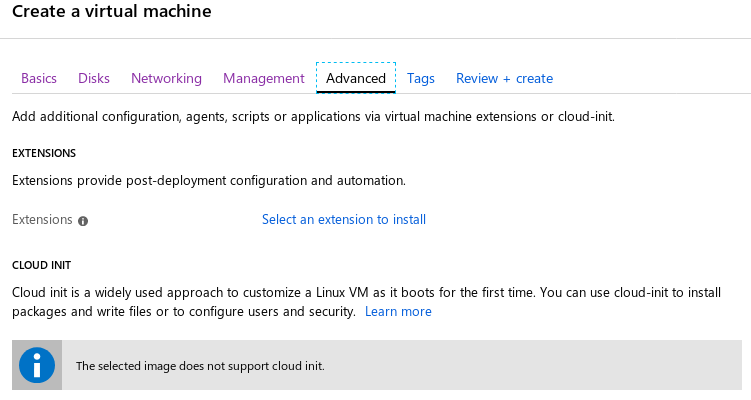
Yet when I use the create image on the portal wizard, it states "The selected image does not support cloud init." in the "Advanced tab" of the creation wizard.
It works when provisioning from the CLI, yet my goal here is to expose this possibility in the portal. How to achieve this ? Is there some kind of metadata I could add on the image in some way ?
Document Details
⚠ Do not edit this section. It is required for docs.microsoft.com ➟ GitHub issue linking.
- ID: 2821df0b-e273-692f-aa09-028b6f942a9e
- Version Independent ID: a0b698f8-fb2c-5e5c-8b00-936f723df5cc
- Content: Prepare Azure VM image for use with cloud-init
- Content Source: articles/virtual-machines/linux/cloudinit-prepare-custom-image.md
- Service: virtual-machines-linux
- GitHub Login: @danis
- Microsoft Alias: danis
 duckie
All 23 comments
Thanks for the feedback! We are currently investigating and will update you shortly.
 Karishma-Tiwari-MSFT
on 10 May 2019
Karishma-Tiwari-MSFT
on 10 May 2019
@duckie Can you please share which specific Azure VM image are you using to enable cloud-init?
Also, please provide the link to the documentation, if you are following any, for steps you are taking on Azure portal. If not, screenshots will be helpful to understand it better.
Karishma-Tiwari-MSFT
on 15 May 2019
@duckie Is there any update?
Karishma-Tiwari-MSFT
on 16 May 2019
Hello,
I'm experiencing the same issue.
I can provision a Virtual Machine from the CLI using the --custom-data parameter (and it works), but when I use the portal, my image is stated not compatible with cloud-init.
My image is built on top of OpenLogic Centos 7.6.
Here is my waagent.conf:
Provisioning.Enabled=n
Provisioning.UseCloudInit=y
ResourceDisk.Format=y
ResourceDisk.Filesystem=ext4
ResourceDisk.MountPoint=/mnt/resource
ResourceDisk.EnableSwap=n
ResourceDisk.SwapSizeMB=0
ResourceDisk.MountOptions=None
Logs.Verbose=n
OS.RootDeviceScsiTimeout=300
OS.OpensslPath=None
OS.SshDir=/etc/ssh
OS.EnableFirewall=n
 mgraff
on 17 May 2019
mgraff
on 17 May 2019
Hello @Karishma-Tiwari-MSFT
I am using OpenLogic:CentOS-CI:7-CI:latest
Best
duckie
on 20 May 2019
@duckie @mgraff Also, please provide the link to the documentation, if you are following any, for steps you are taking on Azure portal. If not, screenshots will be helpful to me to understand it better, to be able to reproduce it and share with the product team.
Karishma-Tiwari-MSFT
on 20 May 2019
Hello @Karishma-Tiwari-MSFT,
Here is the command to provision from the CLI with custom data (cloud-init.txt) :
az vm create --resource-group cloudinittest --name cloudinittest --image OpenLogic:CentOS-CI:7-CI:latest --admin-username cloud-user --admin-password "my_password" --custom-data cloud-init.txt
When provisionning the same image from the portal, we cannot add custom data because the portail says "The selected image does not support cloud-init" (which obviously is not true) :
mgraff
on 21 May 2019
@mgraff answered for me, I do the same.
duckie
on 21 May 2019
Thanks @mgraff @duckie for sharing the details. Let me investigate the issue and get back to you on this.
Karishma-Tiwari-MSFT
on 22 May 2019
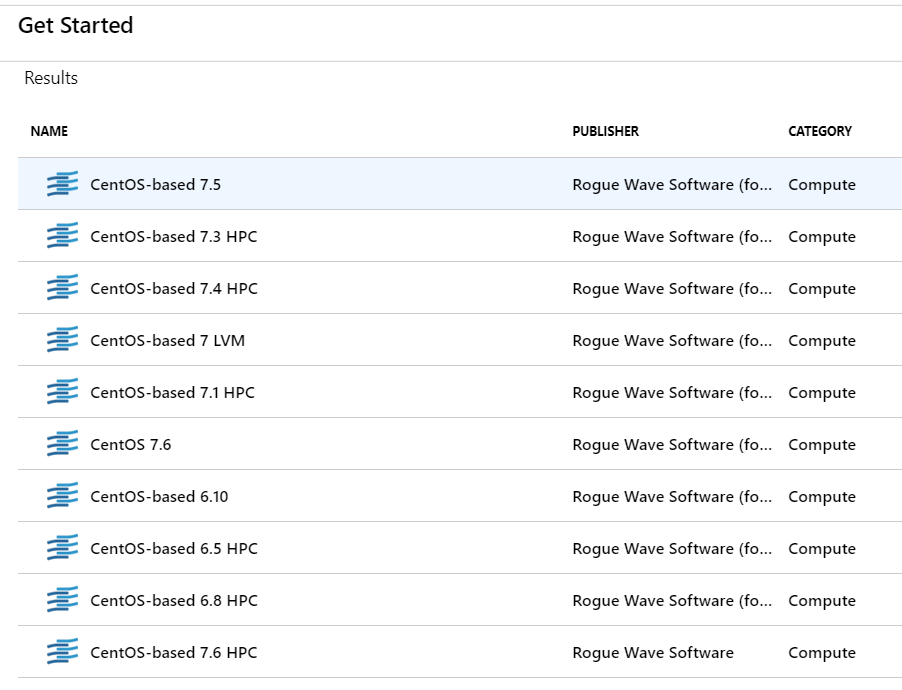
@mgraff @duckie I am also seeing 'The selected image does not support cloud init.' when I choose one of these marketplace images, for example, CentOS 7.6
I am reaching out to Product teams and will share the updates here.
Karishma-Tiwari-MSFT
on 25 May 2019
Hello @Karishma-Tiwari-MSFT
You are not trying the right image, Centos is published in various versions. The ones seen in the marketplace are not cloud init enabled.
However, you can observe the phenomenon on the "Ubuntu Server 18.04 LTS" image of the marketplace.
Additionally, the publishing portal for the marketplace has a checkbox asking if the published image is cloud-init enabled. But the equivalent for private managed images is nowhere to be found.
Thanks for your help.
Edit: After discussing with someone on your side, the "cloud init" support field has not been made available on the public market publication portal but is yet reserved for some "core" images. So adding it to the portal for everyone to use would be nice too.
duckie
on 29 May 2019
@duckie Thanks for the explanation. It helped in understanding that the issue is for the private managed images. I am in touch with the product teams and will share as soon as I have an update.
Karishma-Tiwari-MSFT
on 1 Jun 2019
Hello @Karishma-Tiwari-MSFT
You are not trying the right image, Centos is published in various versions. The ones seen in the marketplace are not cloud init enabled.
However, you can observe the phenomenon on the "Ubuntu Server 18.04 LTS" image of the marketplace.
Additionally, the publishing portal for the marketplace has a checkbox asking if the published image is cloud-init enabled. But the equivalent for private managed images is nowhere to be found.
Thanks for your help.
Edit: After discussing with someone on your side, the "cloud init" support field has not been made available on the public market publication portal but is yet reserved for some "core" images. So adding it to the portal for everyone to use would be nice too.
Can you please let me know where I can find check-box for enabling cloud-init on publishing VM offer?
I am trying to publish VM based on Ubuntu and want to have cloud-init available in portal.
 rgalexey
on 4 Jun 2019
rgalexey
on 4 Jun 2019
@rgalexey The product team is aware of this issue. I will share the updates as I hear back. Currently, there is no option to do it for private managed images from Azure portal. It can be done from Azure CLI.
Karishma-Tiwari-MSFT
on 5 Jun 2019
@duckie @rgalexey @mgraff Thank you all for bringing this to our attention. The product team have acknowledged this and actively working on the option to have this feature in Azure portal. I will share when I have the ETA for this.
At this point, the workaround is to use Azure CLI option to provision it, enabled with cloud init custom data.
We will now close this for now. I will be tracking this feature and share as soon as I get the ETA and when it goes live. If you have additional questions let me know and we can reopen and continue.
Karishma-Tiwari-MSFT
on 7 Jun 2019
Any update on when this might be available in the portal?
 jazelenk
on 11 Feb 2020
jazelenk
on 11 Feb 2020
It is not rolled out in Azure portal yet. The product team has this feature as part of their discussions. I will share more as I get a clarity from the product team.
Karishma-Tiwari-MSFT
on 11 Feb 2020
also will be happy to have this.. thanks.
 mushon4
on 18 Feb 2020
mushon4
on 18 Feb 2020
A lot of people are waiting for this feature.
It would be better to keep this issue open until the feature is available.
 johanburati
on 20 Feb 2020
johanburati
on 20 Feb 2020
Do you happen to have a rough estimate as to when this will be resolved?
I think I'm also seeing a similar issue with Accelerated Networking -- whenever I go to deploy our Ubuntu 18.04 based image via the portal I see "The selected image does not support accelerated networking." Would you mind raising this with the product team as well?
 dotcarls
on 13 Mar 2020
dotcarls
on 13 Mar 2020
This feature for Azure portal is in the roadmap. Custom data option will be available, if you do not have Cloud-Init enabled on the VM.
Karishma-Tiwari-MSFT
on 25 Mar 2020
Since this feature is in product roadmap but would take some time to be released, I will be closing this issue. I will share the information here when it is released to Azure portal.
Karishma-Tiwari-MSFT
on 27 Mar 2020
I really dont get the "this is gonna take a long time so let's close it". What is the logic here ? Dont we close issues once it is actually fixed ?
duckie
on 11 May 2020
Related issues
 AronT-TLV
·
3Comments
AronT-TLV
·
3Comments
 spottedmahn
·
3Comments
spottedmahn
·
3Comments
 jharbieh
·
3Comments
jharbieh
·
3Comments
 DeepPuddles
·
3Comments
DeepPuddles
·
3Comments
 jebeld17
·
3Comments
jebeld17
·
3Comments
Most helpful comment
I really dont get the "this is gonna take a long time so let's close it". What is the logic here ? Dont we close issues once it is actually fixed ?