Azure-docs: I can't login over SSH to NC6 instance of a VMSS using unmanaged disks
It keeps showing that the password is incorrect, already tried resetting it without any luck. Any know issue?
The image that I'm using is called Linux DSVM Ubuntu.
Thanks.
Document Details
⚠ Do not edit this section. It is required for docs.microsoft.com ➟ GitHub issue linking.
- ID: 7c353c07-72b3-9a2b-2e4b-a79d6b60f07a
- Version Independent ID: 90b738c8-fe64-1657-d834-432c91d93a5b
- Content: Azure virtual machine scale sets overview
- Content Source: articles/virtual-machine-scale-sets/overview.md
- Service: virtual-machine-scale-sets
- GitHub Login: @mayanknayar
- Microsoft Alias: manayar
 carlfm01
All 18 comments
@carlfm01 , Thank you for your feedback. Will take a look and respond back shortly.
 msrini-MSFT
on 11 Apr 2019
msrini-MSFT
on 11 Apr 2019
@carlfm01 I tried to deploy a VMSS. When i searched for the image "Linux DSVM Ubuntu", I am unable to find an image.
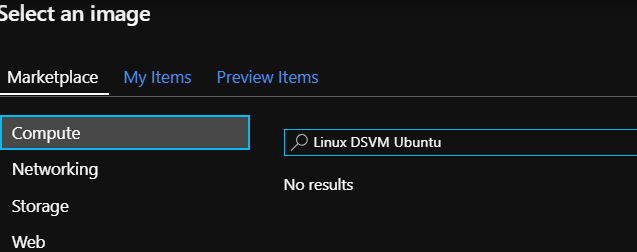
Can you verify the image name again
 jakaruna-MSFT
on 12 Apr 2019
jakaruna-MSFT
on 12 Apr 2019
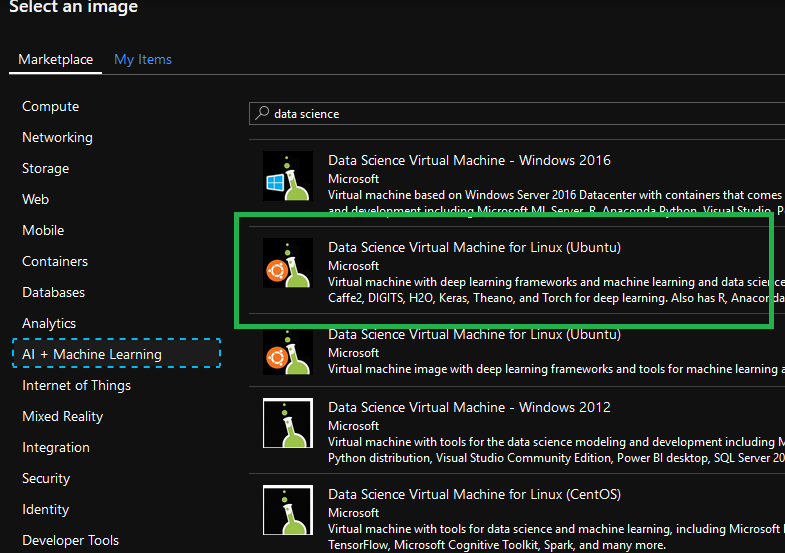
Hi @jakaruna-MSFT Sorry, I meant Data Science VM
carlfm01
on 12 Apr 2019
@carlfm01 I created one now and i am able to login with the given password.
I logged in using the load balancer's NAT configuration.
Did you re imaged all the existing VM's after a password reset?
During the password reset Portal gives that warning.
Update the admin credentials directly in the scale set model. Once the scale set is updated, all new VMs have the new credentials. Existing VMs only have the new credentials if they are updated to the latest model and then reimaged.
jakaruna-MSFT
on 12 Apr 2019
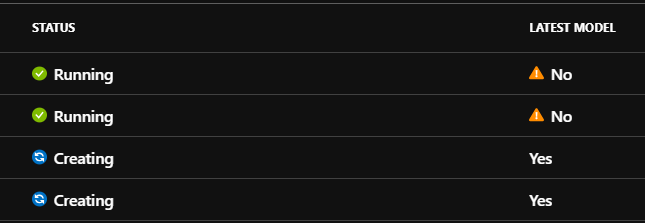
After resetting the password, The instances which has latest model "Yes" will have the new password.
You need to reimage the old VM's to have the new password. Till that time login works with the old password for the old VM's.
jakaruna-MSFT
on 12 Apr 2019
Reviewing that you mention load balancer, I'm not using it, I'm using public ip per instance. And yes, I'm doing the reimage of the VM after changing the password. Thanks.
carlfm01
on 13 Apr 2019
@carlfm01 Irrespective of Load balancer or public ip per instance, It should work after re imaging. Anyway i will test once again and let you know.
jakaruna-MSFT
on 16 Apr 2019
Thanks, I've tried again from scratch and getting the same, can't login. Remeber: with unmanaged disk. I can login if I use managed disks.
carlfm01
on 16 Apr 2019
@carlfm01 Managed or unmanaged disks should not matter as long as you use the marketplace image
jakaruna-MSFT
on 22 Apr 2019
@carlfm01 I tried to deploy using unmanaged disks. I am unable to login now. I really didn't expect this difference between the managed and unmanaged disks. Something wrong with the managed VHD.
I am reaching out to the internal teams and will post here if i have an update.
jakaruna-MSFT
on 23 Apr 2019
Thanks for your help @jakaruna-MSFT
carlfm01
on 24 Apr 2019
@jakaruna-MSFT Any update?
carlfm01
on 16 May 2019
@carlfm01 Issue is still there. I will post here once i have some updates
jakaruna-MSFT
on 22 May 2019
@mayanknayar this is the issue we have been discussion offline. Can you take a look further here? We can all schedule a call if needed.
 mimckitt
on 17 Jun 2019
mimckitt
on 17 Jun 2019
@carlfm01 just a quick update, we have confirmed this is still an issue and are working with the product teams offline to find the resolution. We will update as soon as we have more information.
mimckitt
on 25 Jun 2019
@MicahMcKittrick-MSFT thanks.
carlfm01
on 26 Jun 2019
@carlfm01 we have determined this is an issue with the specific Data Science Ubuntu image.
It is not related to the Size of the VM or its location. Only with that specific image and unmanaged disks. Also note that it does work as expected for managed disks. And managed disks is the recommended way to go regardless.
I have a ticket open with the Data Science team to look into fixing the image. However I have no ETA on when that work will be complete. It is being considered as low priority as it only happens with unmanaged disks which the majority of the users of this image select managed disks.
So short term solution for you if you want to use this Ubuntu image would be to select to use Managed disks instead of unmanaged. I am going to close this out as I am tracking the issue offline. I will update you once the fix has been rolled out but as mentioned I have no ETA as if yet.
mimckitt
on 9 Jul 2019
@MicahMcKittrick-MSFT thanks for the updates.
carlfm01
on 10 Jul 2019
Related issues
 jamesgallagher-ie
·
3Comments
jamesgallagher-ie
·
3Comments
 mrdfuse
·
3Comments
mrdfuse
·
3Comments
 Agazoth
·
3Comments
Agazoth
·
3Comments
 ianpowell2017
·
3Comments
ianpowell2017
·
3Comments
 AronT-TLV
·
3Comments
AronT-TLV
·
3Comments