Azure-docs: No need to run powershell script for setting up multiple Entity IDs
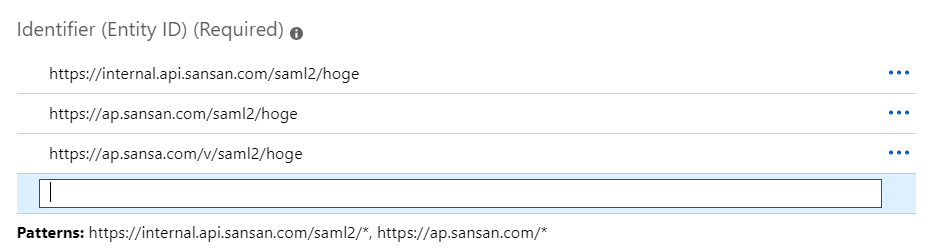
Updating Azure, we can now set multiple Entity IDs on Azure Portal. So it's not needed to run Powershell scripts (step 8).
Just set Entity IDs up on Azure Portal.
Document Details
⚠ Do not edit this section. It is required for docs.microsoft.com ➟ GitHub issue linking.
- ID: df8ab6af-b3f9-228f-43ff-165ccfe48fa0
- Version Independent ID: 99f428dd-03c3-50e7-f7e2-6e06b4449162
- Content: Tutorial: Azure Active Directory integration with Sansan
- Content Source: articles/active-directory/saas-apps/sansan-tutorial.md
- Service: active-directory
- Sub-service: saas-app-tutorial
- GitHub Login: @jeevansd
- Microsoft Alias: jeedes
 watahani
All 8 comments
watahani
on 9 Apr 2019
@watahani Thank you for pointing that out . We will have this looked into and updated as needed.
 shashishailaj
on 9 Apr 2019
shashishailaj
on 9 Apr 2019
@jeevansd
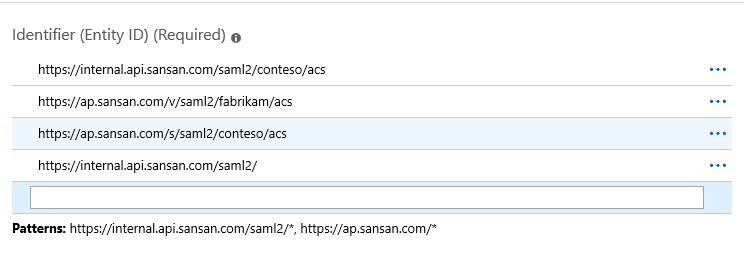
Jeevan, in the mentioned document for Configuring Single Sign-On section, Steps 7 & 8 would need to be removed as multiple URLs can now be updated on the portal directly.
Please find the screenshot from our repro:
 neeleshray
on 16 Apr 2019
neeleshray
on 16 Apr 2019
Hi @jeevansd
Is there any update?
watahani
on 9 May 2019
@chetansriv and @v-viinde Can you please update this doc and remove the PowerShell command from it? Now customers can directly add the multiple identifier for the app from UI directly.
 jeevansd
on 9 May 2019
jeevansd
on 9 May 2019
@watahani We will get this change done now.
jeevansd
on 9 May 2019
Which PR could I see changes?
watahani
on 23 May 2019
@watahani It will go through our private repo. So you will able to see your changes directly in the article soon. But you cannot see our private repo. Our content team will merge the changes to public repo.
jeevansd
on 23 May 2019
Related issues
 mrdfuse
·
3Comments
mrdfuse
·
3Comments
 AronT-TLV
·
3Comments
AronT-TLV
·
3Comments
 ianpowell2017
·
3Comments
ianpowell2017
·
3Comments
 bdcoder2
·
3Comments
bdcoder2
·
3Comments
 spottedmahn
·
3Comments
spottedmahn
·
3Comments