Azure-docs: You cannot use dbutils within a spark job
I am using Azure Key Vault backed secrets in Databricks and using the following code snippet to retrieve secerets in my notebook:
dbutils.secrets.get(scope = "myVault", key = "mySecret")
My ADF pipeline fails with the following exception:
PicklingError: Could not serialize object: Exception: You cannot use dbutils within a spark job
1) How can I achieve using secrets in notebooks I want to orchestrate with ADF activity?
2) How can I work with mounted storage in notebooks I want to orchestrate with ADF activity?
Document Details
⚠ Do not edit this section. It is required for docs.microsoft.com ➟ GitHub issue linking.
- ID: a176f27b-f9fc-e0ff-0a48-aa42036051f2
- Version Independent ID: d2356b83-3101-4b56-baaf-8bdf31e3bb57
- Content: Run a Databricks Notebook with the Databricks Notebook activity in Azure Data Factory
- Content Source: articles/data-factory/transform-data-using-databricks-notebook.md
- Service: data-factory
- GitHub Login: @nabhishek
- Microsoft Alias: abnarain
 jdobrzen
All 9 comments
Hello @jdobrzen . Thank you for alerting us to this issue. Until we have more information, here are some relevant documents.
https://azure.microsoft.com/en-us/updates/azure-key-vault-support-with-azure-databricks/
https://docs.azuredatabricks.net/user-guide/secrets/secret-scopes.html#akv-ss
https://docs.databricks.com/user-guide/secrets/index.html
https://docs.databricks.com/getting-started/try-databricks.html#step-2-optionally-add-security-features
 MartinJaffer-MSFT
on 27 Mar 2019
MartinJaffer-MSFT
on 27 Mar 2019
About the error message iteself,
PicklingError: Could not serialize object: Exception: You cannot use dbutils within a spark job
Pickling in Python refers to a module which serializes state. Example . Storing credentials in a Pickle is a terrible idea (security risk), so it makes sense to prohibit doing so.
MartinJaffer-MSFT
on 27 Mar 2019
I've been working through this issue a little and noticed that I can in fact use dbutils commands in a notebook being executed by the ADF activity.
This is actually a Databricks specific issue that I can recreate by executing notebooks interactively from the Databricks portal. Where the issue occurs is when I have the dbutils commands inside a function definition that I then register as a UDF.
def myFunction(arg1,arg2):
____some code
____varSecret = dbutils.secrets.get(scope = "myVault", key = "mySecret")
____some code
udfMyFunction = udf(myFunction)
dfs1 = dfs.withColumn('result', udfMyFunction ('column1', 'column2'))
jdobrzen
on 27 Mar 2019
I have been trying to reproduce the issue. When you recreate the issue from the Databricks GUI, is the message still 'PicklingError ..' ? Or is the message different.
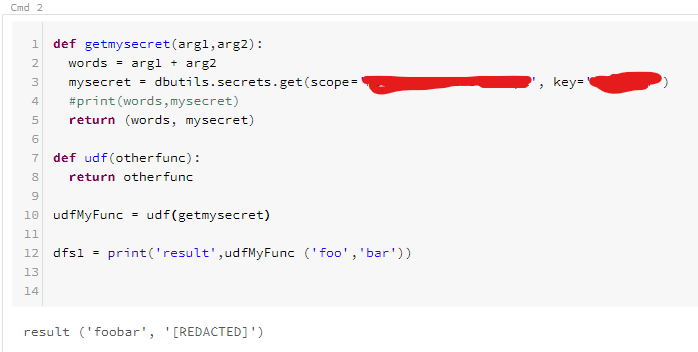
This is what I have so far. I'm pretty sure I missed the point. I'll have to brush up on my higher-order programming. Maybe you could provide a more complete example? @jdobrzen
MartinJaffer-MSFT
on 28 Mar 2019
@MartinJaffer-MSFT
Your example is probably not executing on a worker as a "Spark" job. I realized I can use dbutils.secrets.get() inside a function. It's when I register it as a Spark UDF and then call that function using the Spark dataframe function withColumn() that I get the pickling error.
You'll need to create a Spark dataframe first from some set of data. Then call your UDF using the withColumn() function, which will call the UDF for every row in the dataframe.
For example:
dfs1 = dfs.withColumn('result', udfMyFunction ('column1', 'column2'))
Let me know if you need more detail to recreate the issue.
jdobrzen
on 28 Mar 2019
@MartinJaffer-MSFT
Here's another example I ran into that produces the pickling error. Again, I am producing this outside of the ADF activity.
def appBackup(row):
dbutils.notebook.run("AppBackupNotebook", 0, {"widget1": row.column1,"widget2": row.column2})
dfs.rdd.map(appBackup)
Error:
Out[10]: You cannot use dbutils within a spark job or otherwise pickle it.
If you need to use getArguments within a spark job, you have to get the argument before
using it in the job. For example, if you have the following code:
          myRdd.map(lambda i: dbutils.args.getArgument("X") + str(i))

        Then you should use it this way:

          argX = dbutils.args.getArgument("X")
          myRdd.map(lambda i: argX + str(i))
I have begun reaching out to the product group for more support.
MartinJaffer-MSFT
on 28 Mar 2019
I see where you pulled this from.
https://forums.databricks.com/questions/16546/you-cannot-use-dbutils-within-a-spark-job-or-other.html
MartinJaffer-MSFT
on 29 Mar 2019
It sounds like you have answered your own question.
I have called the notebook whose screenshot I shared (and uses dbutils to get a secret), from Azure Data Factory, and Data Factory completed successfully.
Alternatively you can pass parameters to the Notebook from Data Factory, such as described in this tutorial.
MartinJaffer-MSFT
on 29 Mar 2019
Related issues
 JeffLoo-ong
·
3Comments
JeffLoo-ong
·
3Comments
 ianpowell2017
·
3Comments
ianpowell2017
·
3Comments
 jamesgallagher-ie
·
3Comments
jamesgallagher-ie
·
3Comments
 jharbieh
·
3Comments
jharbieh
·
3Comments
 bityob
·
3Comments
bityob
·
3Comments