Azure-docs: Unable to create HTTP setting with HTTPS protocol and custom probe
Hi,
as I already described in this issue: #27908 - I am unable to create custom HTTP setting with HTTPS protocol and custom probe.
Steps to reproduce:
- Create custom HTTP setting with HTTPS protocol
- Use your custom probe
- You will see the error: Either all BackendHttpSettings must reference authentication certificate, or none of them should.
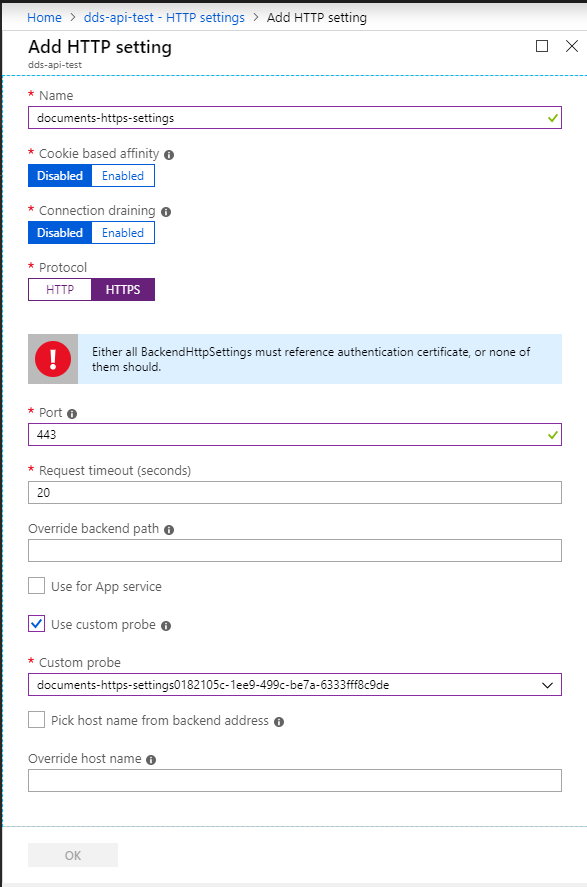
- You are not supporting authentication certificates in V2 anymore, how can I solve this issue?
Thank you
Jana
 georgievaja
All 15 comments
@georgievaja Thanks for the feedback! We're investigating this and will get back to you shortly.
 BhargaviAnnadevara-MSFT
on 25 Mar 2019
BhargaviAnnadevara-MSFT
on 25 Mar 2019
@georgievaja , As of now, you need to use PowerShell to create Trusted Root certificate.
Here is the documentation: https://docs.microsoft.com/en-us/azure/application-gateway/application-gateway-end-to-end-ssl-powershell#create-an-application-gateway-configuration-object
If you find any difficulty in implementation part, please let me know.
 msrini-MSFT
on 25 Mar 2019
msrini-MSFT
on 25 Mar 2019
@georgievaja , Any update on this issue?
msrini-MSFT
on 26 Mar 2019
Hi, so I tried to add it using powershell commands:
$probe = Get-AzApplicationGatewayProbeConfig -ApplicationGateway $appgw3 -Name "probe-name"
$trustedRootGatewayTest = New-AzApplicationGatewayTrustedRootCertificate -Name "cert-name" -CertificateFile <path-to-file>
Add-AzApplicationGatewayTrustedRootCertificate -ApplicationGateway $appgw3 -Name "cert-name" -CertificateFile <path-to-file>
Add-AzApplicationGatewayBackendHttpSettings -ApplicationGateway $appgw3 -Name "https-settin-name" -Port 443 -Protocol "Https" -CookieBasedAffinity "Disabled" -RequestTimeout 200 -Probe $probe -TrustedRootCertificate $trustedRootGatewayTest -PickHostNameFromBackendAddress
$appgw3 = Set-AzApplicationGatewayTrustedRootCertificate -ApplicationGateway $appgw3 -Name "cert-name" -CertificateFile <path-to-file>
$appgw3 = Set-AzApplicationGatewayBackendHttpSettings -ApplicationGateway $appgw3 -Name "https-settin-name" -Port 443 -Protocol "Https" -CookieBasedAffinity "Disabled" -RequestTimeout 200 -Probe $probe -TrustedRootCertificate $trustedRootGatewayTest -PickHostNameFromBackendAddress
Set-AzApplicationGateway -ApplicationGateway $appgw3
It fails with this general error:
Set-AzApplicationGateway : Long running operation failed with status 'Failed'. Additional Info:'An error occurred.'
At line:1 char:1
- Set-AzApplicationGateway -ApplicationGateway $appgw3
~~~~~~~~~~~~
- CategoryInfo : CloseError: (:) [Set-AzApplicationGateway], CloudException
- FullyQualifiedErrorId : Microsoft.Azure.Commands.Network.SetAzureApplicationGatewayCommand
What do I do wrong? Can I see some specific log why it failed?
Thanks
georgievaja
on 26 Mar 2019
@georgievaja , Can you remove -PickhostnamefromBackendAddress switch in HTTPSettings and use -Hostname "FQDN" and try again?
msrini-MSFT
on 26 Mar 2019
still getting:
Set-AzApplicationGateway : Long running operation failed with status 'Failed'. Additional Info:'An error occurred.'
At line:1 char:1
- Set-AzApplicationGateway -ApplicationGateway $appgw4
~~~~~~~~~~~~
- CategoryInfo : CloseError: (:) [Set-AzApplicationGateway], CloudException
- FullyQualifiedErrorId : Microsoft.Azure.Commands.Network.SetAzureApplicationGatewayCommand
georgievaja
on 26 Mar 2019
It does works perfectly for me.
Here is the script that I used:
$appgw3=Get-AzApplicationGateway -Name "YYYYYYY" -ResourceGroupName "XXXXXX"
Add-AzApplicationGatewayTrustedRootCertificate -ApplicationGateway $appgw3 -Name "cert-name" -CertificateFile "C:\Users\msrini\Documents\certificates\root.cer"
$trustedRootGatewayTest=Get-AzApplicationGatewayTrustedRootCertificate -Name "cert-name" -ApplicationGateway $appgw3
Add-AzApplicationGatewayBackendHttpSettings -ApplicationGateway $appgw3 -Name "https-settin-name" -Port 443 -Protocol "Https" -CookieBasedAffinity "Disabled" -RequestTimeout 200 -TrustedRootCertificate $trustedRootGatewayTest -PickHostNameFromBackendAddress
Set-AzApplicationGateway -ApplicationGateway $appgw3
I think the reason why it failed for you is that you have used $appgw3 for the set command and used the same variable in -ApplicationGateway switch in your final command.
msrini-MSFT
on 26 Mar 2019
Used same commands as you did (with probe), still same result.
Btw you are not doing the same as me, as I do not see any custom probe in your http setting.
georgievaja
on 26 Mar 2019
Can you try this script?
$appgw3=Get-AzApplicationGateway -Name "Name" -ResourceGroupName "RG"
$probe = Get-AzApplicationGatewayProbeConfig -ApplicationGateway $appgw3 -Name "probe-name"
Add-AzApplicationGatewayTrustedRootCertificate -ApplicationGateway $appgw3 -Name "cert-name" -CertificateFile
$trustedRootGatewayTest=Get-AzApplicationGatewayTrustedRootCertificate -Name "cert-name" -ApplicationGateway $appgw3
Add-AzApplicationGatewayBackendHttpSettings -ApplicationGateway $appgw3 -Name "https-settin-name" -Port 443 -Protocol "Https" -CookieBasedAffinity "Disabled" -RequestTimeout 200 -Probe $probe -TrustedRootCertificate $trustedRootGatewayTest -PickHostNameFromBackendAddress
Set-AzApplicationGateway -ApplicationGateway $appgw3
msrini-MSFT
on 26 Mar 2019
Well yes, I already did, It is the same as you sent before.
Anyway, I think the problem is when I try to add new http setting with trustedroot certificate while there is another http setting already existing without it.
(eventhough the script fails in the end, new failed http setting is visible)
This is the error I see in portal after running my script:
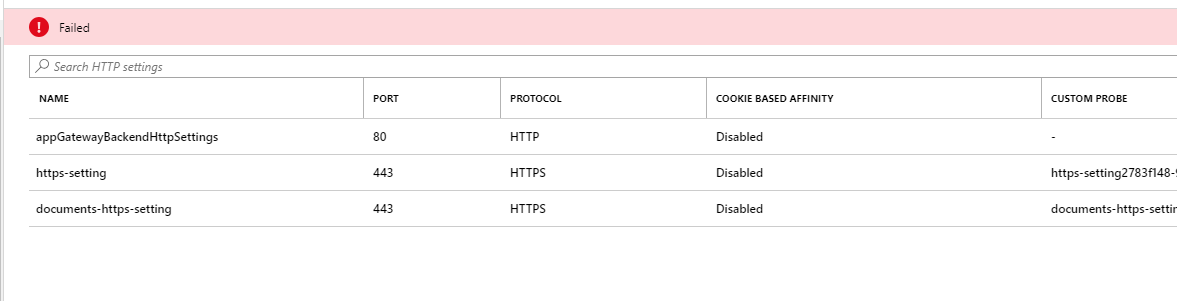
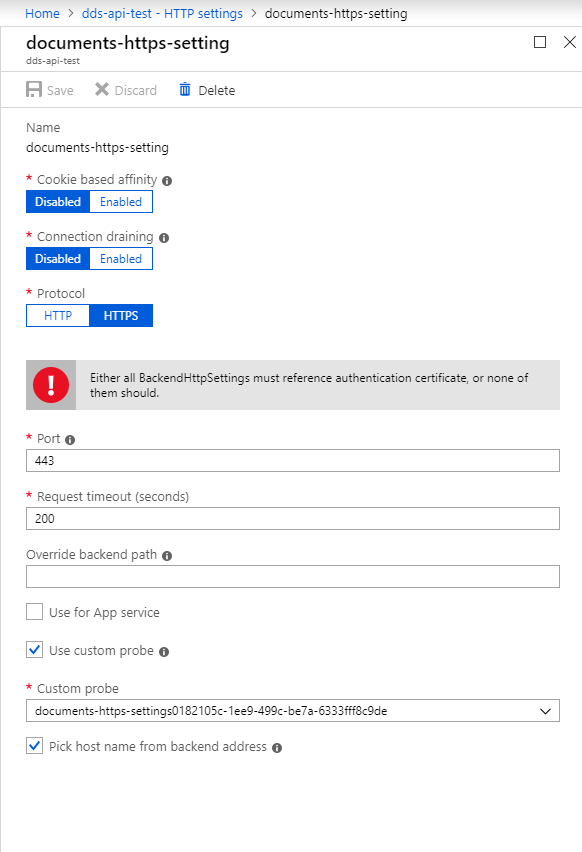
georgievaja
on 26 Mar 2019
@georgievaja , If you are seeing a Failed state, that means any operation that you perform in Application gateway will fail. In order to bring the Application gateway back into succeeding state, you need to redo the operation which made this gateway into failed state.
This will require some deeper analysis. Can you please file a support request @
https://aka.ms/azsupt? If you do not have access to a support plan, please reach out @ [email protected] with a link to this Doc/Issue as well as your subscription ID and we can help get the support ticket opened for this issue.
msrini-MSFT
on 26 Mar 2019
Ok, I created a support request
georgievaja
on 26 Mar 2019
Thank you @georgievaja , I will go ahead and close this issue. Please let me know if you have any further questions.
msrini-MSFT
on 26 Mar 2019
For anybody ever having the same issue: the problem is as I wrote earlier: when you try to add new https setting with trustedroot certificate while there is another https setting already existing without it. I solved it by removing existing setting and adding it again with cert.
georgievaja
on 27 Mar 2019
Thanks a lot, you experience saved my time :) Thanks for posting!
 manikandan5555
on 24 Apr 2019
manikandan5555
on 24 Apr 2019
Related issues
 jebeld17
·
3Comments
jebeld17
·
3Comments
 ianpowell2017
·
3Comments
ianpowell2017
·
3Comments
 JeffLoo-ong
·
3Comments
JeffLoo-ong
·
3Comments
 varma31
·
3Comments
varma31
·
3Comments
 behnam89
·
3Comments
behnam89
·
3Comments