Azure-docs: [python SDK] Stored procedure not written/available at 'dbs/myDatabase/colls/myContainer/sprocs/spCreateToDoItem'
When using the python SDK to register a stored procedure on a partitioned database, I cannot access it from 'dbs/myDatabase/colls/myContainer/sprocs/spCreateToDoItem' (HTTPFailure: Status code: 404 / {"code":"NotFound","message":"Server could not parse the Url."}).
I see the stored procedure with MS Azure Storage Explorer that lies in an address that looks like:
'dbs/myDatabase/colls/myContainer/sprocs/H3EYAOXXXXXXXXXXXXXXgA==/'
I suspect the stored procedure not to have access to all the different partitions and so not working properly.
What is wrong here?
Document Details
⚠ Do not edit this section. It is required for docs.microsoft.com ➟ GitHub issue linking.
- ID: 239e3b2d-4a09-c6a1-ab36-70b60a18f8b5
- Version Independent ID: 10a323f6-5a10-8b38-6339-48ee7a4c54b3
- Content: How to call stored procedures, triggers, and user-defined functions using Azure Cosmos DB SDKs
- Content Source: articles/cosmos-db/how-to-use-stored-procedures-triggers-udfs.md
- Service: cosmos-db
- GitHub Login: @markjbrown
- Microsoft Alias: mjbrown
 5mdd
5mdd
All 16 comments
@5mdd Thank you for bringing this to our attention. Are you trying to call a store procedure from another database? Stored procedures are per database (or container). In cases where the collections are partitioned within the database, you must use a partition key:
For partitioned containers, when executing a stored procedure, a partition key value must be provided in the request options. Stored procedures are always scoped to a partition key. Items that have a different partition key value will not be visible to the stored procedure. This also applied to triggers as well.
I suspect it is a partition key issue. Please investigate and let me know if that is not the case.
 Mike-Ubezzi-MSFT
on 12 Feb 2019
Mike-Ubezzi-MSFT
on 12 Feb 2019
Thanks @Mike-Ubezzi-MSFT for your swift answer!
- I am not trying to call a stored procedure (SP) from another database nor collection/container
- What I did is creating the SP with the python SDK following: https://github.com/MicrosoftDocs/azure-docs/blob/2e5a6b48a7f28cb809479028b40b8a8f0222a8d0/articles/cosmos-db/how-to-use-stored-procedures-triggers-udfs.md
When I create the SP, there is only use of the database and container name (no mention of partitionKey). - What is strange is that the method placed the SP here:
'dbs/myDatabase/colls/myContainer/sprocs/H3EYAOXXXXXXXXXXXXXXgA==/'
instead of :
'dbs/myDatabase/colls/myContainer/sprocs/spCreateToDoItem' - I am not sure to understand what you said. When I try to call the SP, I use the
'dbs/myDatabase/colls/myContainer/sprocs/H3EYAOXXXXXXXXXXXXXXgA==/'address and the partitionKey ofmyContainer. What do you refer to when you talk about the partition key of the database? I only set a partition key to the container... - Why am I getting a (HTTPFailure: Status code: 404 / {"code":"NotFound","message":"Server could not parse the Url."}) error when I try to use the SP address
'dbs/myDatabase/colls/myContainer/sprocs/spCreateToDoItem'? - Shall I pass the partitionKey with or without the / ? (I tried both version without success)...
- I tried to pass random partitionKey and I manage to run the SP without error message (but unfortunately not getting it to process the data...)
- Here is the code I used to call the SP:
result =client.ExecuteStoredProcedure('dbs/myDatabase/colls/myContainer/sprocs/H3EYAOXXXXXXXXXXXXXXgA==/', config, {'partitionKey': '/partKey'})
5mdd
on 12 Feb 2019
- I tried to create the SP with Azure Storage Explorer... same issue (see screenshots):
a/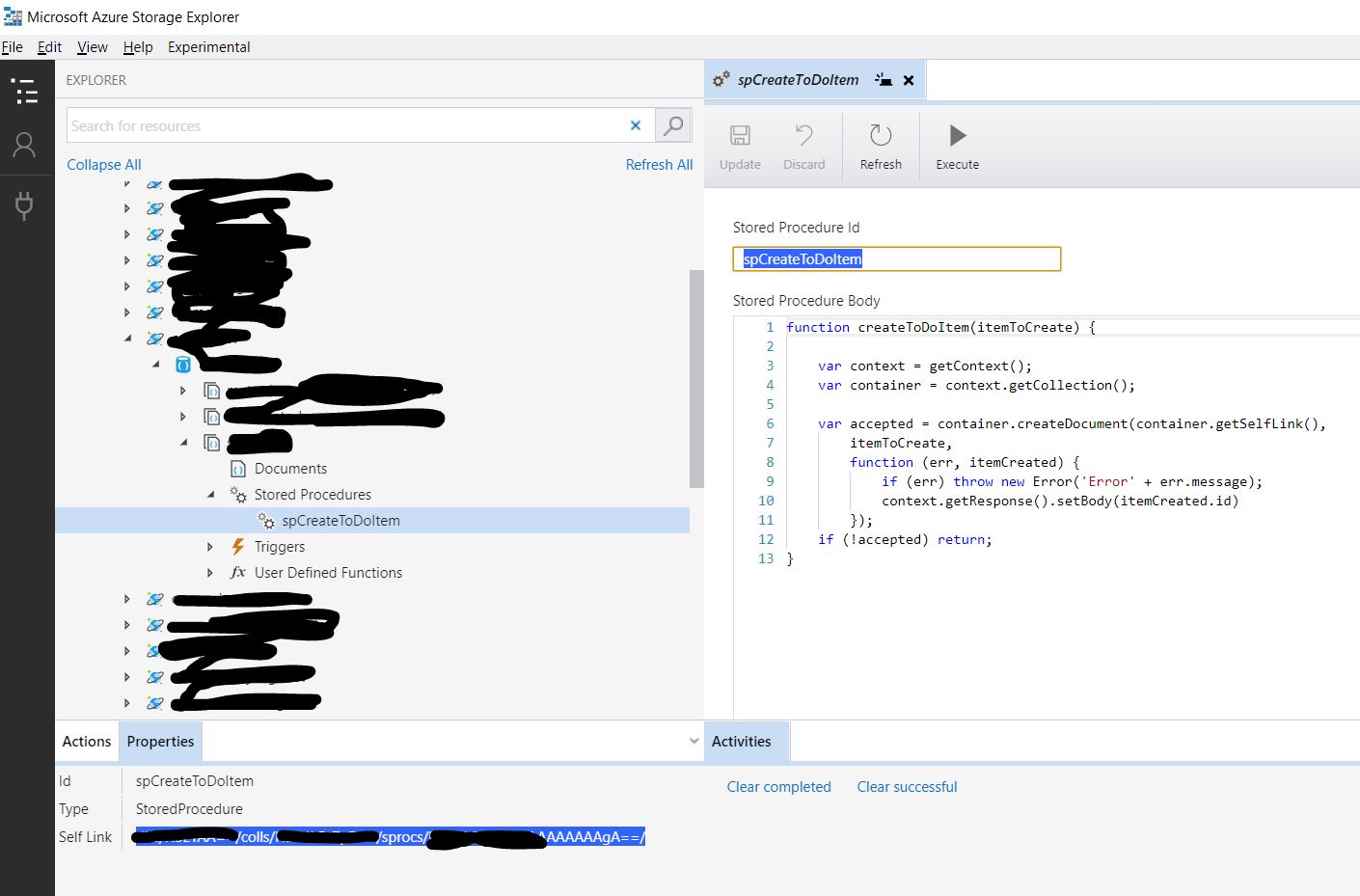
b/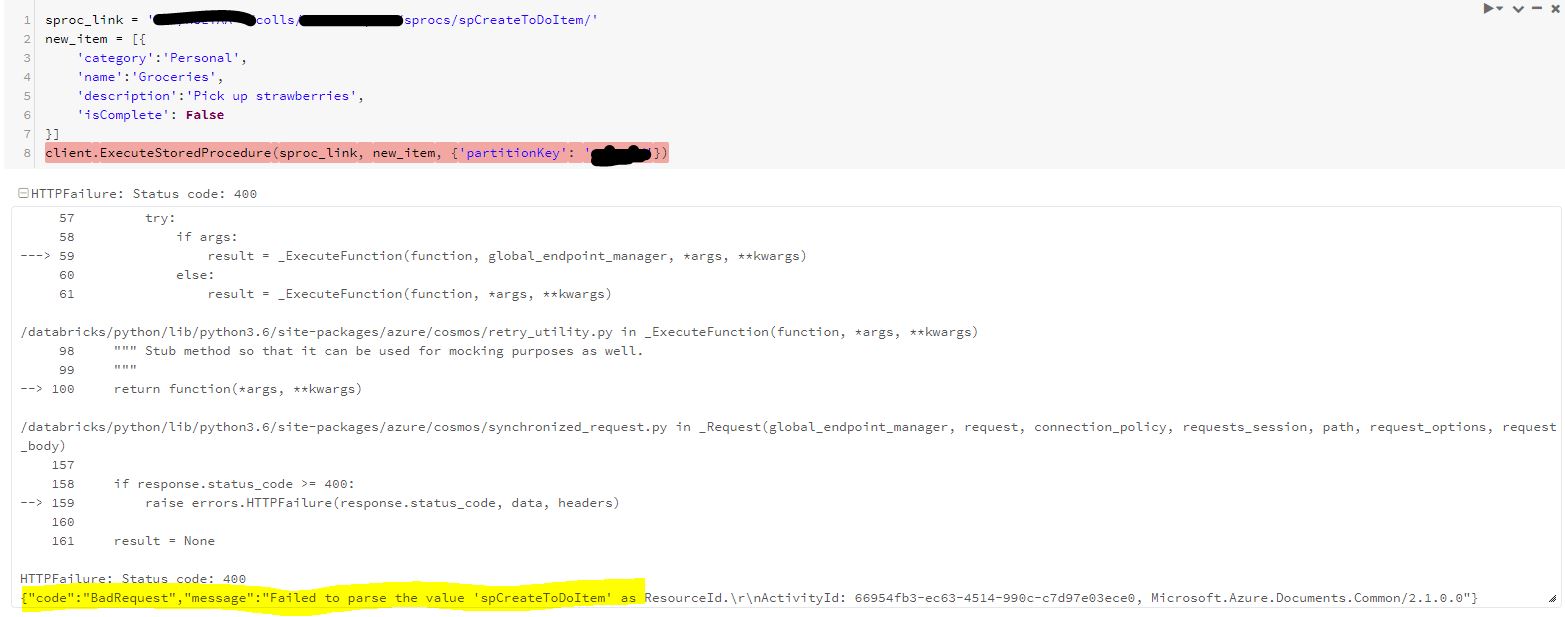
c/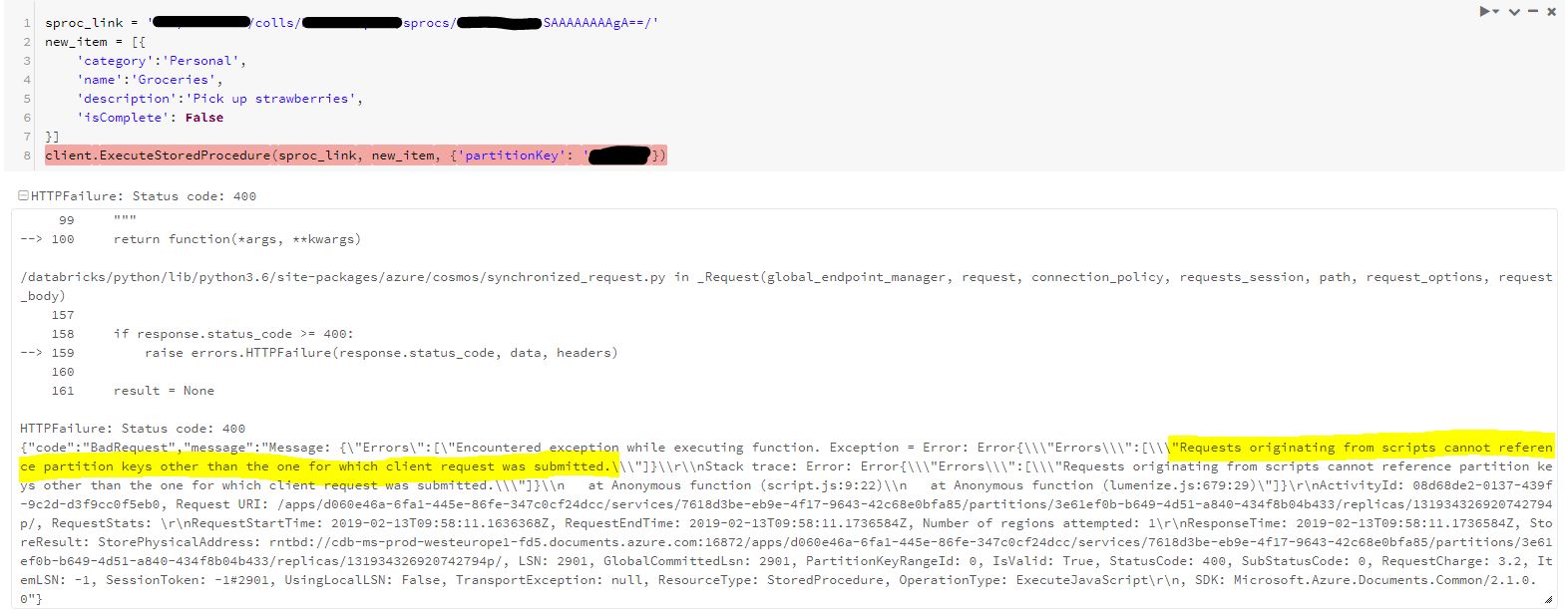
a/ shows the creation of the SP via the Explorer
b/ running the example with Databricks and the python library azure-cosmos
c/ running the example with the SP address given by Azure Storage Explorer... clearly here the error mentions the issue with access to other partitions:
"Requests originating from scripts cannot reference partition keys other than the one for which client request was submitted."
To sum up: why are the Explorer and the python SDK creating a SP which cannot be accessed by:
'dbs/myDatabase/colls/myContainer/sprocs/spNAME' ?
5mdd
on 13 Feb 2019
@5mdd Thank you for providing all the detail. The SP is attempting to execute across multiple partitions where an SP is only scoped to work against a single logical partition defined by partition key.
A) You cannot have an SP in one collection that attempts to query items in another collection that is defined by a separate partition key.
B) If you have multiple collections and are calling an SP via a client to query, you will need to have an SP in each collection, where the client will need to call all SPs from across each collection.
Stored procedures are written using JavaScript. They can create, update, read, query, and delete items within an Azure Cosmos container.
For partitioned containers, when executing a stored procedure, a partition key value must be provided in the request options. Stored procedures are always scoped to a partition key. Items that have a different partition key value will not be visible to the stored procedure. This also applied to triggers as well.
Stored procedures - Python SDK
If you had a fixed collection, the example would work but it is clear that you have partitioned collections.
Mike-Ubezzi-MSFT
on 13 Feb 2019
Thanks again @Mike-Ubezzi-MSFT !
It is not possible anymore to create fixed collections via the Azure Portal.
I still have a problem understanding your point A. I have 3 collections in this database. The SP lies in one and query only this one (with the given partition key). It should work then?
What I understand from point B is that in order to run the SP via a client, I cannot create multiple collections in my database? Am I limited to only one collection?
5mdd
on 13 Feb 2019
@5mdd To your first point (point A), yes it should work. With regard to point B, you can create multiple collections but you cannot use an SP to query all of those collections with a single SP. If you have 5 collections and wish to query all 5 via an SP, you are going to need to create 5 SPs and call each SP for each collection. With partition keys now the norm, it is best practice to use partitions keys in all references to a given collection.
In the following example:
client.ExecuteStoredProcedure('dbs/myDatabase/colls/myContainer/sprocs/H3EYAOXXXXXXXXXXXXXXgA==/', config, {'partitionKey': '/partKey'})
Are you using the read-only key or the read-write key? /H3EYAOXXXXXXXXXXXXXXgA==
Mike-Ubezzi-MSFT
on 13 Feb 2019
I used the read-write key.
/H3EYAOXXXXXXXXXXXXXXgA== is the "name" of the SP attributed by Storage Explorer (instead of / spCreateToDoItem) when creating it... see picture 9.a (bottom left)
5mdd
on 14 Feb 2019
@5mdd Something is clearly not working correctly with this. I would like to get you to support to have a closer investigation. Do you have an Azure Support Plan? If not, can you send me your Subscription ID to AzCommunity at Microsoft.com and I will return instructions to get a support request created to have this issue investigated, as support can see all the services you have deployed. There is only so much product support one can do through a documentation channel. This also allows for any bugs identified to be addressed and handled.
Mike-Ubezzi-MSFT
on 14 Feb 2019
Dear Mike,
I have a “Standard” Support Plan and just submitted a support ticket: case 119022025000068.
Regards,
Sebastien
5mdd
on 20 Feb 2019
@5mdd I have engaged the support engineer currently assigned this issue to ensure all details are made available. In the meantime, this issue will be closed and the issue tracked through the support request created. If there are any additional questions or updates to be made (such as resolution), additional comments can be made to this GitHub issue. Thank you!
Mike-Ubezzi-MSFT
on 20 Feb 2019
Hi did this got resolved. I am having similar issue, Non partitioned Container work fines, but in partitioned container i am getting this exception. Any way ?
 tusharnarang
on 11 Jun 2019
tusharnarang
on 11 Jun 2019
I am following up on this to get a more solid response, which I believe is a doc edit. There is the following NOTE but there is nothing about the SP name being referenced as a key or other value.
Mike-Ubezzi-MSFT
on 12 Jun 2019
@tusharnarang +Others:
There are 2 ways to address a server-side resource: by RID and by id. Both ways can be used for stored procedure. When using id, the link looks like this: dbs/myDatabase/colls/myContainer/sprocs/spCreateToDoItem, so this is correct link given that database id = “myDatabase”, collection id = “myContainer”, sproc id = “spCreateToDoItem”. Note that ids are caes-sensitive.
If you get 404, that means one of the ids (database, collection, sproc) is incorrect, e.g. a database with such id doesn’t exist under account used with endpoint/master key. I tried executing sproc from python 3.7 using id and PK for partitioned collection and it worked fine. If the customer validated the ids are correct, we need a repro. Best would be python code snippet + endpoint/masterkey (they can set up simple collection for the repro and then remove it).
Mike-Ubezzi-MSFT
on 14 Jun 2019
As for the issue where the sproc is executed but doesn’t return any data. There is a common misunderstanding of partition keys for request, by mixing up partition key definition in the collection (e.g. /country) and actual PK value in a document (e.g. “USA”). When a sproc is executed or a document is deleted, partition key provided is the value and not definition. Just set partitionKey to a value from one of the documents in the collection.
Mike-Ubezzi-MSFT
on 14 Jun 2019
@5mdd and @tusharnarang Please let me know if there are any additional questions regarding this topic.
Mike-Ubezzi-MSFT
on 14 Jun 2019
As for the issue where the sproc is executed but doesn’t return any data. There is a common misunderstanding of partition keys for request, by mixing up partition key definition in the collection (e.g. /country) and actual PK value in a document (e.g. “USA”). When a sproc is executed or a document is deleted, partition key provided is the value and not definition. Just set partitionKey to a value from one of the documents in the collection.
This was the reason why I was getting no response. Thanks alot for your help
tusharnarang
on 18 Jun 2019
Related issues
 JeffLoo-ong
·
3Comments
JeffLoo-ong
·
3Comments
 behnam89
·
3Comments
behnam89
·
3Comments
 jebeld17
·
3Comments
jebeld17
·
3Comments
 DeepPuddles
·
3Comments
DeepPuddles
·
3Comments
 bdcoder2
·
3Comments
bdcoder2
·
3Comments