Azure-docs: Wow, Seriosly? I'm Sitting Here Creating my Function.json file. Yep. Never did one before, but now I'll just go ahead and do that. LOL. Wooo. Hilarious.
This is a late night joke, right? I have no clue how to create my very own json function file. LOL.
The instructions state: "In version 2.x of the Azure Functions runtime, you have to explicitly register the binding extensions (binding types) that you use in your function app." ...Hmmmm, help me out here. _What does this mean? How do I do it?_
"When you develop functions locally, you can install the extensions you need by using the Azure Functions Core Tools from the Terminal or from a command prompt. Ah Ha, I see. Yes, yes... But wait!! How does one do this???
Ooh, I see...here we go. The info to help me do this:
"After you have updated your function.json file to include all the bindings that your function needs, run the following command in the project folder." ... ! Wait! It's assumed that I was able to _create the file I need by being told I need to create the file._ Hahahahahaha!! Nope! I don't know how. Still don't know.... There is a missing piece to this puzzle, right?
The part that's missing is There is no instruction regarding how to do this. Seriously??? Yup. OK. I'll go do that. I'll create my function. yup. going to create my very own function.json now. mmmmhhhhm. yup. LOL. WOW. What was I thinking?
Ooops, looks like i guessed poorly....This is hilarious. Seriously. Come on man. Tell me how to create a function.json file. I'm new to this... need some hand-holding.... Oh you guys are such kidders. Hahahahahaha HAH! Wooooo,
func : Unable to find project root. Expecting to find one of host.json, local.settings.json in project root.
At line:1 char:1
+ func extensions install
+ ~~~~~~~~~~~~~~~~~~~~~~~
    + CategoryInfo          : NotSpecified: (Unable to find ...n project root.:String) [], RemoteException
    + FullyQualifiedErrorId : NativeCommandError
Document Details
⚠ Do not edit this section. It is required for docs.microsoft.com ➟ GitHub issue linking.
- ID: b2646ad4-34b7-fc5e-dcc9-d53a061df394
- Version Independent ID: bbff4fda-24e4-2b62-24b9-94cda5f53bed
- Content: Work with Azure Functions Core Tools
- Content Source: articles/azure-functions/functions-run-local.md
- Service: azure-functions
- GitHub Login: @ggailey777
- Microsoft Alias: glenga
 dhmorrison
All 9 comments
@dhmorrison Thanks for your feedback. Could you clarify which documentation you're referring to? Please provide us with the URL of the documentation so that we ensure your feedback is addressed by the right team.
 KetanChawda-MSFT
on 5 Feb 2019
KetanChawda-MSFT
on 5 Feb 2019
@dhmorrison Based on the error message that you are seeing, I believe you are running the command from the wrong folder.
After running func init, you should have the host.json and local.settings.json files generated and running func new should have a function.json file generated as well (except in the case of C#/Java Functions). The CLI Quickstart is a good doc to start with.
You can read more about Triggers and Bindings in the docs. And for specifics about modifying the function.json file when working with different triggers/bindings, refer to the reference docs for them which can be found under Reference > Bindings in the functions docs.
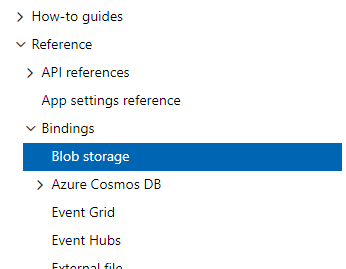
I hope that clears some things up.
That being said, I understand the confusion created because of the sequence of sections in this doc. I believe a better flow would be to have Register extensions after the Create a function section instead.
 PramodValavala-MSFT
on 6 Feb 2019
PramodValavala-MSFT
on 6 Feb 2019
@dhmorrison sorry about the confusion. We are planning to add a better overview to the Core Tools article to clarify the general steps to create and publish function apps.
 ggailey777
on 6 Feb 2019
ggailey777
on 6 Feb 2019
@PramodValavala-MSFT please assign this issue to me.
ggailey777
on 6 Feb 2019
This is really DUMB! How come before the VS 2017 cloud wizard generated the localsettings.json file? Now I have to jump through hoops and figure out how to manually generate a localsettings.json file that has the right entries for the storage locations? I feel like we have gone backwards here folks!
 ScottyMac52
on 11 Feb 2019
ScottyMac52
on 11 Feb 2019
Another note, the documentation SUCKS and is written with a ton of assumptions for a brand new construct that is pretty poor design.
ScottyMac52
on 11 Feb 2019
It's all good. I know it can be challenging to document as you create cool new components. I'm no angel when it comes to that either. I suspect you are targeting your documentation toward the developer community whose interest is more than academic. IMHO, it makes sense to put a premium on solid code examples that go a bit deeper than writing a function that returns... Yo! My name is Lil Deep. For me anyhow in depth real world samples are worth their weight in gold.
dhmorrison
on 12 Feb 2019
@dhmorrison your suggestion is very correct and we are in the process of reworking the Functions quickstarts to add Storage bindings to be more realistic.
@ScottyMac52 if you are creating C# Functions in.Visual Studio, we have an article for working with Visual Studio tools. I think it’s easier to use VS than Core Tools (CLI) for C# Functions.
ggailey777
on 12 Feb 2019
OK, good news on this thread. There is now a new extension bundles feature that makes it much easier to install the binding extensions needed by your project.
If there are still things in this article that you think we need to address, please re-open this issue.
please-close
ggailey777
on 31 Aug 2019
Related issues
 ianpowell2017
·
3Comments
ianpowell2017
·
3Comments
 spottedmahn
·
3Comments
spottedmahn
·
3Comments
 monteledwards
·
3Comments
monteledwards
·
3Comments
 behnam89
·
3Comments
behnam89
·
3Comments
 bityob
·
3Comments
bityob
·
3Comments
Most helpful comment
It's all good. I know it can be challenging to document as you create cool new components. I'm no angel when it comes to that either. I suspect you are targeting your documentation toward the developer community whose interest is more than academic. IMHO, it makes sense to put a premium on solid code examples that go a bit deeper than writing a function that returns... Yo! My name is Lil Deep. For me anyhow in depth real world samples are worth their weight in gold.