Azure-docs: Custom start-up command docs for Python on App Service for Linux unclear
If you read https://docs.microsoft.com/en-us/azure/app-service/containers/how-to-configure-python#custom-startup-command it makes it sound like you can only provide a custom command for gunicorn which I don't believe is accurate. It also doesn't state what python command is set up for use, e.g. can I safely use python because my web app is running under a virtual environment? Or how about python3 without worrying about using the system-installed Python 3? And what about python3.7 (which would break if I ever upgrade my web app or could potentially point to the system install some day which may not be up-to-date)?
Document Details
⚠ Do not edit this section. It is required for docs.microsoft.com ➟ GitHub issue linking.
- ID: 4348313e-7280-dc7e-4943-14c4675bbe5a
- Version Independent ID: 970e6640-8042-5f88-5ecf-84d58d09b8fd
- Content: Configure Python apps on Linux - Azure App Service
- Content Source: articles/app-service/containers/how-to-configure-python.md
- Service: app-service-web
- GitHub Login: @cephalin
- Microsoft Alias: astay;cephalin;kraigb
 brettcannon
All 24 comments
@brettcannon, Thanks for the feedback on this item! I have assigned the issue to the content author to review further and update the document as appropriate.
 AjayKumar-MSFT
on 20 Dec 2018
AjayKumar-MSFT
on 20 Dec 2018
@brettcannon What's the scenario in which you need to run the python/python3/python3.7 command? The Gunicorn direction is because it's considered a production server, where as the python command is not.
As far as versioning, the built-in image automatically creates a virtual environment in your app's network share (/home/site/wwwroot). If you reconfigure your app to use a different built-in image (e.g. hypothetically v3.8), you'd wanna delete the antenv directory in your network share so the virtual environbment files get recreated.
@qubitron FYI
 cephalin
on 20 Dec 2018
cephalin
on 20 Dec 2018
You're correct that gunicorn is a production _WSGI_ server, but I'm running an asynchronous workload and so gunicorn simply cannot run my code (i.e. I'm using aiohttp).
So my question still stands: what python command do you want me to be using to use the Python version I specified when creating my App Service instance (and that the docs suggest I can change with an az command)?
brettcannon
on 20 Dec 2018
@JennyLawrance which python command should Brett use when trying to run a webserver using aiohttp?
 qubitron
on 20 Dec 2018
qubitron
on 20 Dec 2018
@qubitron , @brettcannon
Here is how I'd do it:
Create a startup.txt file in your content folder which explicitly specifies the exact python command to run: Since we have version specific images, the only version of python in the 3.7 image will be python 3.7. So referring to as python is all you need:
We will read this file, and launch it as is (provided the file contains either python or gunicorn).
[ See start_server() method in the below script: https://github.com/Azure-App-Service/python/blob/master/3.7.0/entrypoint.py]
 JennyLawrance
on 20 Dec 2018
JennyLawrance
on 20 Dec 2018
I also just realized that the docs make no mention of what port to connect to/specify for a custom command.
brettcannon
on 21 Dec 2018
Looks like it must be 8000 as e.g. the PORT environment variable isn't set.
brettcannon
on 21 Dec 2018
@brettcannon can you provide the full command you used to get this working?
qubitron
on 31 Dec 2018
Command is python3.7 -m pvscbot as set in the Portal. Code is at https://github.com/microsoft/pvscbot .
brettcannon
on 3 Jan 2019
I also seemed to have forgotten to mention that the docs say that Startup File can take a file name or a command, but in fact can only take a command, so the field name is misleading and the docs are incorrect.
brettcannon
on 14 Jan 2019
I don't think that's accurate; I just tested using a startup.txt file containing the command and it worked just fine. What behavior are you seeing that indicates it can take only a direct command?
 kraigb
on 14 Jan 2019
kraigb
on 14 Jan 2019
My logs when I did this 26 days ago showed that the string in the Startup File box were simply prepended to the gunicorn command. It may have been fixed subsequently.
brettcannon
on 15 Jan 2019
Brett, the logic is that we check if the startupfile exists on disk. If it doesn't, we pass it as gunicorn args:
except:
# appCommandLine is not a file, assume it is the script to be started bu gunicorn
print('startup script is not a file, use it as gunicorn arg')
return startupScript
From: Brett Cannon notifications@github.com
Sent: Monday, January 14, 2019 3:03:49 PM
To: MicrosoftDocs/azure-docs
Cc: Jenny Lawrance; Mention
Subject: Re: [MicrosoftDocs/azure-docs] Custom start-up command docs for Python on App Service for Linux unclear (#21044)
My logs when I did this 26 days ago showed that the string in the Startup File box were simply prepended to the gunicorn command. It may have been fixed subsequently.
—
You are receiving this because you were mentioned.
Reply to this email directly, view it on GitHubhttps://nam06.safelinks.protection.outlook.com/?url=https%3A%2F%2Fgithub.com%2FMicrosoftDocs%2Fazure-docs%2Fissues%2F21044%23issuecomment-454194878&data=02%7C01%7Cjennylaw%40microsoft.com%7Ca7468fdadc1e4ef5540408d67a748c3a%7C72f988bf86f141af91ab2d7cd011db47%7C1%7C0%7C636831038352373152&sdata=deqdwAIKvHtrYCtKig31grxXFg7nujLqZrK75u9Ue8I%3D&reserved=0, or mute the threadhttps://nam06.safelinks.protection.outlook.com/?url=https%3A%2F%2Fgithub.com%2Fnotifications%2Funsubscribe-auth%2FAVd5MWViqI-D9oaRbAni8YK3Wg0cTMLVks5vDQzVgaJpZM4ZbONX&data=02%7C01%7Cjennylaw%40microsoft.com%7Ca7468fdadc1e4ef5540408d67a748c3a%7C72f988bf86f141af91ab2d7cd011db47%7C1%7C0%7C636831038352383161&sdata=pOPcqzFcsY%2F5ii4KlFgUSctTerLj95IOSTk5uiPl3j0%3D&reserved=0.
JennyLawrance
on 15 Jan 2019
https://github.com/Azure-App-Service/python/blob/master/3.7.0/entrypoint.py
From: Jenny Lawrance
Sent: Monday, January 14, 2019 4:28:31 PM
To: MicrosoftDocs/azure-docs; MicrosoftDocs/azure-docs
Cc: Mention
Subject: Re: [MicrosoftDocs/azure-docs] Custom start-up command docs for Python on App Service for Linux unclear (#21044)
Brett, the logic is that we check if the startupfile exists on disk. If it doesn't, we pass it as gunicorn args:
except:
# appCommandLine is not a file, assume it is the script to be started bu gunicorn
print('startup script is not a file, use it as gunicorn arg')
return startupScript
From: Brett Cannon notifications@github.com
Sent: Monday, January 14, 2019 3:03:49 PM
To: MicrosoftDocs/azure-docs
Cc: Jenny Lawrance; Mention
Subject: Re: [MicrosoftDocs/azure-docs] Custom start-up command docs for Python on App Service for Linux unclear (#21044)
My logs when I did this 26 days ago showed that the string in the Startup File box were simply prepended to the gunicorn command. It may have been fixed subsequently.
—
You are receiving this because you were mentioned.
Reply to this email directly, view it on GitHubhttps://nam06.safelinks.protection.outlook.com/?url=https%3A%2F%2Fgithub.com%2FMicrosoftDocs%2Fazure-docs%2Fissues%2F21044%23issuecomment-454194878&data=02%7C01%7Cjennylaw%40microsoft.com%7Ca7468fdadc1e4ef5540408d67a748c3a%7C72f988bf86f141af91ab2d7cd011db47%7C1%7C0%7C636831038352373152&sdata=deqdwAIKvHtrYCtKig31grxXFg7nujLqZrK75u9Ue8I%3D&reserved=0, or mute the threadhttps://nam06.safelinks.protection.outlook.com/?url=https%3A%2F%2Fgithub.com%2Fnotifications%2Funsubscribe-auth%2FAVd5MWViqI-D9oaRbAni8YK3Wg0cTMLVks5vDQzVgaJpZM4ZbONX&data=02%7C01%7Cjennylaw%40microsoft.com%7Ca7468fdadc1e4ef5540408d67a748c3a%7C72f988bf86f141af91ab2d7cd011db47%7C1%7C0%7C636831038352383161&sdata=pOPcqzFcsY%2F5ii4KlFgUSctTerLj95IOSTk5uiPl3j0%3D&reserved=0.
JennyLawrance
on 15 Jan 2019
@brettcannon Sorry for the delay. I've updated the doc to show how to run a non-gunicorn command. It should be published within the next day. #please-close
cephalin
on 29 Jan 2019
@kraigb How can I run the "python manage.py migrate" command in case of django with webapps with code?
 codalprashant
on 29 Jul 2019
codalprashant
on 29 Jul 2019
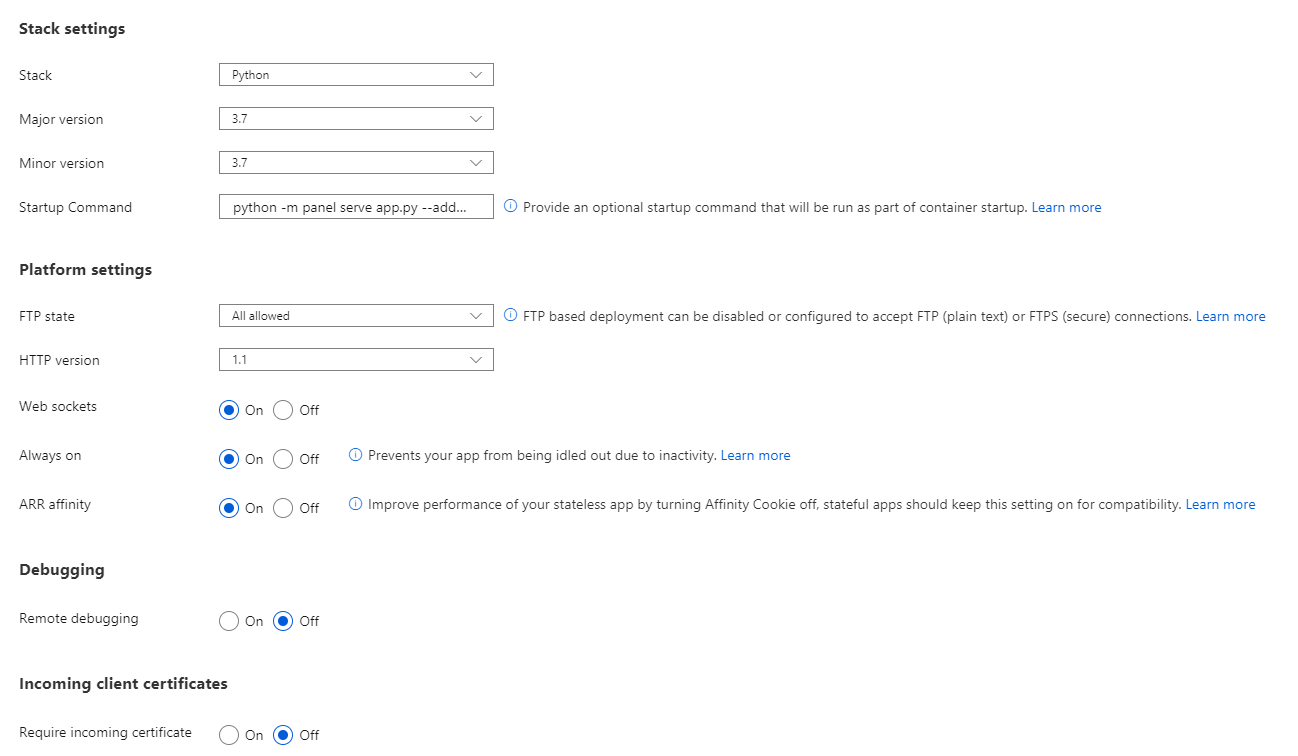
As far as I can see I cannot run a Panel web app with panel serve app.py --address 0.0.0.0 --port 8000 as startupcommand. Is that correct?
I've been doing it with a dockerized web app for a long time. But now I just wanted to do it in a simple web app for a new use case I have.
 MarcSkovMadsen
on 14 May 2020
MarcSkovMadsen
on 14 May 2020
@MarcSkovMadsen - I believe your case is similar to https://github.com/MicrosoftDocs/azure-dev-docs/issues/142. To run "panel" as a command, the container would have to recognize it as such. However, because panel isn't installed by default, and would be installed through requirements.txt only, then the container won't have it in the PATH. In that case, run it with python -m panel instead, which should work. Issue #142 that I link to above has a similar case with uvicorn. Let me know if that works for you.
kraigb
on 14 May 2020
Hi @kraigb
Thanks for your reply. Yes python -m panel ... solved this problem. BUT
But then the web sockets do not work

I have turned the web sockets on under configuration but still it does not work
MarcSkovMadsen
on 15 May 2020
Hmmm. Sockets are too far out of my experience, unfortunately, so I can't be of further help. If it's something to do with the behavior of the App Service container, then you're best off asking Azure support directly through the Help & Support center on the Azure portal. Sorry I don't have more to offer.
kraigb
on 15 May 2020
@kraigb . I solved the web socket problem by adding --allow-web-socket-origin to the command. The command that works for me is
python -m panel serve app.py --address 0.0.0.0 --port 8000 --allow-websocket-origin=MY-APP-NAME.azurewebsites.net
To me the Python Web App experience is always confusing and troublesome. I know you are doing your best but the things that are problematic for me is
- Assuming your web app is Django or Flask run by gunicorn.
Well sometimes I'm running Panel, Voila or Streamlit. I imagine some users would be using uvicorn. And some users have other use cases.
For me the name Python Web App is confusing when its simply targeted at Flask or Django apps run by gunicorn. I would have different expectations.
And one thing I would like much more clearly stated is that my app must run on port 8000. That also always causes me problems.
MarcSkovMadsen
on 15 May 2020
I agree; naming is often problematic. Part of the trouble comes from running everything in a pre-defined container, which is primarily targeted at Django and Flask due most likely to prioritization for testing only a limited number of frameworks. But I'm glad you got it working.
kraigb
on 15 May 2020
FYI.
I've contributed a guide on deploying Panel to the reference documentation of Panel.
See https://twitter.com/MarcSkovMadsen/status/1261542618028060673?s=20. If you like it please retweet to share the information.
When the PR is approved it will be available at https://panel.holoviz.org/user_guide/Server_Deployment.html
MarcSkovMadsen
on 16 May 2020
Related issues
 jamesgallagher-ie
·
3Comments
jamesgallagher-ie
·
3Comments
 spottedmahn
·
3Comments
spottedmahn
·
3Comments
 mrdfuse
·
3Comments
mrdfuse
·
3Comments
 Ponant
·
3Comments
Ponant
·
3Comments
 AronT-TLV
·
3Comments
AronT-TLV
·
3Comments