Azure-docs: Creating collections no longer works via 3rd party tools
As far as I can tell, Cosmos DB no longer supports creating collections via Studio 3T. I am always presented with the error "Shared throughput collection should have a partition key" when following the instructions listed above.
Document Details
⚠ Do not edit this section. It is required for docs.microsoft.com ➟ GitHub issue linking.
- ID: 21d6cd84-d0c4-eea9-c2c6-e6f3be91dad8
- Version Independent ID: 6fa411bf-934b-fc27-8fef-09f07c3f0299
- Content: Use Studio 3T (MongoChef) with Azure Cosmos DB
- Content Source: articles/cosmos-db/mongodb-mongochef.md
- Service: cosmos-db
- GitHub Login: @slyons
- Microsoft Alias: sclyon
 ericbarch
All 11 comments
@ericbarch Thanks for your feedback! We will investigate and update soon on it.
 MohitGargMSFT
on 2 Dec 2018
MohitGargMSFT
on 2 Dec 2018
@ericbarch I have followed the same document and able to create databases, collections, and documents with Studio 3T tool.
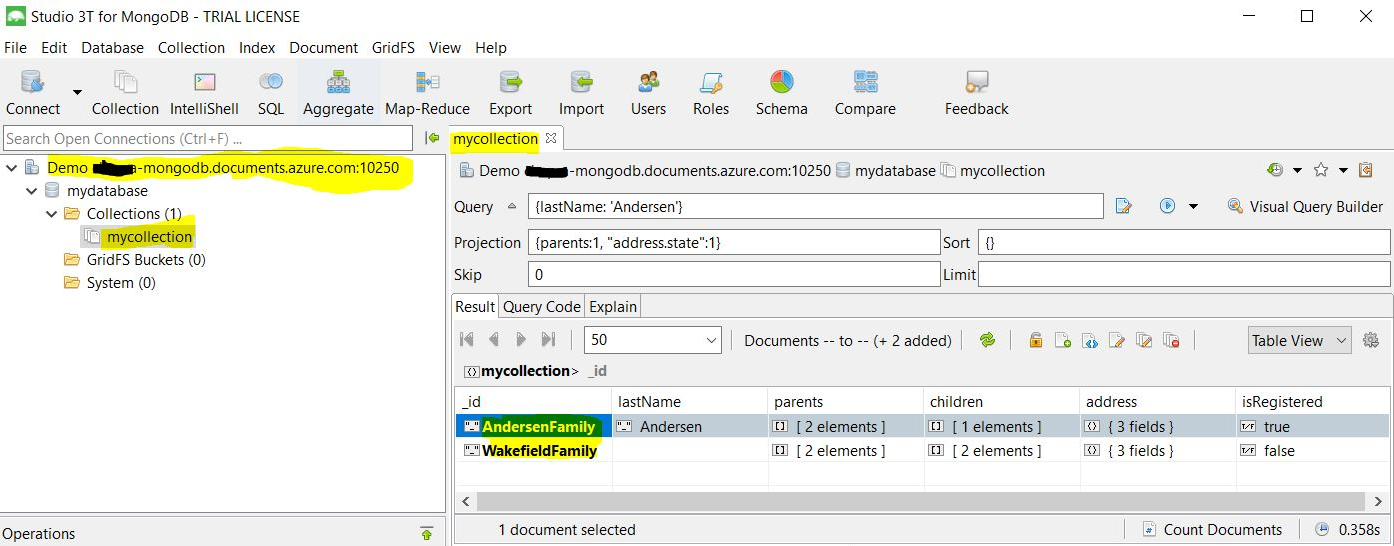
Could you share the steps which you have followed, and which step does it throws this error message “Shared throughput collection should have a partition key”?
 CHEEKATLAPRADEEP-MSFT
on 3 Dec 2018
CHEEKATLAPRADEEP-MSFT
on 3 Dec 2018
@ericbarch We will now proceed to close this thread. If there are further questions regarding this matter, please comment and we will gladly continue the discussion.
 Mike-Ubezzi-MSFT
on 4 Dec 2018
Mike-Ubezzi-MSFT
on 4 Dec 2018
I get this error when I follow this exactly from Studio3T:
SERVER [URL.documents.azure.com:10255] (Type: UNKNOWN)
|_/ Connection error (MongoSocketOpenException): Exception opening socket
|____/ I/O error: connect timed out
Details:
Timed out after 30000 ms while waiting to connect. Client view of cluster state is {type=UNKNOWN, servers=[{address=splc-ip-mongo-1.documents.azure.com:10255, type=UNKNOWN, state=CONNECTING, exception={com.mongodb.MongoSocketOpenException: Exception opening socket}, caused by {java.net.SocketTimeoutException: connect timed out}}]
 SplDataCenter
on 30 Jan 2019
SplDataCenter
on 30 Jan 2019
I have this same issue with Robo3t and Mongoose.
Here is a screenshot from Robo:
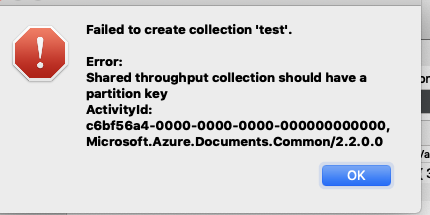
Also from Mongoose:
(node:75409) UnhandledPromiseRejectionWarning: MongoError: Shared throughput collection should have a partition key
console.pub.js:42
ActivityId: 7b53602c-0000-0000-0000-000000000000, Microsoft.Azure.Documents.Common/2.2.0.0
    at Function.MongoError.create (/Users/chriskarkowsky/Documents/workspace/us-express/node_modules/mongodb-core/lib/error.js:31:11)
    at /Users/chriskarkowsky/Documents/workspace/us-express/node_modules/mongodb-core/lib/connection/pool.js:497:72
    at authenticateStragglers (/Users/chriskarkowsky/Documents/workspace/us-express/node_modules/mongodb-core/lib/connection/pool.js:443:16)
    at Connection.messageHandler (/Users/chriskarkowsky/Documents/workspace/us-express/node_modules/mongodb-core/lib/connection/pool.js:477:5)
    at TLSSocket.<anonymous> (/Users/chriskarkowsky/Documents/workspace/us-express/node_modules/mongodb-core/lib/connection/connection.js:331:22)
    at TLSSocket.emit (events.js:189:13)
    at addChunk (_stream_readable.js:284:12)
    at readableAddChunk (_stream_readable.js:265:11)
    at TLSSocket.Readable.push (_stream_readable.js:220:10)
    at TLSWrap.onStreamRead [as onread] (internal/stream_base_commons.js:94:17)
(node:75409) UnhandledPromiseRejectionWarning: Unhandled promise rejection. This error originated either by throwing inside of an async function without a catch block, or by rejecting a promise which was not handled with .catch(). (rejection id: 1)
This is not an issue with document-set throughput, instead of shared across the database.
 chriskarkowsky
on 20 Mar 2019
chriskarkowsky
on 20 Mar 2019
The ONLY exception is for a fixed collection where a partition key is not required. As soon as you introduce partitioned containers, you must use a partition key.
Mike-Ubezzi-MSFT
on 20 Mar 2019
I manage to connect to CosmosDB using Studio3T, but Studio3T does not see any collection, although I created them in the CosmosDB mamagement interface.
It is not clear for me either how to perform a "clear" of a collection using CosmosDB (meaning deleting all the documents without droping the collection).
I trying using Python, but CosmosDB doesn't accept Collection.delete_many({})
 gnumarco
on 31 Jul 2019
gnumarco
on 31 Jul 2019
Same with me I'm able to connect but does not able to see any collections using Studio 3T, It shows collections in Robo 3T
 BKB503
on 20 Aug 2019
BKB503
on 20 Aug 2019
I have the same problem as @gnumarco and @BKB503.
 ziziz
on 29 Aug 2019
ziziz
on 29 Aug 2019
@ziziz @BKB503 @gnumarco If you are creating a fixed partition where a partition key is not required, you will likely have a more useful experience with any 3rd Party client. In the case where a partition key is required, you will experience issues. Can one of you create an entry in the Cosmos DB User Voice while the others upvote and comment on the one entry that was created? This will be super helpful in communicating to the product group that 3rd Party client tools are desired. Thank you!
Mike-Ubezzi-MSFT
on 29 Aug 2019
Additionally, Cosmos DB is moving towards requiring a partition key in all cases. I see this is an older issue and not requiring a partition key was available for a fixed collection.
Mike-Ubezzi-MSFT
on 29 Aug 2019
Related issues
 JamesDLD
·
3Comments
JamesDLD
·
3Comments
 spottedmahn
·
3Comments
spottedmahn
·
3Comments
 behnam89
·
3Comments
behnam89
·
3Comments
 mrdfuse
·
3Comments
mrdfuse
·
3Comments
 Agazoth
·
3Comments
Agazoth
·
3Comments
Most helpful comment
I manage to connect to CosmosDB using Studio3T, but Studio3T does not see any collection, although I created them in the CosmosDB mamagement interface.
It is not clear for me either how to perform a "clear" of a collection using CosmosDB (meaning deleting all the documents without droping the collection).
I trying using Python, but CosmosDB doesn't accept Collection.delete_many({})