Azure-docs: New-AzureRmPolicyDefinition - category
How to set policy Category for policy definition using New-AzureRmPolicyDefinition cmdlet?
Document Details
⚠ Do not edit this section. It is required for docs.microsoft.com ➟ GitHub issue linking.
- ID: 131095f2-56ff-d771-621a-c33973be0684
- Version Independent ID: c62f2864-f6a3-515f-0f63-bfde76491842
- Content: Programmatically create policies and view compliance data with Azure Policy
- Content Source: articles/governance/policy/how-to/programmatically-create.md
- Service: azure-policy
- GitHub Login: @DCtheGeek
- Microsoft Alias: dacoulte
 JozoSlejko
All 6 comments
@JozoSlejko That's something that would typically be in the cmdlet reference page (https://docs.microsoft.com/powershell/module/azurerm.resources/new-azurermpolicydefinition). I believe that Category is passed through the Metadata parameter, but will validate with engineering. I'll also ask if they can add an example for metadata to include category. Thanks for the feedback!
@MicrosoftDocs/azure-cxp-triage Please assign to me, label 'product-question', and #in-progress
 DCtheGeek
on 14 Nov 2018
DCtheGeek
on 14 Nov 2018
@JozoSlejko Got confirmation, Category can be used with Metadata. Metadata takes a string, but that string is JSON that contains the property key/value pairs. So, something like this:
-Metadata '{"Category":"Virtual Machine"}'
We'll get the ref content updated with an example to cover using Metadata like this that includes Category. Thanks again for the feedback!
@MicrosoftDocs/azure-cxp-triage #please-close
DCtheGeek
on 14 Nov 2018
Azure/azure-powershell#7829 Here's the link to the PR to update the example in the ref content.
DCtheGeek
on 14 Nov 2018
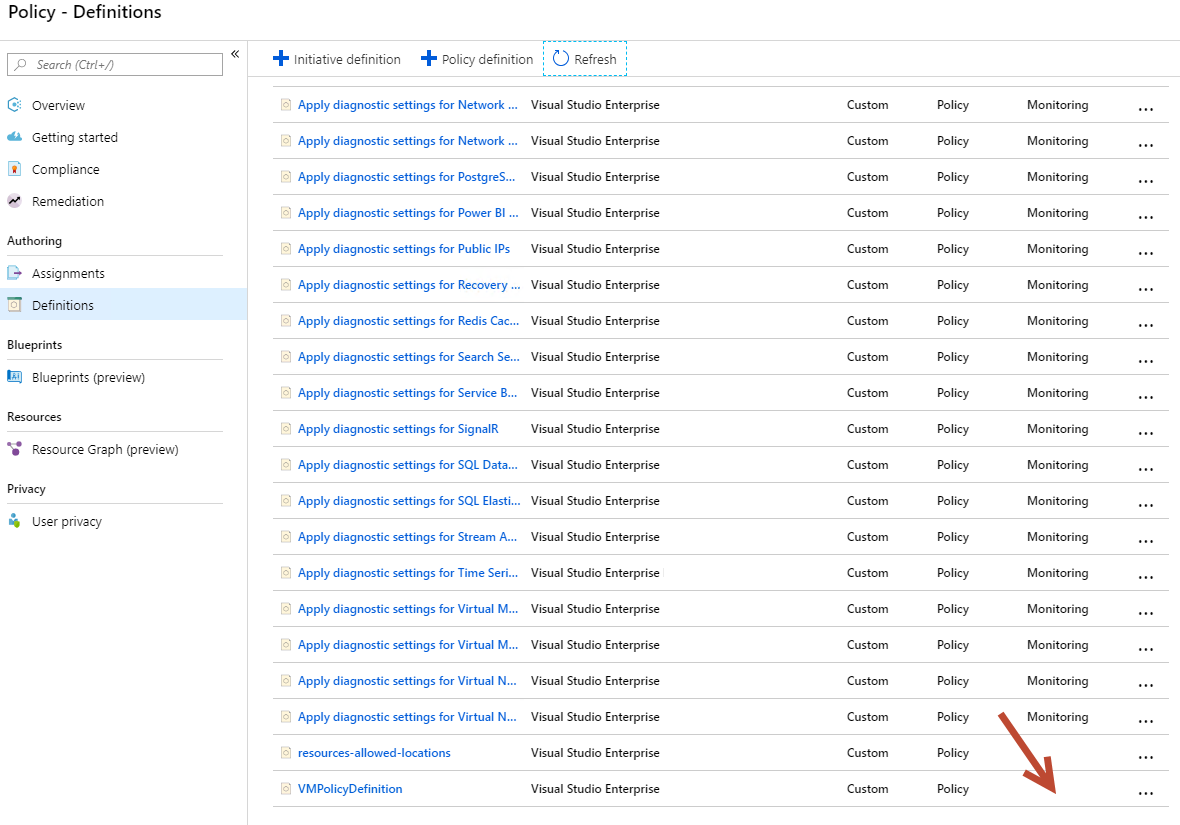
If i use the example (_New-AzureRmPolicyDefinition -Name 'VMPolicyDefinition' -Metadata '{"Category":"Virtual Machine"}' -Policy '{"if":{"source":"action","equals":"Microsoft.Compute/virtualMachines/write"},"then":{"effect":"deny"}}'_) to create a policy, the Category is still empty:
 Obiwan72
on 2 Jan 2019
Obiwan72
on 2 Jan 2019
@Obiwan72 The issue appears to be that 'category' is case-sensitive within the Portal UX. Please use all lower-case 'category' and validate that solves the issue for you of it not showing up in Portal UX.
DCtheGeek
on 14 Jan 2019
Yes, with category in lower-case it works. Thx!
Obiwan72
on 17 Jan 2019
Related issues
 jamesgallagher-ie
·
3Comments
jamesgallagher-ie
·
3Comments
 ianpowell2017
·
3Comments
ianpowell2017
·
3Comments
 jebeld17
·
3Comments
jebeld17
·
3Comments
 Favna
·
3Comments
Favna
·
3Comments
 DeepPuddles
·
3Comments
DeepPuddles
·
3Comments
Most helpful comment
Yes, with category in lower-case it works. Thx!