Azure-docs: Unauthorized error on following the instructions in the page
I followed the steps as mentioned in this page. Even though I created the API Management instance, on clicking the Test option in the Portal, it did not auto-populate Ocp-Apim-Subscription-Key. On clicking Send, I got the below error
{
"statusCode": 401,
"message": "Access denied due to missing subscription key. Make sure to include subscription key when making requests to an API."
}
I tried the Developer Portal option but got the same result. Please let me know if any other details are needed for reproducing/replicating the issue.
Document Details
⚠ Do not edit this section. It is required for docs.microsoft.com ➟ GitHub issue linking.
- ID: a0b38af1-81e7-341a-d7bf-e471ea7585e5
- Version Independent ID: 6d16fd43-249e-5afc-062a-2e019eade30e
- Content: Import an Azure Function App as an API in Azure API Management
- Content Source: articles/api-management/import-function-app-as-api.md
- Service: api-management
- GitHub Login: @mikebudzynski
- Microsoft Alias: apimpm
 sudeep-sol
All 4 comments
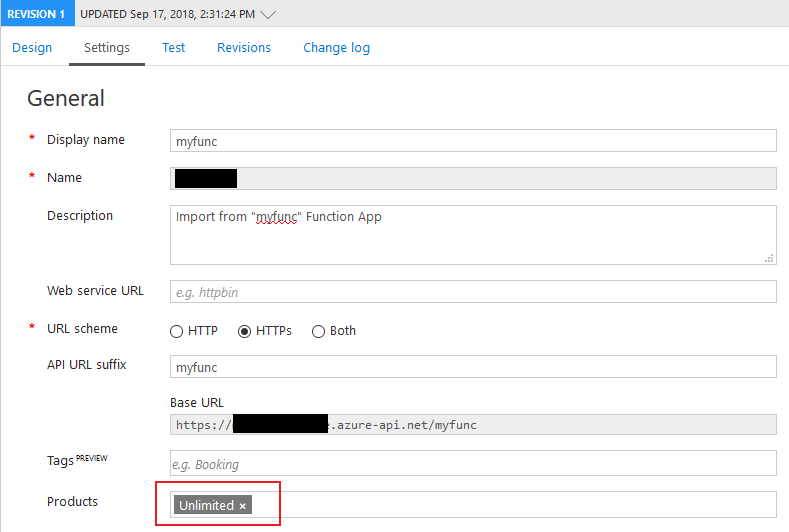
@sudeep-sol Can you make sure you assigned a "Product" to your API? If not, please see if it works once you do.
 mikebudzynski
on 17 Sep 2018
mikebudzynski
on 17 Sep 2018
Excellent!!! The response was quick and it fixed the issue. Can this be documented in the same page?
sudeep-sol
on 17 Sep 2018
Yes, we missed it, I will add it to the doc. Glad it worked and thanks for catching it.
mikebudzynski
on 17 Sep 2018
Closing the issue as the solution provided in the screenshot worked fine
sudeep-sol
on 17 Sep 2018
Related issues
 ianpowell2017
·
3Comments
ianpowell2017
·
3Comments
 paulmarshall
·
3Comments
paulmarshall
·
3Comments
 mrdfuse
·
3Comments
mrdfuse
·
3Comments
 varma31
·
3Comments
varma31
·
3Comments
 DeepPuddles
·
3Comments
DeepPuddles
·
3Comments
Most helpful comment
Yes, we missed it, I will add it to the doc. Glad it worked and thanks for catching it.