Azure-docs: Need more info on Target Condition given in Device Configuration in Automatic Device Management
Instead of using Tags , our requirement is to update twin for few devices , lets say out of ten devices we need only to update firmware for 3 devices . In the given article , they are using tags with device type as 'Chiller' but can't we 'deviceId" with AND condition to apply firmware only on selected device. We tried with below target condition but it didn't work
deviceId = 'deviceOne' AND deviceId='deviceTwo'
Please suggest .
Document Details
⚠ Do not edit this section. It is required for docs.microsoft.com ➟ GitHub issue linking.
- ID: a6ae92a4-4bdc-965a-c62c-14da252f784d
- Version Independent ID: 3e68a6e7-17a1-df0a-6349-633536be8fe6
- Content: Update device firmware through Azure IoT Hub
- Content Source: articles/iot-hub/tutorial-firmware-update.md
- Service: iot-hub
- GitHub Login: @dominicbetts
- Microsoft Alias: dobett
 ampac28
All 9 comments
@ampac28 thank you for your feedback!
Did you try using something like the following:
targetCondition: SELECT deviceId FROM devices WHERE deviceId='device1' OR deviceId='device2'
Let us know the results?
You can learn more about device configuration here: https://docs.microsoft.com/en-us/azure/iot-hub/iot-hub-auto-device-config
Thank you!
 asergaz
on 10 Jul 2018
asergaz
on 10 Jul 2018
@dominicbetts can we enhance this doc and add a reference to IoT Device Configuration doc: https://docs.microsoft.com/en-us/azure/iot-hub/iot-hub-auto-device-config ? It may help on similar questions.
Thank you!
asergaz
on 10 Jul 2018
@sergaz-msft @ampac28 - I added some links to further information in the article. The changes should be published later today.
 dominicbetts
on 11 Jul 2018
dominicbetts
on 11 Jul 2018
@ampac28 - I'm going to request this issue is closed. If you have further questions, please reopen it. Thanks!
dominicbetts
on 11 Jul 2018
please-close
dominicbetts
on 11 Jul 2018
@ampac28 - in the tutorial you're looking at, the syntax you need to use is:
targetCondition: deviceid=\'device01\' OR deviceid=\'device02\'
dominicbetts
on 11 Jul 2018
@dominicbetts - Thanks for sharing the syntax , it really worked for me.
I have one more query on how to show device name (ID) under the Metrics section on the configuration tile. Currently I see it displays only the count of devices the configuration applied .
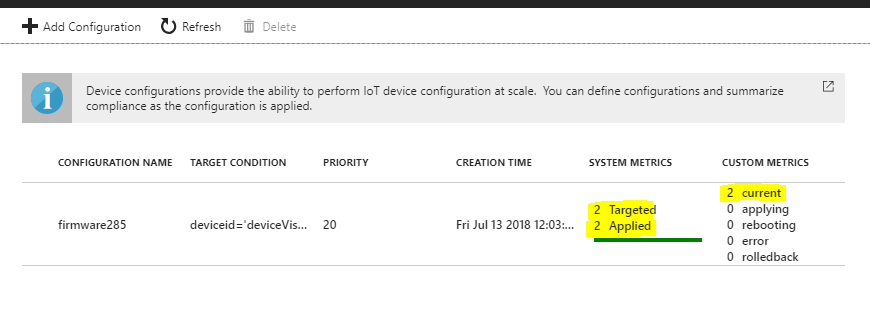
I did the firmware sample for 2 devices and interested to show the each device name with their status. There may be a case if firmware update is apply on 5 devices then how best we can show the progress by device name on UI.
Please suggest.
ampac28
on 13 Jul 2018
Hi @ampac28 - the metrics page only shows counts - there could potentially be thousands or tens of thousands of devices updated through a configuration, so displaying a list of device ids is not practicable. If you think it would be useful to add this feature, then please make a suggestion for it here: https://feedback.azure.com/forums/321918-azure-iot
Alternatively, you could write your own application that queries and reads reported properties. This example shows how you can query reported properties: https://docs.microsoft.com/en-us/azure/iot-hub/iot-hub-node-node-device-management-get-started#trigger-a-remote-reboot-on-the-device-using-a-direct-method
Thanks,
Dominic
dominicbetts
on 17 Jul 2018
@ampac28 - I'm going to request this issue is closed. If you have further questions, please reopen it. Thanks!
please-close
dominicbetts
on 17 Jul 2018
Related issues
 paulmarshall
·
3Comments
paulmarshall
·
3Comments
 behnam89
·
3Comments
behnam89
·
3Comments
 ianpowell2017
·
3Comments
ianpowell2017
·
3Comments
 bdcoder2
·
3Comments
bdcoder2
·
3Comments
 mrdfuse
·
3Comments
mrdfuse
·
3Comments
Most helpful comment
@ampac28 - in the tutorial you're looking at, the syntax you need to use is:
targetCondition: deviceid=\'device01\' OR deviceid=\'device02\'