Azure-docs: How to change the protocol that the edge runtime should use to communicate with Azure IoT Hub?
How to change the protocol that the edge runtime should use to communicate with Azure IoT Hub? Is there an equivalent command of "iotedgectl setup --upstream-protocol" for Linux?
Document Details
⚠ Do not edit this section. It is required for docs.microsoft.com ➟ GitHub issue linking.
- ID: 1cf7aade-9690-1b15-edca-952e4f509601
- Version Independent ID: b99f0f0f-87fe-5446-670e-b3fd8eb1c34d
- Content: How to install Azure IoT Edge on Linux
- Content Source: articles/iot-edge/how-to-install-iot-edge-linux-arm.md
- Service: iot-edge
- GitHub Login: @kgremban
- Microsoft Alias: kgremban
 luyaok
All 11 comments
@luyaok Thanks for the feedback! We are currently investigating and will update you shortly.
 asergaz
on 2 Jul 2018
asergaz
on 2 Jul 2018
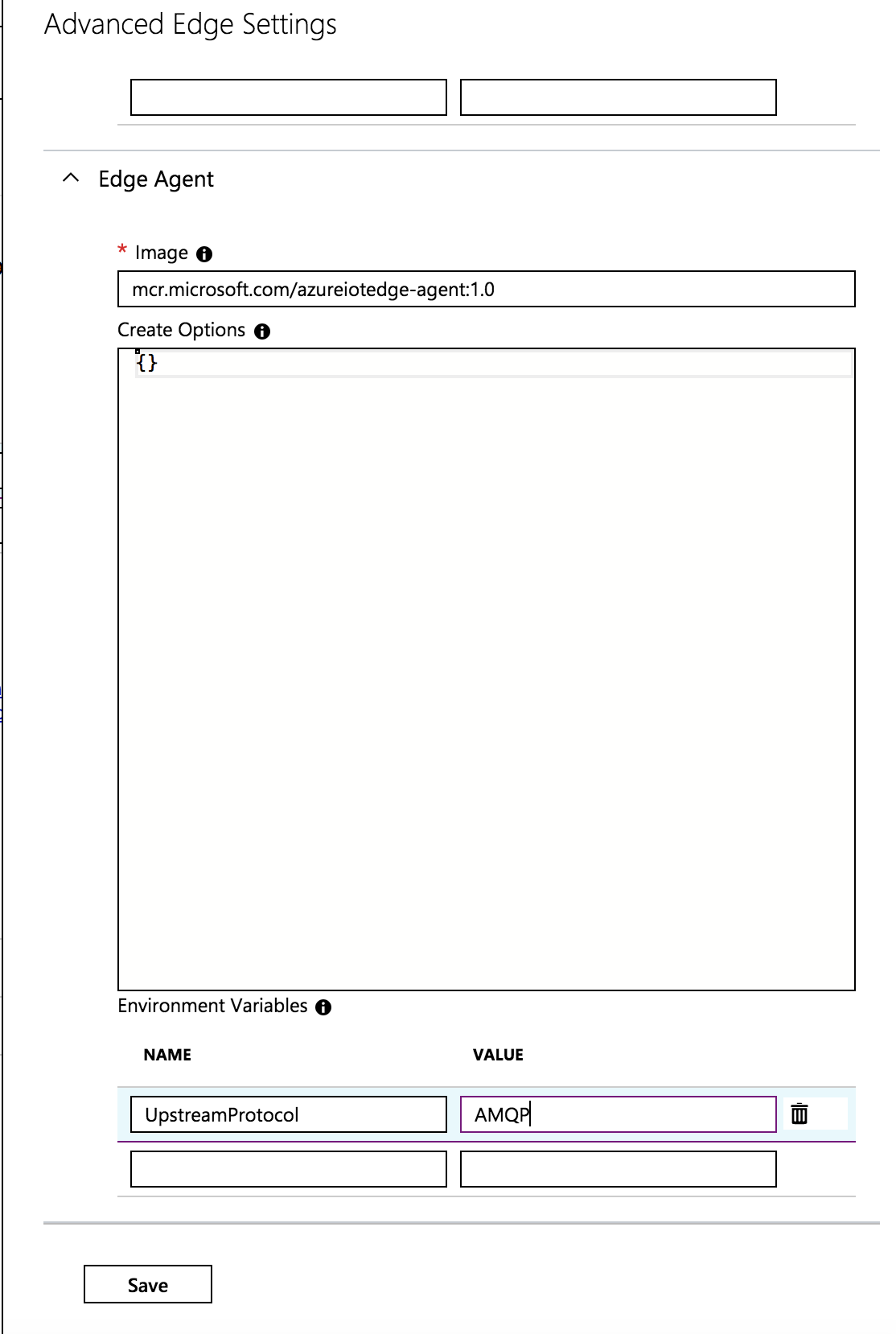
@luyaok The recommended method is do this is setting the environment variable UpstreamProtocol for the edge agent. The valid values are AMQP, AMQPWS, MQTT or MQTTWS.
The variable can be set in Advanced Edge Settings pane from the Set Modules page:
 veyalla
on 2 Jul 2018
veyalla
on 2 Jul 2018
Thank you @veyalla !
@luyaok we will now proceed to close this thread. If there are further questions regarding this matter, please tag me in your reply. We will gladly continue the discussion and we will reopen the issue.
asergaz
on 3 Jul 2018
To follow up on this issue, for runtime version 1.0.1 and older, the value of the UpstreamProtocol is case sensitive. The valid values are:
Amqp,
AmqpWs
Mqtt
MqttWs
This has been fixed here: https://github.com/Azure/iotedge/commit/f48c780eacfc724d5bf4752a9e6c53e9ae377c6a but hasn't been released yet. It will be released in version > 1.0.1
 myagley
on 12 Sep 2018
myagley
on 12 Sep 2018
Is this also valid for the EdgeHub or only EdgeAgent? If not, how does the EdgeHub determine which protocol to use to connect to Azure IoT Hub?
 sebader
on 30 Oct 2018
sebader
on 30 Oct 2018
@sebader You can configure the UpstreamProtocol parameter for both EdgeHub and EdgeAgent in either the deployment manifest or the portal as veyalla showed earlier.
 kgremban
on 30 Oct 2018
kgremban
on 30 Oct 2018
Thanks for the clarification!
sebader
on 30 Oct 2018
@veyalla @myagley Can we please bring this into the official documentation? E.g. the troubleshooting guide https://docs.microsoft.com/en-us/azure/iot-edge/troubleshoot
I think it's a very helpful information for anybody using Edge and should not be hidden in this github issue.
//edit: Never mind, just found it here :) https://docs.microsoft.com/en-us/azure/iot-edge/production-checklist#choose-upstream-protocol
sebader
on 14 Dec 2018
Hi @sergaz-msft and Team,
I needed to make my edge device to communicate to upstream over port 443. I followed the guidelines provided here. Below are the changes I have done:
config.yaml:
agent:
  name: "edgeAgent"
  type: "docker"
  env:
    UpstreamProtocol: "AmqpWs"
  config:
    image: "mcr.microsoft.com/azureiotedge-agent:1.0.7.1"
    auth: {}
In Azure portal: I have set below environment variable for both edgeAgent and edgeHub:
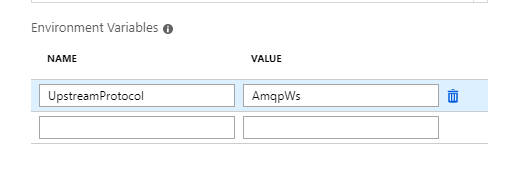
I can see that telemetry is going to IoTHub, and when I block port 443 from outbound rules of firewall, the communication stops. But how can I verify from the logs that edge device is actually using the correct protocol for the upstream communication i.e. AMQP over WebSocket over port 443?
I can see the logs from edgeHub below:
2019-06-12 13:08:25.954 +00:00 [INF] - Starting protocol heads - (MQTT, AMQP, HTTP)
2019-06-12 13:08:25.963 +00:00 [INF] - Starting MQTT head
2019-06-12 13:08:26.060 +00:00 [INF] - **Initializing TLS endpoint on port 8883 for MQTT head**.
2019-06-12 13:08:26.159 +00:00 [INF] - Starting AMQP head
2019-06-12 13:08:26.175 +00:00 [INF] - Started MQTT head
2019-06-12 13:08:26.279 +00:00 [INF] - Started AMQP head
2019-06-12 13:08:26.282 +00:00 [INF] - Starting HTTP head
and
Created cloud proxy for client testdevice/tempSensor via AMQP over WebSockets, with client operation timeout 20 seconds.
What is the meaning of Initializing TLS endpoint on port 8883 for MQTT head .
 VikasJaiswal
on 13 Jun 2019
VikasJaiswal
on 13 Jun 2019
the protocol heads that are being started are where modules or downstream devices ("leaf devices") can connect to your edgeHub. So those are inbound ports that the edgeHub listens on for connections. Outbound connection upstream (to the IoT Hub) go in your case only over amqp-ws.
sebader
on 13 Jun 2019
Thanks @sebader for the reply. My doubts are clear now. 👍
VikasJaiswal
on 14 Jun 2019
Related issues
 JamesDLD
·
3Comments
JamesDLD
·
3Comments
 JeffLoo-ong
·
3Comments
JeffLoo-ong
·
3Comments
 AronT-TLV
·
3Comments
AronT-TLV
·
3Comments
 paulmarshall
·
3Comments
paulmarshall
·
3Comments
 mrdfuse
·
3Comments
mrdfuse
·
3Comments