Azure-docs: SSL Certificate for Sub Domain
Does App Service Certificate support sub domain? Cause our domain already protected by web hosting service and now we need sub domain certificate for our Azure Virtual Machine that needed by ERP system.
Document Details
⚠ Do not edit this section. It is required for docs.microsoft.com ➟ GitHub issue linking.
- ID: fa7e21c2-d024-dda5-a468-b140422b9fae
- Version Independent ID: 5475c8e6-1186-8ed1-2ad6-6eaa2cac871f
- Content: Buy and Configure an SSL Certificate for your Azure App Service
- Content Source: articles/app-service/web-sites-purchase-ssl-web-site.md
- Service: app-service
- GitHub Login: @cephalin
- Microsoft Alias: apurvajo;cephalin
 zelosng
All 12 comments
@zelosng Thanks for the feedback! We are currently investigating and will update you shortly.
 BryanTrach-MSFT
on 3 May 2018
BryanTrach-MSFT
on 3 May 2018
@zelosng Yes, you can create a standard SSL cert that has a CN, which contains a subdomain. You can also create a wildcard certificate, which supports multiple subdomains with a single cert.
We will now proceed to close this thread. If there are further questions regarding this matter, please reopen it and tag me in your reply. We will gladly continue the discussion.
BryanTrach-MSFT
on 4 May 2018
@BryanTrach-MSFT Do wildcard certificates also cover apex/root domains? I would like to purchase a single certificate and then be able to secure multiple subdomains / DNS entries with it. Thanks!
 georgenica
on 21 Sep 2018
georgenica
on 21 Sep 2018
@georgenica A wildcard cert will only cover *.companyname.com. The first level domain that you set is permanent. This means you can use the wildcard cert with any second level domain, as long as the first level domain is the same.
If you need to secure multiple first level domains, you will need to purchase multiple standard or wild card certs to do so.
BryanTrach-MSFT
on 22 Sep 2018
@BryanTrach-MSFT thanks for adding to this.
What I'm trying to achieve is NOT to secure multiple level domains BUT instead to use a single certificate to secure companyname.com and *.companyname.com. This is possible if the certificate specifies companyname.com as a Subject Alternate Name on the wildcard certificate for *.companyname.com.
Now, to make sure we're 100% on the same page, you're saying that the wildcard certificates that I can buy right in the Azure Portal DO NOT specify the root domain as a Subject Alternative Name. Is that correct? If so, we will need to buy elsewhere and import into Azure.
georgenica
on 22 Sep 2018
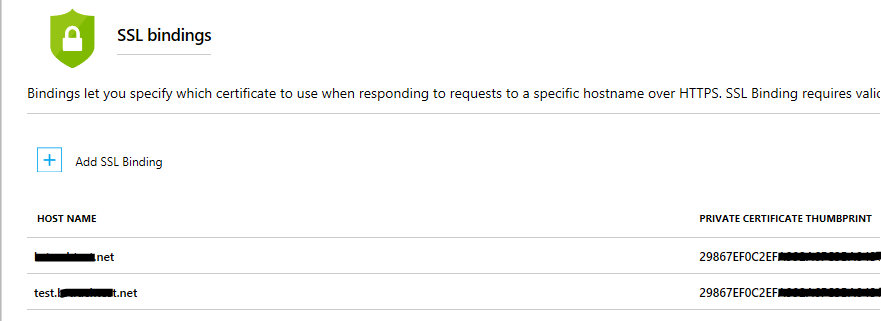
@georgenica Thank you for the additional details. I apologize for any confusion on my end. To help you, I tried to reproduce the situation I believe you are trying to accomplish.
I took 'web app A' and binded two hostnames to it. test.hostname.com and hostname.com. I then used the same Azure App Certificate (wildcard) cert to secure both names. I believe this should answer your question. Please let me know if you have any further questions.
BryanTrach-MSFT
on 25 Sep 2018
@BryanTrach-MSFT looks like it works; it would be great if you guys would update the intra-portal info to clearly display this and save a bit of time for both yourself and your customers that would be looking into solving this exact same problem. Thank you!
georgenica
on 25 Sep 2018
@georgenica Thank you for the feedback. We will share the feedback with the product group in our next review cycle.
BryanTrach-MSFT
on 25 Sep 2018
@BryanTrach-MSFT I had a similar doubt that @georgenica described. Our team will buy a wildcard certificate on Azure, but the documentation is not clear if the naked domain will also be considered or is needed to buy two certificates. I think that would be nice to have a section on the doc explaining more about it.
 pcdro
on 10 Oct 2019
pcdro
on 10 Oct 2019
@pcdro Can you please create a new feedback item so we can ingest it and share it with the doc author? Thank you for your understanding.
BryanTrach-MSFT
on 10 Oct 2019
I have a similar query but little addition to this.
We have wildcard certificate *.[companyname].co.in and we have created a new DNS record for WebApp hosted on Azure PaaS.
like _[ApplicationName].azurewebsites.net_
We have added DNS CNAME record for above like www.[application].[companyname].co.in and it's allowed in Custom DNS.
But while configuring SSL it's stated that Multilevel wildcard certificate is not supported. Now, how can we apply an SSL to this scenario?
 wecloudheroes
on 20 Aug 2020
wecloudheroes
on 20 Aug 2020
@wecloudheroes Since this is a different ask and more troubleshooting rather than document feedback, please post your question on our troubleshooting forums. We have engineers engaged on Microsoft Q&A who can assist you further.
BryanTrach-MSFT
on 20 Aug 2020
Related issues
 spottedmahn
·
3Comments
spottedmahn
·
3Comments
 bdcoder2
·
3Comments
bdcoder2
·
3Comments
 mrdfuse
·
3Comments
mrdfuse
·
3Comments
 jharbieh
·
3Comments
jharbieh
·
3Comments
 behnam89
·
3Comments
behnam89
·
3Comments
Most helpful comment
@BryanTrach-MSFT looks like it works; it would be great if you guys would update the intra-portal info to clearly display this and save a bit of time for both yourself and your customers that would be looking into solving this exact same problem. Thank you!