Azure-devops-docs: There is no "Edit in Repos" button
There just isn't one, although direct editing is not allowed by branch policy.
Document Details
⚠ Do not edit this section. It is required for docs.microsoft.com ➟ GitHub issue linking.
- ID: d7892ee5-8b56-bd95-29bb-41ebb8a8bd7e
- Version Independent ID: eccf0785-0968-d6a2-d29e-0c4796aa165c
- Content: Add, edit, reorder, manage wiki pages - Azure DevOps
- Content Source: docs/project/wiki/add-edit-wiki.md
- Product: devops
- Technology: devops-collab
- GitHub Login: @chcomley
- Microsoft Alias: chcomley
 jukkamaljanen
All 10 comments
Hi @jukkamaljanen, Thanks for your feedback and I'm sorry for the delayed response. The Edit in Repos button is only visible for Azure DevOps Server 2020 and Azure DevOps Services. Are you using one of these versions? If so, this likely isn't a documentation issue. I'm closing this issue, but if you're still having problems, please @ mention amitkumariiit for further assistance. Thank you!
 chcomley
on 30 Nov 2020
chcomley
on 30 Nov 2020
Hi @jukkamaljanen, Thanks for your feedback and I'm sorry for the delayed response. The Edit in Repos button is only visible for Azure DevOps Server 2020 and Azure DevOps Services. Are you using one of these versions? If so, this likely isn't a documentation issue. I'm closing this issue, but if you're still having problems, please @ mention amitkumariiit for further assistance. Thank you!
Hi, thanks for your reply.
I'm using Azure DevOps, it's hosted in name-i-picked.visualstudio.com. I've been using one repo for Wiki and documentation, and another for source code. I recently enabled some branch policies to prevent commits into master (default branch) in the source code repo and then tried to edit a Wiki page. I got error Pushes to this branch is not permitted. Please continue with 'Edit in Repos' and use a pull request to update this branch. Click on 'Learn More' to find out how to edit in Repos. and a Learn More link, which opens url "https://docs.microsoft.com/en-us/azure/devops/project/wiki/add-edit-wiki?view=azure-devops&tabs=browser#edit-and-delete-wiki-pages". That page contains a lot of helpful information, if only it were true and such button existed. And from that page I opened this ticket.
It does look like a bug in the DevOps, although I would be surprised if no one else run into it. Maybe @amitkumariiit can help?
jukkamaljanen
on 1 Dec 2020
@chcomley please re-open, I have the same issue. I'm also using Azure DevOps (cloud)
 BHoggs
on 3 Dec 2020
BHoggs
on 3 Dec 2020
Hi @amitkumariiit, can you please lend a hand with this issue? Is this a bug in the product? Thanks so much.
chcomley
on 3 Dec 2020
Hi @jukkamaljanen,
I believe you are using the code wiki that you would have created by publishing the repository as a wiki.
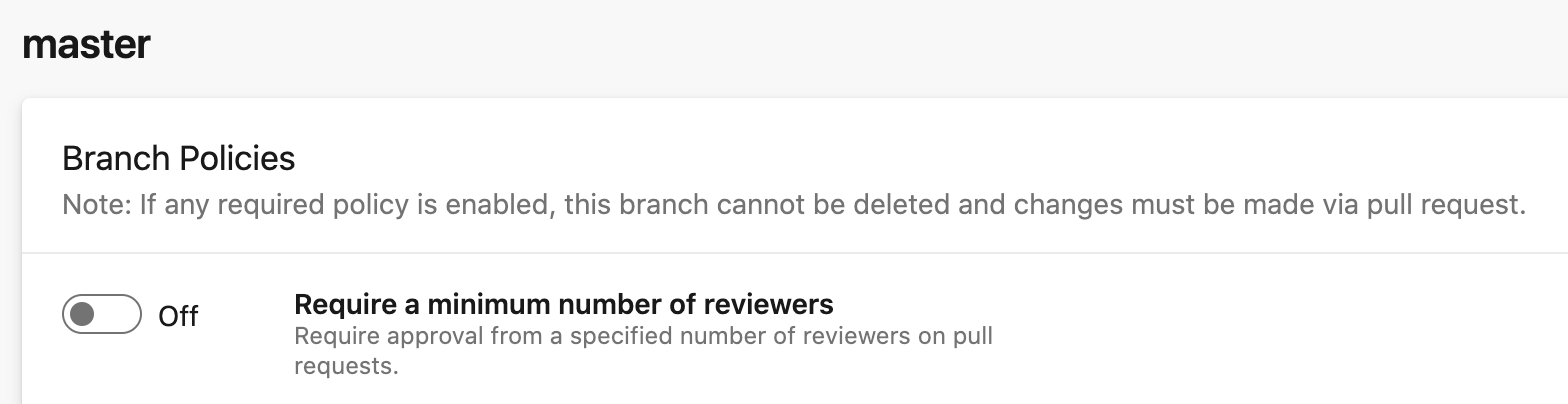
Have you applied the reviewer branch policy like in below image.
Ideally, if such branch policy is applied then the Edit button on the wiki page should be disable and it won't allow you to edit the wiki itself. Can you please let us know your use case. Are you seeing the Edit button enabled? can you share some screen shots. Thanks.
 amitkumariiit
on 7 Dec 2020
amitkumariiit
on 7 Dec 2020
I might have confused some terms here. Let's reset some assumptions.
- I'm using Azure DevOps, thats hosted under mycompanyname.visualstudio.com. I registered it years ago.
- I have many projects, but usually only one repository in a project. I use one project (let's call it project T) for source code and another for Wiki (it's M), which is for docs for that source code. This is not optimal, so I would like to combine.
- I have a few Wiki pages written in the source code T project/repo as a test.
- I recently enabled some branch policies to prevent direct editing of master in the source code T project/repo. I also have some project wide policies.
Commits only from my company:
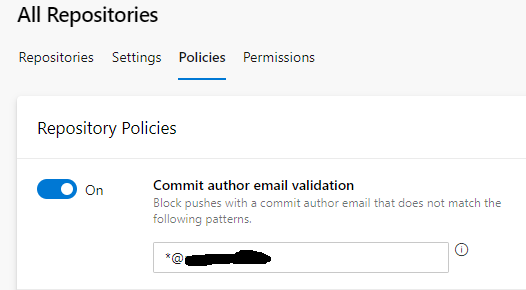
and from that page we get to default branch policies, where only setting is comment resolution.
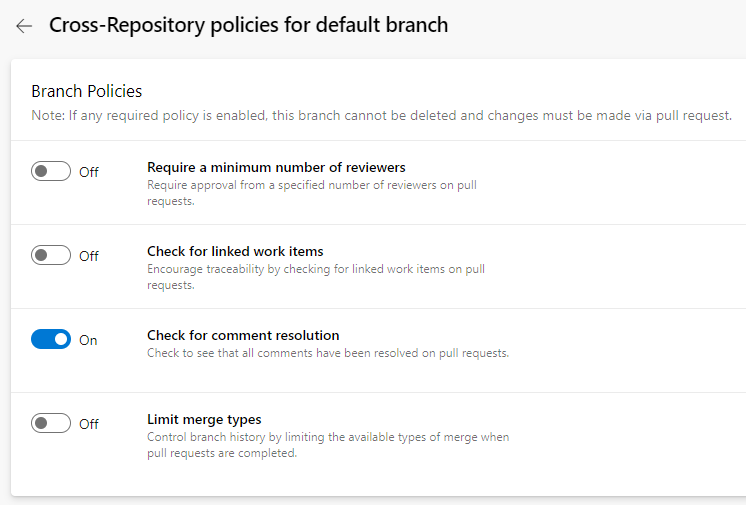
These are the only two policies that I can currently find and the latter one prohibits any direct changes (as seen in comments in the scrshot). There are no repository specific policies and no branch specific policies in master, other than inherited (pics above).
(The project settings navigation is confusing, it takes time to find things.)
That said, lets get back to:
Hi @jukkamaljanen,
I believe you are using the code wiki that you would have created by publishing the repository as a wiki.
Not sooner than today I found a button that says "Publish code as wiki", which I don't think I have never clicked and I've got no idea what it does.
Have you applied the reviewer branch policy like in below image.
Ideally, if such branch policy is applied then the Edit button on the wiki page should be disable and it won't allow you to edit the wiki itself. Can you please let us know your use case. Are you seeing the Edit button enabled? can you share some screen shots. Thanks.
I have some policies, see above. Still I get normal Edit button in Wiki:

and a normal New page button:

But inserting and updating a page results in the message that I described in my previous post (https://github.com/MicrosoftDocs/azure-devops-docs/issues/9614#issuecomment-736452722).
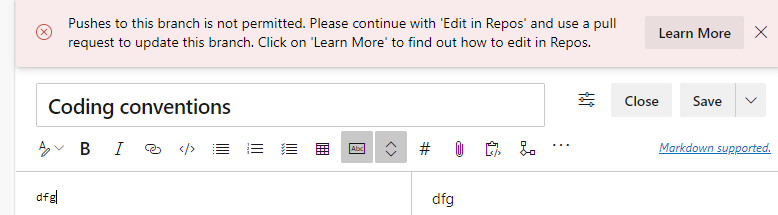
I just found out I can make more repos in a project, so I created another in the T project: "docs"
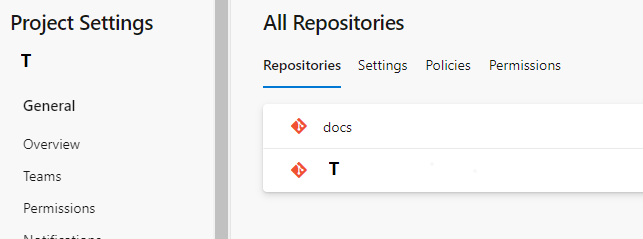
But all above still applies, no direct editing, normal buttons are there. This is not very intuitive, I cannot figure out how to use this. Should I enable the policies in the T repository instead of T project wide? That way the docs repo should be unaffected? How can I put my Wiki pages to the docs repo and not in T repo?
Anyhow the documentation of this should be more clear what happens and when, and the visible buttons should only be where a function is allowed.
jukkamaljanen
on 7 Dec 2020
Hi @jukkamaljanen
The branch policy that you have applied is for the all the repositories for the default branch. If that is applied, it means that any commit to the repository must go through a pull request. Basically it's a policy and because of this when you are attempting to commit (clicking save button on wiki edit page) you are getting that error. WIki is also backed by a hidden repo, so the error is coming. I agree that the error message is wrong about Edit in Repos thing.
If you must apply the branch policy, instead of applying it to the default branch, you can choose the specific branch like below, you can mention the branch name for you repo, by default the default branch name is master.
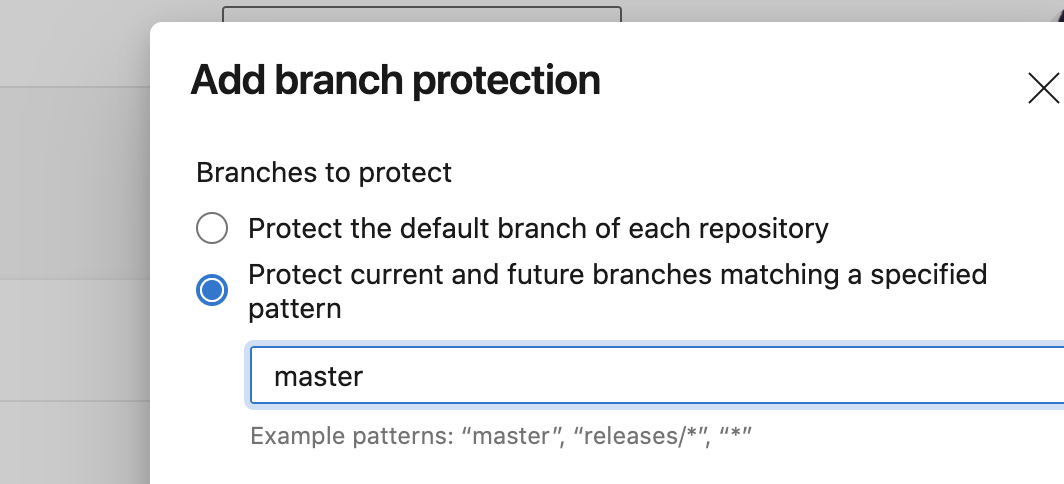
Now this way, you can edit the wiki because the repository that's backed by wiki has the default branch name as wikiMaster and hence the above policy won't apply.
If anyway you need to apply the branch policy to the wiki also, this feature is not available for the wiki (project wiki) you are using, for that purpose you would need to use the code wiki, which allows you to create a wiki from any other repository in your project. Documentation here https://docs.microsoft.com/en-us/azure/devops/project/wiki/publish-repo-to-wiki?view=azure-devops&tabs=browser
amitkumariiit
on 9 Dec 2020
Hi @jukkamaljanen, Please let me know whether the information that Amit provided has cleared things up for you or whether you have further questions. Thank you!
chcomley
on 9 Dec 2020
Hi @chcomley, the information has been useful and I have now achieved a way to edit my Wiki pages. You can close this issue if you wish, although I suggest you do some reviewing to your docs.
jukkamaljanen
on 10 Dec 2020
Hi @jukkamaljanen That's great to hear that you've been able to move forward with some clarity. I'll be closing this issue, and have created a user story for my backlog to review/refresh the wiki documentation set. Thanks so much for your feedback and have a great day!
chcomley
on 10 Dec 2020
Related issues
 letmaik
·
3Comments
letmaik
·
3Comments
 adnanebrahimi
·
3Comments
adnanebrahimi
·
3Comments
 sandeepzgk
·
3Comments
sandeepzgk
·
3Comments
 EM1L
·
3Comments
EM1L
·
3Comments
 LennartAJansson
·
3Comments
LennartAJansson
·
3Comments