Azure-devops-docs: Select pipeline resource version
Is there a way to select the pipeline resource version when manually running a pipeline through the UI?
We have a large app with a long enough build time to necessitate breaking out the build and release into two separate pipelines. Without a way to specify / verify the released version, it is causing us to go back to the classic releases.
Document Details
⚠ Do not edit this section. It is required for docs.microsoft.com ➟ GitHub issue linking.
- ID: ee4ec9d0-e0d5-4fb4-7c3e-b84abfa290c2
- Version Independent ID: 3e2b80d9-30e5-0c48-49f0-4fcdfedf5eee
- Content: Resources - Azure Pipelines
- Content Source: docs/pipelines/process/resources.md
- Product: devops
- Technology: devops-cicd-process
- GitHub Login: @juliakm
- Microsoft Alias: jukullam
 cmeyertons
All 16 comments
@cmeyertons -- thank you for your question. You may find answers here:
@juliakm -- please look into this issue.
 WilliamAntonRohm
on 18 Mar 2020
WilliamAntonRohm
on 18 Mar 2020
Was just about to ask the same thing.
Having the ability to set a resource as "select-able" would bridge one of the biggest gaps with releases.
Something like:
resources:
  repositories:
  - repository: somerepo
    type: git
    name: somerepo
    selectable: true
  pipelines:
  - pipeline: somepipeline
    source: somepipeline
    branch: master
    selectable: true
or any other system to make resources "settable at queue time" would be great
 sagmor
on 19 Mar 2020
sagmor
on 19 Mar 2020
In the "Run Pipeline" side panel, it looks like there is now a Resources option, but when I go to select it, it says:
This pipeline has no specified resources
However when I go to a previous run, I can see the consumed pipeline resources.
cmeyertons
on 2 Apr 2020
We are also interested in this. I've found the resources option in the side panel but also see
This pipeline has no specified resources
 rink72
on 6 Apr 2020
rink72
on 6 Apr 2020
We'd also like to see an option to run a pipeline and manually select its pipeline resources at run time. We don't want to CD everything but rather be selective about what is deployed.
 tomcurran
on 10 Apr 2020
tomcurran
on 10 Apr 2020
We have the same problem:
I have build pipeline and deploy pipeline.
I want developers to be able to choose which version of build pipeline to use during deployment, as this:
tag: $(resources.pipeline.build-ci.runID)
My resource description:
resources:
  pipelines:
  - pipeline: build-ci
    source: build-CI
    branch: 'master'
How can I do this?
 kutsyk-neocles
on 15 May 2020
kutsyk-neocles
on 15 May 2020
Just faced this problem with the following case: there's one big repo that includes an application sources and performance benchmarks. The benchmark pipeline consumes artifacts produced by the main pipeline and runs tests. Here's an extract from benchmark.yml:
trigger: none
resources:
  pipelines:
    - pipeline: Main-App
      source: Main-App-CI
      branch: dev
      trigger:
        branches:
          - "dev"
          - "release/*"
When a tester adds more benchmark scenarios to the repo, she wants to compare fresh builds against the older builds.
At the moment it's not possible manually trigger the benchmark pipeline against older main artifacts.
Instead, she has to branch off an older commits on the main, cherry-pick test changes, add branch parameter yaml pipeline and run the both pipelines.
 arkein
on 21 May 2020
arkein
on 21 May 2020
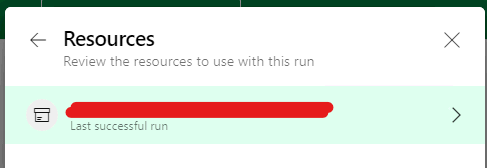
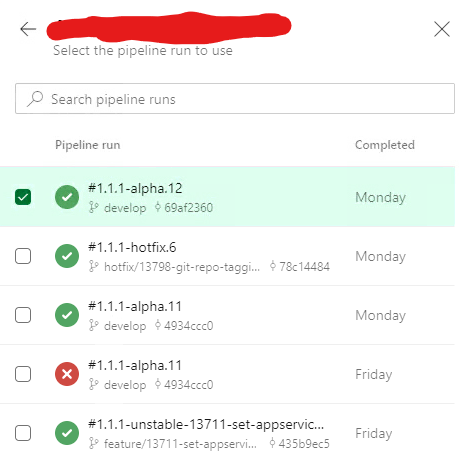
The ability to select resource versions rolled out to my Azure DevOps organization instance today.
The This pipeline has no specified resources message has been replaced with a list of versions to select:
I'm so happy right now.
 AdrianSanguineti
on 17 Jun 2020
AdrianSanguineti
on 17 Jun 2020
We decided to move forward with checked and tested Release pipelines. To fresh functionality to risk putting it for production. And we all know how Microsoft is maintaining its documentations
kutsyk-neocles
on 17 Jun 2020
@AdrianSanguineti, what did you need in the yaml to be able to select your resources to use? Mine still show up as "no resources"
 mattk09
on 23 Jul 2020
mattk09
on 23 Jul 2020
@mattk09 at the top of the pipeline we need to specify a pipeline artifact to pull
resources:
  pipelines:
    - pipeline: <label>
      source: <source_pipeline>
      branch: master
You can then use the artifact by using a deployment job (rather than a normal job)
- stage: Plan
  displayName: Plan

  jobs:

    - deployment: JobPlan
      pool: onprem-windows
      displayName: Plan
      environment: 'prod-plan'
      workspace:
        clean: all
      strategy:
        runOnce:
          deploy:

            steps:

              - task: PowerShell@2
                name: StepPlan
                displayName: Plan
                inputs:
                  pwsh: true
                  targetType: filePath
                  filePath: $(Pipeline.Workspace)/<label>/<label>/cloud/Deploy-TerragruntConfig.ps1
                  failOnStderr: false
                  errorActionPreference: continue
Thank for the reply @rink72 , I got that part working. I have my yaml setup in two stages: Build, Deploy. Ideally what I would like to do is allow manual runs to select the artifact and skip the build stage. Using the above that works, except the download path is different than when I have a normal triggered run (
mattk09
on 24 Jul 2020
Hi @mattk09, I haven't tried it that way so not sure on how you'd do it. What we have is a build pipeline that then feeds in to a separate yaml deploy pipeline. You can set a trigger on the deploy pipeline to run whenever the build pipeline has run so it will automatically run. It also then lets you run that deploy pipeline separately and use the same pathing etc.
Our build pipeline looks something like the below. We can then use this artifact in other pipelines.
# Pipeline to create an artifact on any commit to master

name: build


# Against any merge this will trigger a build of the artifact.
trigger:
  branches:
    include:
      - '*'

pool:
  vmImage: 'ubuntu-latest'

variables:
  artifactName: <artifactname>

steps:

  # Checkout tf-iac-live repo
  # Note, s is the default path for checking out all repositories
- checkout: self
  clean: true
  path: s

# Version the artifact and tf-iac-live repo
# The workingPath variable tells gitversion which repo to version under the default 's' path
- task: UseGitVersion@5
  displayName: Version build artifact
  inputs:
    versionSpec: '5.0.0'

- task: CopyFiles@2
  displayName: Copy artifact files to staging directory
  inputs:
    SourceFolder: $(Pipeline.Workspace)/s/
    Contents: '**'
    TargetFolder: $(build.artifactstagingdirectory)

# Publish the pipeline artifact
- publish: $(build.artifactstagingdirectory)
  artifact: $(artifactName)
  displayName: Publish $(artifactName) artifact
Hi @rink72, that makes sense for migrating from the classic release pipelines, but I started a clean pipeline that has the build stage create and publish the artifact for the deploy stage. This is how I believe it should be and is illustrated my the Microsoft docs here: https://docs.microsoft.com/en-us/azure/devops/pipelines/get-started/multi-stage-pipelines-experience?view=azure-devops#view-pipeline-run-details. I would expect a way to kick off a run manually where I can run only the deploy stage and select any previously built artifact. Just not sure how...
mattk09
on 25 Jul 2020
@mattk09 My team and I've been working a bit on this and we have it working with a separate build and deploy pipeline.
Build:
// this pipeline is called "build"
trigger:
- master

pool:
  vmImage: 'ubuntu-latest'

steps:
- template: common-steps.yaml // SA, build, test - our assets end up in a target folder, but this could be any build process

- task: CopyFiles@2
  displayName: 'Copy Files to artifact staging directory'
  inputs:
    SourceFolder: '$(System.DefaultWorkingDirectory)'
    Contents: '**/target/**'
    TargetFolder: $(Build.ArtifactStagingDirectory)

- upload: $(Build.ArtifactStagingDirectory)
  artifact: drop
Then, in the deploy yaml:
resources:
  pipelines:
  - pipeline: drop
    source: build // from the name of the above

jobs:
  - job: "Deploy_App"
    continueOnError: "true"
    steps:
      - download: drop
      - template: deploy-steps.yaml
         parameters:
// ...
Where deploy-steps.yaml looks like:
// ... parameter definitions
- steps:
  - task: ArchiveFiles@2
    displayName: "Zip Azure Function Files for deployment"
    inputs:
      rootFolderOrFile: "$(Pipeline.Workspace)/drop/drop/target/azure-functions/${{parameters.functionName}}"
      includeRootFolder: false
      archiveFile: "$(Build.ArtifactStagingDirectory)/deploy.zip"
  - task: AzureFunctionApp@1
    displayName: "Deploy Azure Function"
    inputs:
      azureSubscription: ${{parameters.azureServiceConnection}}
      appName: ${{parameters.appServiceName}}
      package: $(System.ArtifactsDirectory)/deploy.zip
// ...
Bit funky, since you can see it ends up in a /drop/drop path which we should probably fix, but it gets the job done.
 zmmille2
on 30 Jul 2020
zmmille2
on 30 Jul 2020
There is documentation now on the version picker for resources. See the Manual version picker section.
 juliakm
on 12 Nov 2020
juliakm
on 12 Nov 2020
Related issues
 EM1L
·
3Comments
EM1L
·
3Comments
 dtamai
·
3Comments
dtamai
·
3Comments
 michhar
·
3Comments
michhar
·
3Comments
 cijujoseph
·
3Comments
cijujoseph
·
3Comments
 mikedouglasdev
·
3Comments
mikedouglasdev
·
3Comments
Most helpful comment
Was just about to ask the same thing.
Having the ability to set a resource as "select-able" would bridge one of the biggest gaps with releases.
Something like:
or any other system to make resources "settable at queue time" would be great