Azure-devops-docs: Variable group yaml variable expression in Azure Devops Pipeline
I'm having difficulties with variable expression with the AzureKeyVault task. Both the azureSubscription and KeyVaultName values expressions are not being resolved to have variables in a variable Group. It works if I define those variables manually in any way in the yaml. Either in azure-pipelines.yml or in the template variables_test.yml that I import at the beginning of the stage.
I read in the documentation, that variables from a variable group should be used like this $(var) but then it throws an error saying a subscription like '$(var)' does not exist.
Template:
azure-pipelines.yml:
- stage: Test

  variables:
  - template: variables_Test.yml  # Template reference
  - group: testVariableGroup

  dependsOn: []

  jobs:

  - job: Test

    steps:

    - task: AzureKeyVault@1
      inputs:
        azureSubscription: ${{ variables.spn_kv_app }} # Service connection Name
        KeyVaultName: ${{ variables.keyVaultName }}
        SecretsFilter: '*'
In the logs from the staging i can see the variables being set from the variable group:
Job preparation parameters
Variables:
  keyVaultName: $[ variablegroups.testVariableGroup.keyVaultName ]
  resourceGroupName: $[ variablegroups.testVariableGroup.resourceGroupName ]
  spn_cd_app: $[ variablegroups.testVariableGroup.spn_cd_app ]
  spn_kv_app: $[ variablegroups.testVariableGroup.spn_kv_app ]
  storageAccountName: $[ variablegroups.testVariableGroup.storageAccountName ]
One thing to note that those variables are not set to secrets in the variable group.
Document Details
⚠ Do not edit this section. It is required for docs.microsoft.com ➟ GitHub issue linking.
- ID: dd7e0bd3-1f7d-d7b6-cc72-5ef63c31b46a
- Version Independent ID: dae87abd-b73d-9120-bcdb-6097d4b40f2a
- Content: Define variables - Azure Pipelines
- Content Source: docs/pipelines/process/variables.md
- Product: devops
- Technology: devops-cicd-process
- GitHub Login: @juliakm
- Microsoft Alias: jukullam
 Repcak
All 21 comments
https://stackoverflow.com/questions/60643142/variable-group-yaml-variable-expression-in-azure-devops-pipeline
So someone proposed to me a solution to stackoverflow. So it seems like it works when importing the variable group in the main context but not in the stage context. I think this is a technical bug. After further investigation this is what I found:
- stage: Test

  variables:
  - template: variables_Test.yml  # Template reference
  - group: testVariableGroup

  jobs:
  - deployment: TestEnv
    environment: TestEnv
    strategy:
      runOnce:
        deploy:
          steps:
      - task: AzurePowerShell@5
            inputs:
          azureSubscription: $(spn.kv_app) #Variable Group !!!! THIS WILL NOT BE RESOLVED
            ScriptType: 'FilePath'
        ScriptPath: '$(Pipeline.Workspace)/drop/deployment/scripts/Upload-UsqlToStorage.ps1'
        ScriptArguments: "
        -StorageAccountName '$(resource.storageAccountName)' `   #Variable Group | THIS WORKS
            -StorageAccountResourceGroup '$(resource.resourceGroupName)'"     #Variable Group | THIS WORKS
So the StorageAccountName and StorageAccountResourceGroup will be resolved. But the azureSubscription will not because it needs to be resolved before the pipeline even starts because it does not see a service connection named "$(spn.kv_app)" when trying to grant access.
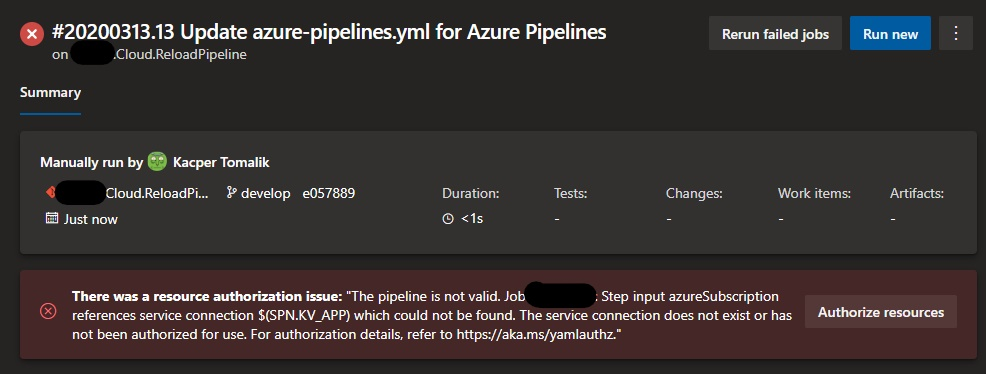
Again. This would work if the variableGroup would be imported in the main context of the yaml and not in the specific stage context.
Repcak
on 13 Mar 2020
@Repcak You should be able to specify a variable at the pipeline, stage, or job level. One issue is that in azure-pipelines.yml you are both assigning the group and using a template. You would just want to do one of those things.
I've put together a simplified YAML that is working but please feel free to also reach out to the Developer Community if you think you have found a bug.
Here's an example that worked for me. I'll add a modified version of this to the docs.
variables_test.yml
variables:
  - group: testVariableGroup
azure-pipeline.yml
stages:
- stage: MyStage
  variables:
  - template: variables_test.yml
  jobs:
  - job: Test
    steps:
    - script: echo $(keyVaultName)
    - script: echo $(resourceGroupName)
    - script: echo $(storageAccountName)
 juliakm
on 13 Mar 2020
juliakm
on 13 Mar 2020
Okey, so this anyways does not solve my problem. Script echo as a task works. It does not work however on the AzureSubscription which excepts a service connection endpoint. Try it with any task that needs a AzureSubscription endpoint.
This behaves wierdly. Because if the group would be imported on the main level. It would be resolved. However if imported on a stage level. It cannot resolve the service connection name like in the screenshot above i've posted.
Created a support ticked if anyone wants to follow this:
https://developercommunity.visualstudio.com/content/problem/949342/azuresubscription-serviceconnection.html
Repcak
on 15 Mar 2020
Thanks for the clarification @Repcak. It sounds like this is a functionality problem with the task. The Developer Community is the right place to address it so I'm closing this issue for now.
juliakm
on 17 Mar 2020
This is exactly my problem and still doesn't work. Very annoying because no where in the docs there is a reference that the group import of variables only works on root level! Please, update the docs with a warning, this just took 8 hours of my time.
 tomkuijsten
on 1 Jul 2020
tomkuijsten
on 1 Jul 2020
@tomkuijsten Thanks for pointing this out. I'm adding a note that this should be at the root level.
juliakm
on 1 Jul 2020
@juliakm and is there a timeline for an actual fix? I want to use different variable groups for each stage, but that seems to be impossible now.
tomkuijsten
on 2 Jul 2020
@juliakm any update?
tomkuijsten
on 16 Jul 2020
i am having the same issue, cannot make the service connection a variable. a different pipeline and file commit is required for me right now for each combinations of service endpoints. Unsustainable in the long run.
 patdaman
on 19 Aug 2020
patdaman
on 19 Aug 2020
I have the same problem, when will a fix be issued???
 Fl4v
on 24 Aug 2020
Fl4v
on 24 Aug 2020
@tomkuijsten and @Fl4v Unfortunately, I don't have updates on product development. Your best bet is to follow-up in the Developer Community.
juliakm
on 25 Aug 2020
Please add fix ASAP
 ElkRom
on 28 Aug 2020
ElkRom
on 28 Aug 2020
Why this issue closed? Is there any workaround for this issue?
 sahalsaad
on 13 Oct 2020
sahalsaad
on 13 Oct 2020
@tomkuijsten and @Fl4v Unfortunately, I don't have updates on product development. Your best bet is to follow-up in the Developer Community.
And then end up at another github issue? This is clearly a big bug, I don't understand that you want people's input, but then redirect me to another page to create another issue and pray for the best.
tomkuijsten
on 27 Oct 2020
Because of this issue, tt is not possible to implement multistage deployment without this functionality, unless I hardcode variables for every stage. Please add fix ASAP.
 mildsar
on 17 Nov 2020
mildsar
on 17 Nov 2020
Same here. I would like to use different groups variables per stage/environment
 albpal
on 2 Dec 2020
albpal
on 2 Dec 2020
Pheeew luckily i found this post quite quickly. completly agree that this needs to be fixed asap
 dagtveit
on 3 Dec 2020
dagtveit
on 3 Dec 2020
but it seem to be working on job lvl.
dagtveit
on 3 Dec 2020
Another place where group variables are not properly managed is when downloading a secret file. The name couldn't be a group variable defined on the stage. Very annoying if you split your deployments like 1 stage -> 1 environment and use different credential files depending on a name defined in the group variable.
albpal
on 3 Dec 2020
This shouldn't be closed. It's a real issue.
Here's another example of this problem in action https://stackoverflow.com/questions/60917078/azure-pipelines-yaml-error-when-using-variable-group-for-deploy-web-app-azur.
 ericchansen
on 14 Dec 2020
ericchansen
on 14 Dec 2020
yeah, +1 from me for fixing this issue. This is quite a major bug in my opinion...
 MichalKosowski
on 25 Dec 2020
MichalKosowski
on 25 Dec 2020
Related issues
 letmaik
·
3Comments
letmaik
·
3Comments
 michhar
·
3Comments
michhar
·
3Comments
 cijujoseph
·
3Comments
cijujoseph
·
3Comments
 adnanebrahimi
·
3Comments
adnanebrahimi
·
3Comments
 csutorasr
·
3Comments
csutorasr
·
3Comments
Most helpful comment
Why this issue closed? Is there any workaround for this issue?